Introduction
In the current corporate environment, organizations worldwide grapple with massive volumes of repetitive, manual administrative tasks. Employees frequently spend hours moving data between disparate legacy software systems, copying information from spreadsheets into enterprise resource planning platforms, and manually verifying digital forms. This manual overhead creates operational bottlenecks, introduces human errors, and delays critical business outcomes. To address these operational inefficiencies, modern enterprises leverage digital transformation strategies to streamline workflows and unlock higher organizational productivity.
To assist professionals and organizations navigating this technological journey, specialized platforms provide deep insights, training frameworks, and strategic guidance on scaling automation frameworks. Organizations can explore RobotsOps, a dedicated resource for enterprise automation guidelines, tool evaluations, and modern architectural practices, to understand how to design and sustain resilient software deployment strategies. Implementing these strategies enables businesses to transition away from labor-intensive manual data entry, lowering operational costs while allowing human workers to focus on creative problem-solving, strategic planning, and customer-facing initiatives.
What Is Robotic Process Automation (RPA)?
Robotic Process Automation is a technology segment that allows organizations to deploy specialized software utilities—frequently called software robots or digital bots—to interpret, capture, and manipulate data within existing digital applications. These software assistants replicate repetitive human actions, such as logging into enterprise portals, navigating user interfaces, extracting text from structured documents, moving files, and filling out digital forms. Instead of modifying core database architectures or writing complex application programming interfaces, these bots operate directly on the user interface layer, interacting with software systems exactly like a human employee would.
The evolution of business automation traces back to early command-line scripting and basic screen scraping technologies used to extract textual data from legacy mainframe terminals. While effective for simple tasks, early automation systems were brittle and highly sensitive to minor layout changes. Over time, these basic scripts evolved into advanced macro recorders and desktop automation tools. Modern corporate environments have evolved far beyond these individual desktop macros, establishing centrally managed platforms that securely orchestrate hundreds of automated tasks concurrently across globally distributed cloud infrastructures.
| Automation Feature | Traditional Automation | Robotic Process Automation (RPA) |
| Integration Layer | Deep backend database and API level connections | Frontend User Interface (UI) and surface-level interactions |
| Infrastructure Changes | Requires extensive software architecture updates | Operates on top of existing applications without modifications |
| Development Time | Months or years of complex coding | Weeks or days using low-code graphical workflows |
| System Compatibility | Highly dependent on modern open systems | Works across modern web tools and legacy systems |
The core philosophy of workflow automation centers on removing mundane, non-cognitive tasks from human workloads. Software robots work by observing structured digital actions defined by clear rules. When a bot executes a process, it follows logical paths: if an email arrives containing an invoice, the bot downloads the attachment, reads the text fields using optical character recognition, logs into an accounting system, enters the payment values, and routes the invoice to an administrator for final approval. This approach enables rapid deployment because it treats existing enterprise applications as fixed environments, removing the need for costly and prolonged software rewrites.
Why RPA Matters in Modern Businesses
The strategic adoption of software robots across global industries is driven by clear operational advantages that directly impact an organization’s bottom line. The primary benefit is the substantial reduction of manual, error-prone data entry. When human operators manually process thousands of transactions per day, physical fatigue inevitably leads to typographical errors, data omissions, and compliance oversights. Software robots execute instructions identically every single time, achieving perfect operational accuracy for rule-based data processing tasks.
Furthermore, software robots operate continuously without downtime, executing business processes 24 hours a day, 7 days a week, 365 days a year. This continuous execution model significantly reduces cycle times; processing a customer onboarding application that previously took 48 hours can often be completed in less than five minutes. This acceleration increases overall business velocity, enabling corporations to scale their operational capacity up or down instantly in response to seasonal demand surges without requiring immediate changes to head count.
From a financial perspective, automation drives substantial cost optimization. While developing and deploying an enterprise software bot requires initial infrastructure and licensing investments, the operational cost per automated transaction is significantly lower than manual human processing. Additionally, because bots record every single action they take into secure digital logs, compliance auditing becomes straightforward. Regulatory reports can be produced automatically, ensuring companies maintain strict compliance with data privacy laws and corporate governance standards while freeing human workers to perform high-value strategic tasks.
Core Concepts of RPA
Software Bots
Software bots are the foundational execution engines of any automation ecosystem. These digital workers reside on virtual machines or desktop computers, operating within the operating system to interact with web browsers, enterprise resource planning platforms, and desktop tools. They contain built-in connectors to interpret user interface objects, recognize button elements, and simulate mouse clicks or keyboard inputs precisely as dictated by their underlying instructions.
Workflow Automation
Workflow automation represents the end-to-end structural mapping of a business process from its initial trigger to its final resolution. It defines how data moves between distinct applications based on pre-established paths. By configuring structured workflows, enterprises ensure that documents, notifications, and data updates flow seamlessly across finance, human resources, and customer support departments without manual intervention.
Rule-Based Automation
Rule-based automation applies to processes governed entirely by deterministic logic. These operations do not require subjective human judgment or emotional intelligence; they rely on explicit “if-then” statements. For example, if a customer’s account balance is greater than 5000, route the application to tier-one processing; otherwise, route it to tier-two processing. If a process cannot be defined by explicit, binary rules, it requires advanced cognitive layers.
Intelligent Automation
Intelligent automation combines traditional rule-based software bots with machine learning models and artificial intelligence components. This combination allows the automation framework to handle semi-structured or unstructured data sources, such as processing conversational emails, evaluating customer sentiment, or determining data categorizations. This advanced intelligence expands the scope of tasks that can be safely automated.
Process Orchestration
Process orchestration involves the centralized coordination, scheduling, and management of an entire digital workforce. Through a centralized management console, administrators allocate specific software bots to different production queues, balance workloads based on incoming transaction volume, monitor execution logs, and ensure that high-priority enterprise processes receive computing resources before lower-priority tasks.
AI Integration
AI integration infuses machine learning models directly into active automation paths. Rather than relying solely on fixed user interface interactions, software bots call specialized cognitive services via API endpoints. This allows an active bot to pass a complex text block to a natural language processing service, receive a calculated classification or confidence score, and use that result to make data-driven decisions within the workflow.
Document Processing
Intelligent Document Processing (IDP) allows software robots to extract, classify, and validate data from unstructured documents like PDF invoices, physical receipts, scanned medical records, and legal contracts. By leveraging optical character recognition combined with machine learning pattern matching, IDP converts raw document images into structured data tables that software bots can process instantly.
Automation Analytics
Automation analytics provides visibility into the health, efficiency, and return on investment of an enterprise digital workforce. These specialized dashboard tools track key performance metrics, such as individual bot utilization rates, transaction success velocities, systemic exception frequencies, and financial cost savings over time. This data helps teams identify operational bottlenecks and plan future automation expansions.
Attended vs Unattended Bots
Understanding the distinction between attended and unattended software configurations is essential for designing an enterprise automation environment.
- Attended Bots: These digital assistants run on a human employee’s local workstation and are triggered directly by the user to assist with specific portions of a task. For example, a customer support agent can trigger an attended bot to pull data from three separate legacy systems simultaneously while live on a call with a customer. The bot works alongside the human operator, who provides subjective decisions and overrides when necessary.
- Unattended Bots: These software robots operate independently on remote virtual machines within cloud data centers without human intervention. They run continuously based on predetermined schedules, file drop triggers, or queue thresholds. Unattended bots are ideal for high-volume back-office processing tasks, such as nightly financial reconciliations, bulk data migrations, and automated report generation.
Hyperautomation
Hyperautomation represents an advanced enterprise operational approach where an organization systemically identifies, vets, and automates as many business processes as possible. It involves the coordinated use of multiple technological tools, including process mining software to discover operational inefficiencies, robotic automation platforms to handle execution, artificial intelligence engines to provide cognitive decisions, and low-code utilities to democratize development across non-technical teams.
RPA Architecture & Workflow
An enterprise robotic automation framework relies on a multi-tiered architecture to ensure secure, reliable, and scalable operations. The architecture consists of the development environment (where workflows are designed), the control center (where processes are managed), and the execution runtime environments (where software bots run). These components communicate through secure network layers, ensuring all data transactions, system credentials, and audit logs remain fully encrypted.
+-----------------------------------------------------------------+
|                        Control Center                           |
|       (Central Management, Security, Scheduling, Logs)         |
+-----------------------------------------------------------------+
           ^                                         |
           | (Publishes Packages)                    | (Deploys & Monitors)
           |                                         v
+--------------------------+             +------------------------+
|   Development Studio     |             |    Execution Bots      |
| (Low-Code Workflow Design)             | (Virtual Machines/VMs) |
+--------------------------+             +------------------------+
1. Process Discovery
Analysts use monitoring tools to log user actions, identifying high-volume, rule-based workflows that are suitable candidates for automation based on complexity and potential business value.
2. Bot Development
Developers use graphical flowcharts to configure the automation step-by-step, setting up data inputs, UI selectors, variable loops, and system credentials within a secure design studio.
3. Workflow Orchestration
The completed automation package is published to the central control center, where administrators define execution schedules, set access permissions, and assign the process to specific bot queues.
4. Automation Execution
Triggered by a scheduled time or an external data event, the designated execution engine wakes up, initializes the required applications, and runs through the programmed steps on a virtual machine.
5. Monitoring Systems
While the bot runs, the central management platform continuously checks system health, tracks processing speeds, and ensures the digital worker operates within normal performance parameters.
6. Exception Handling
If an application crashes or encounters an unexpected layout change, the bot safely stops, captures a system screenshot, logs the precise error, and alerts an on-duty human administrator.
7. Analytics and Reporting
The operational data from the execution is fed into centralized analytics dashboards, allowing stakeholders to evaluate transactional success rates, process speeds, and overall business metrics.
RPA Lifecycle
Managing an enterprise automation pipeline requires a structured methodology to ensure that software robots are built correctly, tested thoroughly, and maintained systematically over time.
| Stage | Purpose | Technologies Used | Real-World Outcome |
| Process Identification | Evaluate and select business processes that are suitable for automation based on technical feasibility and ROI. | Process mining software, user recording tools, evaluation matrices. | A approved pipeline of high-value automation candidates. |
| Workflow Design | Document the exact step-by-step process as performed by humans and map out the target automated state. | Flowchart editors, Process Definition Documents (PDD). | A technical blueprint guiding development teams. |
| Bot Development | Build the actual automation logic, configure UI selectors, handle variables, and implement exception workflows. | Robotic software development studios, version control tools (Git). | A functional automation package ready for validation. |
| Testing | Validate the bot across staging environments to verify logic under various conditions and data inputs. | Bug tracking software, test data generators, execution logs. | A stable, verified software robot with documented test results. |
| Deployment | Publish the tested automation package to production environments and configure orchestration schedules. | Centralized management consoles, secure credential vaults. | Live automated workflows processing real corporate transactions. |
| Monitoring | Watch execution health, track performance metrics, and manage runtime exceptions continuously. | Central dashboards, automated email alerts, system logs. | Operational visibility and rapid response to application errors. |
| Optimization | Review processing logs to identify bottlenecks, refine selector paths, and speed up data processing loops. | Script editors, advanced analytics platforms. | Improved execution speeds and lower compute resource utilization. |
| Continuous Improvement | Update automation workflows to align with changing underlying enterprise software systems and business rules. | Release management tools, impact assessment frameworks. | Long-term operational resilience and enduring automation value. |
Popular RPA Tools & Platforms
The automation market contains diverse software platforms tailored to different business scales, technical infrastructures, and computational requirements.
Enterprise RPA Platforms
Enterprise-tier software suites provide comprehensive tools for large organizations. These platforms feature advanced development environments, AI integrations, strong security controls, and powerful orchestration servers capable of managing thousands of automated tasks simultaneously. They are designed for high-availability IT infrastructures and strict data compliance regulations.
Workflow Automation Tools
Workflow automation tools focus primarily on connecting web applications through cloud api layers. These systems are highly efficient for moving data between modern cloud tools without interacting directly with frontend interfaces. They allow business users to design data pipelines using visual, trigger-and-action builders.
AI-Powered Automation Platforms
These modern suites embed machine learning and native cognitive processors into their core architecture. They focus heavily on processing unstructured data, recognizing variable document layouts, and offering predictive recommendations within the automation stream.
Cloud Automation Services
Cloud-native automation services run entirely within managed cloud environments as a service (SaaS). They remove the need to manage local virtual machines or physical server infrastructure, allowing organizations to provision, scale, and execute software bots dynamically across cloud instances.
Monitoring & Analytics Tools
Specialized operational analytics tools connect into active automation infrastructure to collect telemetry data. They provide independent visibility into bot health, infrastructure utilization, licensing costs, and business key performance indicators, serving as an audit layer for digital workforces.
Low-Code Automation Platforms
Low-code options focus on democratizing automation across non-technical business units. They feature simplified drag-and-drop interfaces that enable business analysts and operational experts to automate their daily tasks without needing extensive software engineering backgrounds.
RPA Platforms Comparison
| Tool | Purpose | Difficulty | Enterprise Usage |
| UiPath | End-to-end hyperautomation, document processing, and centralized orchestration. | Medium | High — Popular across Fortune 500 financial and operational teams. |
| Automation Anywhere | Cloud-native, AI-infused enterprise automation pipelines. | Medium | High — Extensively used in banking, healthcare, and global business services. |
| Microsoft Power Automate | Deep integration with Office 365 environments and desktop operations. | Low to Medium | Growing rapidly — Adopted by teams leveraging existing corporate ecosystems. |
| Blue Prism | Highly secure, code-centric, back-office server automation. | High | High — Heavily used in secure banking, insurance, and compliance environments. |
| Workato | Enterprise integration and API-led cloud workflow orchestration. | Medium | Medium to High — Used to connect modern software-as-a-service layers. |
| Zapier | Simple, trigger-based cloud application connectivity for light workflows. | Low | Low to Medium — Popular with startups and small to medium business units. |
Real-World Use Cases of RPA
Banking & Finance
Financial institutions use software robots to automate high-volume transactions like data cross-checking during account closures, loan processing, and credit card validations. When a customer applies for a loan, a bot extracts the applicant’s information, initiates background checks across credit bureaus, compiles the risk profile data into a single document, and routes it to an underwriter. This reduces application processing times from days to minutes while maintaining perfect regulatory data tracking.
Healthcare
In hospital operations, automation platforms manage patient scheduling, simplify medical billing, and coordinate insurance eligibility verifications. Bots automatically pull diagnostic codes from electronic health records, populate insurance claim forms, and submit them to clearinghouses. If an insurance claim is denied, the bot extracts the denial reason code, updates the internal hospital database, and notifies the billing team, accelerating revenue cycles.
Insurance
Insurance firms use automated workflows to handle claims processing, policy management, and underwriting data gathering. For a typical auto insurance claim, a software robot can read incoming accident reports, download attached photographic evidence, verify policy coverage limits from a core legacy database, and assign the file to an adjuster, minimizing manual document routing.
Retail & E-Commerce
E-commerce businesses leverage software robots to sync multi-channel inventory counts, track shipments, and process customer returns. When a return request is submitted, a bot verifies the purchase history, updates stock logs across warehouse software, triggers a refund transaction via the payment gateway, and emails a shipping label to the customer without manual intervention.
Telecom
Telecommunications operators utilize automated systems to manage SIM card activations, update customer profiles across billing systems, and process network service requests. Software bots bridge gaps between old legacy network infrastructure and new customer portals, migrating customer service accounts instantly without requiring manual human data copying.
Manufacturing
In manufacturing supply chains, software utilities automate purchase order routing, monitor inventory levels, and manage bill of materials updates. When raw material inventory levels drop below a defined limit, an automated process creates a purchase order draft, populates vendor details from an ERP system, and sends it to a procurement manager for sign-off.
HR Automation
Human resource departments use automation to optimize employee onboarding, process monthly payroll changes, and manage leave requests. On a new hire’s first day, an automated workflow creates corporate email accounts, generates IT service tickets for hardware delivery, sets up profiles in the payroll database, and sends introductory onboarding paths to the employee.
Customer Support
Customer service operations deploy attended digital assistants to reduce call resolution times. As a support agent speaks with a client, a bot aggregates historical interaction logs, billing statements, and active service statuses from multiple backend applications into a single view, allowing the agent to resolve issues faster.
Supply Chain Management
Logistics organizations deploy bots to track shipments across external ocean and air carrier portals, update delivery estimates in internal tracking applications, and process customs documentation. This automated tracking keeps clients informed about cargo timelines while eliminating the need for manual carrier portal checks.
Government Operations
Public sector administrative bodies use automation to process permit applications, manage public records updates, and handle benefit distributions. Software bots extract data from web applications submitted by citizens, verify identity fields against secure state databases, and route clean applications directly into approval queues.
Benefits of Robotic Process Automation
- Faster Task Execution: Software robots operate at compute speeds, manipulating user interfaces and processing data transactions significantly faster than manual human execution, which reduces project turnaround times.
- Reduced Operational Cost: Shifting high-volume, administrative tasks to digital workers optimizes resource spend, allowing companies to run back-office operations with lower per-transaction overhead.
- Better Compliance: Bots generate comprehensive, time-stamped activity logs for every single action they take. This creates clear audit trails that help organizations verify regulatory compliance easily.
- Improved Accuracy: By removing manual data typing, automation eliminates human errors, transcription typos, and copy-paste slips, ensuring consistent data quality across enterprise systems.
- Increased Scalability: Digital workforces can expand instantly by provisioning extra virtual machines to handle unexpected processing loads, then scale back down when volumes normalize.
- Automation Efficiency: Software robots optimize system utilization by operating continuously without human downtime, resolving process backlogs during off-peak hours.
- Better Employee Productivity: Automating repetitive administrative tasks allows human workers to spend their time on higher-value initiatives like strategic planning and complex problem-solving.
- Improved Customer Experience: Drastically reducing processing times for services like account setups and claims processing leads to faster turnarounds and higher customer satisfaction.
Challenges & Limitations
While the business value of automation is clear, organizations must navigate specific challenges to ensure long-term operational stability.
Complex Workflows
Attempting to automate processes that involve subjective decisions, fluid rules, or unmapped exceptions can lead to unstable bots and frequent runtime failures.
- Solution: Implement deep process assessments prior to development. Only automate highly standardized, rule-based tasks, and leave complex cognitive decisions to human operators or advanced machine learning models.
Integration Issues
Software robots can experience issues when running across legacy environments that lack stable element structures or during sudden interface updates.
- Solution: Utilize robust selector definitions, configure smart delays within the workflow, and shift toward API-driven automation layers whenever software vendors make them available.
Infrastructure Costs
Setting up enterprise-grade automation platforms requires investments in software licensing, secure development workstations, orchestration servers, and cloud virtual machines.
- Solution: Begin with targeted pilot implementations to prove cost savings, and focus on cloud-hosted software options to minimize upfront hardware procurement expenses.
Security Concerns
Because software robots regularly handle sensitive personal records, financial values, and enterprise credentials, they can introduce security risks if improperly managed.
- Solution: Use secure, centralized credential managers; apply the principle of least privilege to bot accounts; and ensure all automation activity logs are encrypted and tamper-proof.
Bot Maintenance
When underlying business applications undergo updates, modify field labels, or change visual layouts, dependent software bots may fail to find target elements.
- Solution: Establish a clear change management framework and train a dedicated support team to quickly adjust selector paths when corporate applications get updated.
Process Standardization Challenges
Developing an automation framework on top of unoptimized, fragmented operational workflows simply accelerates inefficiencies without solving root problems.
- Solution: Use process mining tools to optimize and standardize workflows before writing any automation logic.
Skill Shortages
Finding qualified developers, solution architects, and analysts who understand the intersection of business logic and automation engineering can be challenging.
- Solution: Invest in cross-skilling current business analysts and IT teams through structured online training courses and practical internal laboratories.
Scalability Limitations
Organizations can struggle to expand their automation footprint past initial pilot phases if they lack centralized orchestration governance.
- Solution: Build a dedicated Center of Excellence (CoE) to provide standardized development blueprints, reusable logic blocks, and architectural oversight across the enterprise.
RPA Career Opportunities
The global demand for enterprise workflow automation has created a robust job market with diverse technical and analytical roles.
RPA Developer
RPA Developers design, build, and configure the actual automation packages. They use development tools to map out process steps, build UI selectors, configure data variables, and implement exception handling logic.
- Required Skills: Visual workflow building, basic programming knowledge (such as .NET, VB.NET, or Python), understanding of HTML/CSS selectors, and debugging capabilities.
- Daily Responsibilities: Writing automation workflows, adjusting UI selectors, testing bots in staging environments, and resolving runtime errors.
Automation Engineer
Automation Engineers integrate software robots into broader corporate infrastructure, cloud environments, and internal database pipelines. They focus on system availability, API connectivity, and performance scaling.
- Required Skills: Cloud architecture (AWS, Azure), system integrations, script writing (Python, PowerShell), and database management.
- Daily Responsibilities: Setting up virtual environments, managing software updates, and optimizing compute utilization for the digital workforce.
Business Process Analyst
Business Process Analysts serve as the link between operational business departments and the technical development team. They analyze workflows to identify ideal automation candidates and document precise step-by-step business rules.
- Required Skills: Process mapping, ROI calculation, clear professional documentation, and functional business knowledge.
- Daily Responsibilities: Interviewing operational teams, creating Process Definition Documents (PDD), and validating that deployed bots meet business requirements.
Intelligent Automation Consultant
Consultants guide enterprises through the strategic planning stages of digital transformation. They help define governance frameworks, select tool suites, and establish organizational automation roadmaps.
- Required Skills: Enterprise technology strategy, deep knowledge of multiple automation platforms, and strong executive communication.
- Daily Responsibilities: Conducting architectural evaluations, running corporate workshops, and defining long-term automation roadmaps.
Workflow Automation Engineer
These professionals specialize in building cloud-native data pipelines and connecting applications via API webhooks. They focus on optimizing digital events and automated message routing across SaaS platforms.
- Required Skills: REST APIs, JSON data parsing, webhooks, and cloud workflow systems.
- Daily Responsibilities: Configuring system integrations, monitoring webhooks, and ensuring smooth cloud data movement.
RPA Solution Architect
Solution Architects design the end-to-end infrastructure blueprint for enterprise automation programs. They ensure that deployments are secure, scalable, compliant, and well-integrated with corporate disaster recovery plans.
- Required Skills: Enterprise architecture design, advanced security protocols, infrastructure scaling, and advanced technical knowledge.
- Daily Responsibilities: Reviewing technical designs, configuring secure credential systems, and approving deployment infrastructure.
Automation Tester
Automation Testers run verification workflows on software bots before they enter live production environments. They simulate data errors, application crashes, and unexpected network issues to ensure bots handle exceptions safely.
- Required Skills: Quality assurance methodologies, regression testing, test script creation, and log analysis.
- Daily Responsibilities: Executing test cases, documenting edge-case bugs, and certifying that software bots meet reliability standards.
Industry Salary Trends
The growing investment in digital workforces has made automation roles highly competitive within the technology sector.
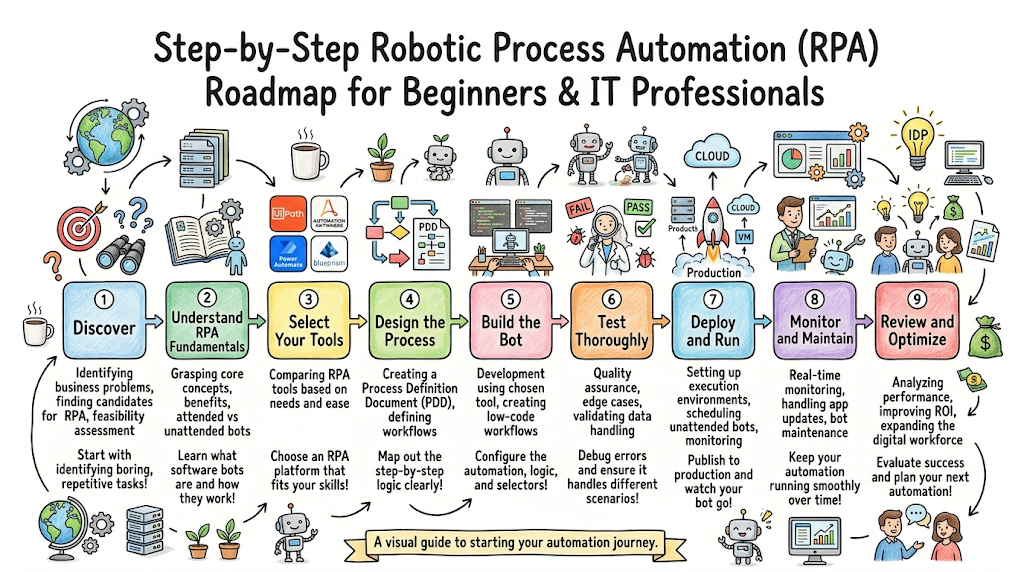
Beginner Roadmap for Learning RPA
Developing a career in enterprise automation requires a structured approach to learning both business logic and technical development concepts.
Step 1: Business Process Basics
Learn how real-world business departments operate. Focus on understanding common operational flows in finance, human resources, and supply chain management, and practice identifying inefficiencies in manual tasks.
Step 2: Workflow Understanding
Master the art of process mapping. Learn how to break down complex human activities into clear, logical flowcharts, accounting for every decision point, data input variation, and potential process exception.
Step 3: Excel & Data Handling
Get comfortable with advanced data manipulation. Learn to work with CSV data matrices, string modifications, text formulas, data sorting, and structured data tables, as a large percentage of automation tasks involve processing spreadsheets.
Step 4: Programming Fundamentals
Build a basic foundation in logic. Learn core programming concepts like variables, loops (for-each, while), conditional statements (if-then-else), object types, and basic error handling methods.
Step 5: Automation Concepts
Understand how software interacts with user interfaces. Study how operating systems render web elements, how HTML trees are structured, and how software engines locate specific input fields or buttons.
Step 6: RPA Tools
Acquire practical experience with industry software. Download free community editions of major development studios and build basic automations like web scraping, document renaming, and form filling.
Step 7: APIs & Integrations
Learn to go beyond surface-level UI interactions. Study how REST APIs work, how to send HTTP requests, and how to parse structured JSON data objects to build faster, more resilient data pipelines.
Step 8: AI Basics
Explore cognitive automation layers. Learn how to connect your software bots to optical character recognition engines, natural language services, and basic text classification models to process unstructured data.
Step 9: Cloud Automation
Understand modern cloud deployments. Learn how software robots run on remote virtual cloud instances, how to configure web-triggered automations, and how to manage cloud storage connections.
Step 10: Monitoring & Analytics
Master production governance. Learn how to interpret execution logs, set up automated alert notifications, and build operational dashboards to monitor the performance of your digital workforce.
Recommended Beginner Projects
To reinforce your learning, build these foundational automation projects in your local development environment:
- Automated Web Scraper: Configure a software bot to open a public e-commerce site, search for a specific product category, loop through multiple pages of results, extract product names and prices into an Excel sheet, and email the finalized report to your inbox.
- Invoice Data Extraction Pipeline: Build a workflow that monitors a local file folder for incoming PDF invoices, uses optical character recognition to extract invoice dates, vendor names, and total amounts, and logs those values directly into a structured database.
- HR Onboarding Assistant: Create a bot that reads a new employee information spreadsheet and automatically fills out an internal web form across multiple registration portals, simulating a cross-system employee registration process.
Certifications & Training
Obtaining professional industry credentials validates your technical automation skills and increases your visibility within the enterprise technology job market.
| Certification | Level | Best For | Skills Covered |
| UiPath Certified RPA Associate (UiRPA) | Beginner | Aspiring developers, business analysts, and junior technical architects. | Foundational automation concepts, basic studio configurations, data manipulation, and simple bot debugging. |
| Automation Anywhere Advanced RPA Professional | Intermediate | Programmers and systems administrators looking to validate implementation skills. | Advanced variable control, resilient web scraping, secure credential configuration, and error management. |
| Microsoft Certified: Power Platform Fundamentals | Beginner | Business professionals and IT analysts using corporate cloud software environments. | Low-code cloud workflow creation, fundamental power automate app triggers, and simple data integrations. |
| UiPath Certified Advanced RPA Developer (UiARD) | Advanced | Senior automation developers and enterprise technical solution leads. | Complex enterprise design frameworks, advanced architecture optimization, queue management, and robust exception handling. |
Common Beginner Mistakes
- Automating Bad Processes: Beginners often try to automate complex, broken, or unoptimized human processes exactly as they are. This simply accelerates existing operational inefficiencies. Always optimize and standardize the process flow before building automation logic.
- Ignoring Process Documentation: Skipping the creation of a clear Process Definition Document (PDD) often leads to missed requirements and frequent development rewrites. Document every step, edge case, and exception before opening your design studio.
- Learning Tools Without Workflow Understanding: Focusing exclusively on button configurations inside a specific software platform without mastering core logical concepts—like loop handling, variable structuring, and exception control—limits your ability to design robust automations.
- Skipping Testing: Running an automation package in production without testing it against varied data profiles and system delays can cause frequent runtime crashes. Test your workflows with realistic data anomalies to ensure stability.
- Lack of Hands-On Projects: Relying solely on video tutorials without actively building, breaking, and debugging your own local software bots makes it difficult to develop true problem-solving skills for complex real-world workflows.
Best Practices for RPA Implementation
Automation-First Mindset
Encourage teams to evaluate operations through an automation lens, systemically identifying highly repetitive administrative tasks that are suitable for software bot execution.
Process Standardization
Clean up and simplify workflows before writing any code. Removing unnecessary steps and standardizing data inputs makes your automation significantly more reliable and easier to maintain.
Security Integration
Never hardcode passwords or corporate access tokens within your automation workflows. Always utilize secure, centralized credential vaults and apply strict access permissions to bot accounts.
Continuous Monitoring
Configure clear operational tracking systems. Ensure your software robots write detailed logs at key execution points, enabling your team to quickly identify where a workflow failed.
Governance and Compliance
Establish an internal Center of Excellence to define coding standards, review automation designs, manage platform updates, and ensure deployments align with corporate security guidelines.
Documentation
Maintain thorough, updated technical design documents for every deployed software robot, detailing input parameters, system dependencies, selector definitions, and error handling paths.
Scalability Planning
Design your workflows using modular components and reusable logic blocks. This structural approach makes it simple to expand your automation footprint as business transaction volumes grow.
Performance Optimization
Regularly analyze execution logs to find processing bottlenecks, refine UI selectors, and eliminate unnecessary delays, keeping your digital workforce running efficiently.
Future of Robotic Process Automation
The automation landscape is moving rapidly toward hyperautomation and deep artificial intelligence integration. Traditional software robots, while highly efficient at execution, are strictly limited by fixed, deterministic rules. The integration of large language models and Generative AI technologies completely changes this dynamic. Modern software bots are evolving into intelligent digital assistants capable of understanding conversational requests, reading semi-structured emails, and making context-aware decisions within enterprise workflows.
Furthermore, cloud-native automation infrastructures allow companies to scale their digital workforces instantly without managing complex local server environments. Low-code development tools continue to open up the field, enabling business analysts and operational experts to build automated tasks safely under IT oversight. As intelligent document processing tools become more sophisticated at reading diverse corporate data records, the scope of automatable tasks will continue to expand, making automated operations a foundational component of modern business strategy.
FAQs
1. What is Robotic Process Automation?
Robotic Process Automation is a technology segment that allows organizations to deploy specialized software utilities—frequently called software robots or digital bots—to interpret, capture, and manipulate data within existing digital applications, mimicking human interactions with user interfaces.
2. Is RPA difficult for beginners?
No, it is highly accessible for beginners. Most popular enterprise platforms use visual drag-and-drop flowcharts to build automation paths, allowing individuals without advanced computer science degrees to master foundational automation concepts quickly.
3. Does RPA require coding?
Basic task configurations can be completed using low-code graphical interfaces. However, writing advanced, enterprise-grade automations often requires a basic understanding of programming logic, variables, conditional loops, and expressions to handle complex data manipulation.
4. Which RPA tool is best?
The ideal choice depends entirely on your specific organizational scale and infrastructure. UiPath and Automation Anywhere are market leaders for comprehensive enterprise deployments, while Microsoft Power Automate is highly efficient for teams integrated into Office 365 environments.
5. Can RPA replace jobs?
It primarily replaces repetitive, administrative tasks rather than entire human job roles. By shifting mundane data entry duties to software bots, employees can transition toward higher-value initiatives like customer engagement, strategic analysis, and creative problem-solving.
6. What industries use RPA?
It is used across almost every major industry sector, with exceptionally high adoption rates in banking, finance, healthcare operations, insurance management, retail supply chains, telecommunications, and human resource administration.
7. Is AI necessary for RPA?
No, traditional implementations run perfectly well using explicit, rule-based logic. However, integrating artificial intelligence and machine learning models becomes necessary when your workflows need to process unstructured data, such as conversational emails or varying invoice layouts.
8. How long does it take to learn RPA?
With consistent study and hands-on practice, a beginner can grasp foundational workflow concepts and build basic automated tasks within four to six weeks. Mastering advanced enterprise architecture frameworks and complex integrations typically takes several months.
9. What is the difference between an attended and an unattended bot?
An attended bot operates on a local workstation alongside a human worker and is triggered manually to assist with specific tasks. An unattended bot runs independently on a remote virtual server based on pre-set schedules or digital triggers without human intervention.
10. How do software bots handle application updates?
If a business application alters its visual interface layout or changes underlying field labels, dependent software bots may fail to locate elements. This challenge is managed through proactive update practices and robust, dynamic user interface selectors.
11. Can RPA connect to older legacy systems?
Yes, this is one of its primary strengths. Because software robots interact directly with frontend user interfaces, they can input and extract data from older mainframe systems that lack modern application programming interfaces.
12. What is a Process Definition Document?
A Process Definition Document is a comprehensive guide created during the design stage that records the exact step-by-step actions a human operator takes to complete a business task, serving as the development blueprint for building the bot.
13. Are software bots secure?
Yes, provided they are implemented using robust security practices. Enterprise automation platforms include secure, encrypted credential managers, maintain strict user access controls, and generate tamper-proof audit logs for every automated action.
14. What is a Center of Excellence in automation?
An automation Center of Excellence is an internal governance team within an organization that defines development standards, evaluates potential bot projects, manages platform infrastructure, and ensures all deployments align with corporate security guidelines.
15. What are the main limitations of software robots?
Software robots are fundamentally non-cognitive systems; they cannot exercise subjective human judgment, interpret vague emotional contexts, or resolve process exceptions that fall outside of their programmed rule-based logic paths.
Final Thoughts
The rapid growth of robotic process automation represents a fundamental shift in how modern business operations are designed and sustained. As companies face increasing pressure to optimize operational costs and accelerate delivery timelines, building an agile digital workforce of software robots is no longer an optional innovation project—it is a core strategy for enterprise survival. For professionals entering this space, developing a practical, hands-on understanding of workflow design, variable management, and tool optimization provides a strong foundation for a career in digital transformation.
