Building a physical robot is an incredible feeling, but turning it on for the first time can be terrifying. What if a bug in your code makes the robot smash into a wall? What if the motor spins backward and breaks a costly gear? In modern robotics engineering, we avoid these disasters by using a simulation-first workflow. Before a single piece of hardware is assembled, engineers build and test their creations in a virtual environment. This educational guide from RobotsOps.com will introduce you to the core concepts of virtual testing, show you the best tools available, and give you the foundational knowledge needed to start your robotics journey safely.
What Is Robot Simulation?
Definition
At its core, robot simulation is the process of mimicking a physical robot’s movements, intelligence, and environment inside a computer program. Instead of interacting with real steel, motors, and concrete, your software interacts with mathematical models.
Purpose
The primary purpose of a robot simulator is to replicate reality as accurately as possible. It serves as a digital sandbox where developers can write robotics software, design mechanical layouts, and see how their code behaves in real-time without needing physical hardware nearby.
Importance in Robotics
In the modern RobotOps framework—which focuses on managing the lifecycle of robot fleets—simulation acts as the ultimate safety net. It bridges the gap between raw code and physical execution. By validating your algorithms virtually, you ensure that the physical robot operates reliably from day one.
History and Evolution of Robot Simulation
Early Robotics Simulations
Decades ago, simulation was rudimentary. Computers lacked the graphics power to display realistic environments. Early tools relied on simple wireframe drawings and basic 2D geometry. These programs could calculate whether a robot arm could reach a specific coordinate, but they couldn’t tell you what happened if the arm bumped into an obstacle.
Physics-Based Simulators
As computing power grew in the late 1990s and early 2000s, engineers introduced physics engines. These engines brought real-world math—like gravity, friction, inertia, and torque—into the digital space. For the first time, a virtual robot could slide on ice or tip over if it turned a corner too quickly.
Open-Source Robotics Platforms
The true explosion of accessibility came with open-source software. The launch of the Robot Operating System (ROS) provided a standardized way for developers to share code. Alongside it, platforms like Gazebo and Webots made high-quality, free simulation accessible to students and hobbyists worldwide.
Modern AI-Powered Simulation
Today, we live in the era of artificial intelligence. Photorealistic environments powered by game engines allow robots to train via machine learning. Software like NVIDIA’s Isaac Sim can simulate thousands of robots simultaneously in photo-quality warehouses, drastically accelerating how fast autonomous machines learn to navigate the world.
Why Robot Simulation Is Important
[Write Code] ➔ [Test in Virtual Simulator] ➔ [Fix Errors Safely] ➔ [Deploy to Physical Robot]
Safe Testing
If an autonomous drone miscalculates its altitude in a simulation, it crashes into a virtual tree. You press the reset button and fix the code. If the same error happens in the real world, you risk damaging expensive hardware or causing injuries.
Cost Savings
Physical prototypes are expensive. Sourcing machined parts, sensors, and powerful microcontrollers adds up quickly. A robot modeling workflow allows you to iterate on your designs digitally for free until you find the perfect setup.
Faster Development
Waiting for physical parts to arrive in the mail creates bottlenecks. With a simulator, software engineers can write and test code for a robot before the physical machine even exists.
Better Debugging
When a physical robot fails, it happens in the blink of an eye. In a simulator, you can pause time, slow it down to 10%, review sensor values frame-by-frame, and pinpoint exactly which line of code caused the error.
Reduced Hardware Risks
Constant real-world testing wears down mechanical gears and drains batteries. Virtual testing eliminates this physical wear and tear, extending the operating life of your actual hardware.
Basic Components of a Robot Simulation Environment
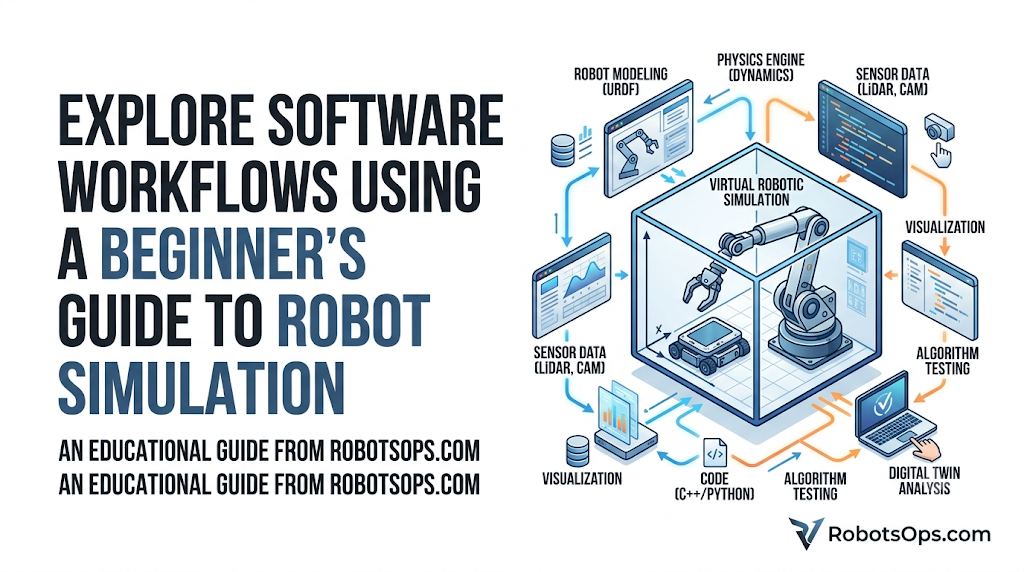
To create an effective virtual world, a simulator combines several interlocking components:
- Robot Models: The digital blueprint of your machine. This includes its visual look, mass, shape, and joint limits.
- Physics Engine: The math engine that handles real-world forces like gravity, friction, collision detection, and momentum.
- Sensors: Virtual versions of cameras, LiDARs, ultrasonic sensors, and IMUs that feed data into the robot’s brain just like real hardware would.
- Actuators: Virtual motors that receive commands (like “spin at 50 RPM”) and apply force to the robot’s joints.
- Virtual Environment: The digital world the robot lives in—complete with floors, walls, obstacles, lighting, and weather conditions.
- Controllers: The algorithms and software code that tell the actuators how to respond based on sensor inputs.
- Visualization Tools: The graphical user interface (GUI) that lets you see the robot move and monitor its internal data streams visually.
Types of Robot Simulation
Physics Simulation
Focuses on forces and interactions. It determines how a robot reacts when pushing a heavy box, driving over loose gravel, or gripping a fragile object without crushing it.
Kinematic Simulation
Calculates positions and movements without looking at the forces causing them. It answers simple structural questions, such as: “Can this robotic arm physically reach the top shelf?”
Dynamic Simulation
Combines kinematics with forces. It calculates acceleration, torque, and energy consumption. This helps you figure out how large your real-world motors need to be.
Sensor Simulation
Generates synthetic data streams. For instance, it can simulate a camera feed complete with lens flare, shadows, or motion blur, allowing your vision algorithms to practice detecting objects.
Multi-Robot Simulation
Simulates entire fleets working together. This is crucial for testing coordination algorithms in automated warehouses where dozens of mobile platforms must avoid colliding with one another.
Cloud-Based Simulation
Runs massive simulation tasks on remote servers. This lets developers run hundreds of parallel test scenarios simultaneously without melting their local laptop’s processor.
How Robot Simulation Works
Getting started with simulation follows a structured, step-by-step workflow:
Step 1: Create the Robot Model
You start by defining the shape and structure of your robot. This is usually done by writing a URDF (Unified Robot Description Format) file or exporting a 3D model from CAD software. You define where the wheels attach, how the joints rotate, and where the sensors sit.
Step 2: Build the Virtual World
Next, design the environment. It could be a simple empty plane, a complex obstacle course, or a highly detailed digital twin of a real-world manufacturing facility.
Step 3: Connect Your Software
Link your control code to the simulator. If you are using ROS Simulation, your node sends velocity commands to the virtual robot, and the simulator sends back virtual sensor readings over standard ROS topics.
Step 4: Run the Simulation and Observe
Fire up the engine and run your tests. Observe how the robot behaves. Does it track a straight line? Does it stop when the virtual camera spots an obstacle?
Step 5: Analyze, Debug, and Iterate
Identify any weird behaviors, pause the simulator, tweak your software code, and rerun the test. Repeat this process until the virtual robot completes its task flawlessly.
Popular Robot Simulation Tools
Gazebo
The long-standing standard for the ROS community. Gazebo handles complex physics, integrates natively with ROS, and has a massive open-source community. It is excellent for outdoor environments and wheeled vehicles.
Webots
An incredibly beginner-friendly, open-source simulator. Webots features a clean user interface, comes with an extensive library of pre-built robot models, and runs efficiently on standard consumer laptops.
PyBullet
A lightweight Python module based on the Bullet Physics engine. It is highly popular among researchers working on deep reinforcement learning and AI because it loads instantly and handles fast algorithmic training beautifully.
Isaac Sim
NVIDIA’s cutting-edge platform built on the Omniverse engine. It offers photorealistic environments and powerful physics. While it requires high-end hardware, it is the modern choice for training advanced AI vision models.
CoppeliaSim
Formerly known as V-REP, this tool is highly versatile and supports multiple programming languages (C++, Python, Lua). It is widely favored in academic environments for studying robotic arms and factory automation.
ROS Integration
Most modern simulators feature native integration with the Robot Operating System. This means the exact same code you write to move a robot in Gazebo can be flashed onto a physical physical platform with minimal changes.
Benefits of Robot Simulation
- Faster Prototyping: You can test five different chassis designs in an afternoon without touching a saw or a 3D printer.
- Safe Experimentation: Feel free to push your algorithms to their absolute limits. If the robot breaks, it costs zero dollars to repair.
- Lower Costs: Reduces the need for physical testing spaces, safety rigging, and multiple hardware prototypes.
- Better Software Quality: Allows you to test rare edge-case scenarios—like a sudden sensor failure or a blacked-out camera—reliably and repeatedly.
- Easier Collaboration: Software teams can share a simulation file via GitHub, allowing everyone to test their code on the exact same virtual hardware setup from home.
Common Challenges
Simulation Accuracy
No simulator perfectly replicates the real world. A physics engine works with clean mathematical approximations, whereas the real world contains unpredictable anomalies.
Sim-to-Real Differences
Often called the “reality gap,” this is the discrepancy between virtual behavior and physical behavior. A robot that navigates a virtual room perfectly might get stuck on a real rug due to minor variations in tire friction and floor texture.
Hardware Limitations
Simulating high-fidelity cameras, LiDARs, and complex physics simultaneously requires substantial CPU and GPU power. Weak computers may experience lag or stutter during testing.
Learning Curve
Setting up URDF files, configuring physics joints, and managing software dependencies can feel overwhelming for beginners. It requires patience to learn both the robotics framework and the simulator itself.
Best Practices for Beginners
- Start Small: Don’t try to simulate a self-driving car on day one. Start by programming a simple two-wheeled robot to drive in a straight line and stop before hitting a wall.
- Keep Models Simple: Use basic geometric shapes (boxes, cylinders, and spheres) for your initial physics models. High-detail 3D meshes slow down performance without adding functional value.
- Validate Step-by-Step: Test individual components separately. Make sure your virtual motors turn correctly before you try testing your complex autonomous navigation algorithms.
- Account for the Reality Gap: Don’t assume real-world success just because it worked perfectly on your screen. Always leave safety margins in your designs to handle real-world friction and noise.
Real-World Applications
Industrial Robots
Manufacturing plants use digital twins to plan how giant robotic arms will weld car frames. Simulation ensures the arms don’t collide with factory pillars or human work zones.
Warehouse Automation
E-commerce facilities simulate hundreds of automated guided vehicles (AGVs) to design efficient routes, test traffic management systems, and prevent gridlocks.
Autonomous Vehicles
Self-driving car companies test their navigation software across millions of virtual miles, exposing their AI models to hazardous weather and dangerous traffic situations that are too risky to replicate on real roads.
Drones
Quadcopters use virtual testing to practice stabilizing themselves against heavy wind gusts and navigating dense forest environments without risking costly crashes.
Healthcare Robots
Surgical assistants and robotic prosthetics are tested extensively in virtual physiological models to ensure their movements are smooth, ultra-precise, and safe for human interaction.
Future Trends
AI-Powered Simulation
Generative AI will soon allow engineers to build massive, highly detailed 3D testing environments using simple text commands, reducing setup times from weeks to minutes.
Digital Twins
More companies will link real-world sensor streams back to active cloud simulations in real-time, allowing them to monitor health, predict maintenance, and optimize performance on the fly.
RobotOps Workflows
Automated testing pipelines will become standard. Every time a developer pushes a code update, cloud servers will automatically run the software through dozens of rigorous virtual simulation tests before approving it for production.
Comparison Tables
Popular Robot Simulation Tools
| Tool | Platform | Advantages | Limitations | Best For |
| Gazebo | Linux | Excellent ROS integration, massive active community | Steep learning curve, heavy resource use | ROS-based software developers |
| Webots | Windows, Mac, Linux | Easy setup, rich library of models, lightweight | Less powerful for complex AI training | Beginners and educational courses |
| PyBullet | Windows, Mac, Linux | Highly efficient, simple Python API, loads fast | Basic visual graphics rendering | Reinforcement learning and AI research |
| Isaac Sim | Windows, Linux | Photorealistic visuals, massive parallel processing | Requires expensive NVIDIA RTX hardware | Advanced AI and corporate R&D |
Robot Simulation vs. Physical Robot Testing
| Feature | Robot Simulation | Physical Testing | Best Use Case |
| Safety | Perfect (Zero hardware risks) | High risk of damage or injuries | Testing untested algorithms |
| Setup Cost | Low (Requires only a computer) | High (Requires parts, tools, space) | Small budgets and rapid iteration |
| Speed | Instant resets and fast-forwarding | Real-time limits, battery recharges | Speeding up software development |
| Accuracy | Approximated (Subject to reality gap) | 100% Real-world accuracy | Final validation before deployment |
FAQs
What is the difference between a robot simulator and a game engine?
A robot simulator prioritizes mathematical accuracy, rigid physics, and exact sensor data generation. A game engine focuses primarily on visual beauty, high frame rates, and fun gameplay, often cheating the physics to keep the game running smoothly.
Do I need a powerful computer to run robot simulations?
It depends on the tool you choose. Light programs like Webots and PyBullet run very well on standard student laptops. However, advanced simulators like NVIDIA Isaac Sim require dedicated gaming graphics cards.
Can I use Python to program my robot simulations?
Yes. Almost all modern simulation platforms—including PyBullet, Webots, and CoppeliaSim—offer native Python APIs, making them highly accessible for beginners.
What is the “reality gap” in robotics?
The reality gap refers to the minor differences between the simulated environment and the real world. Variations in friction, sensor noise, and manufacturing imperfections mean a robot might behave slightly differently on real ground than it does on screen.
Is Gazebo free to use?
Yes. Gazebo is an open-source tool, meaning it is completely free to download, modify, and use for both personal and commercial projects.
What is a URDF file?
URDF stands for Unified Robot Description Format. It is an XML-based file format used to describe the physical layout of a robot, defining its links (bones), joints (hinges), and visual appearance.
Can I simulate multiple robots at the same time?
Yes. Most modern platforms allow for multi-robot simulation, which is essential for developing fleet coordination and collision avoidance systems for warehouses.
Should I learn ROS before starting with simulation?
While it isn’t strictly necessary for basic tasks, learning ROS (Robot Operating System) is highly recommended. Most simulators are built to integrate with ROS, and it is an industry-standard skill.
Can simulation completely replace physical testing?
No. While simulation catches 95% of software bugs, real-world factors like dirt, wear-and-tear, and unpredictable lighting mean you must always perform final testing on physical hardware.
How do I export my CAD designs into a simulator?
Many modern CAD programs (like SolidWorks or Fusion360) have open-source plugins that automatically convert your 3D assemblies into URDF or SDF files compatible with popular simulators.
Conclusion
Robot simulation is more than just a convenient shortcut; it is the absolute foundation of modern robotics development. By providing a safe, cost-effective, and limitlessly flexible environment, simulators empower beginners and experienced engineers alike to experiment boldly and innovate quickly. As you start your journey, remember that every hour spent refining your virtual model saves countless hours of troubleshooting real-world hardware failures. Grab an open-source simulator, build a simple model, and start testing your code today!
