Introduction
Robots are no longer confined to the pages of science fiction or isolated research laboratories. Today, they assemble our vehicles, manage sprawling warehouse inventories, assist surgeons in operating rooms, and even vacuum our living room floors. As automation rapidly transforms industries worldwide, understanding how these machines operate has become an invaluable skill for students, engineering professionals, and technology enthusiasts alike. Learning the essentials of robot programming basics allows us to dictate exactly how a machine interacts with its environment. Whether you are aiming to enter the automation workforce or are simply curious about modern technology, platforms like RobotsOps.com provide the necessary insights to understand these complex systems. This comprehensive guide will walk you through how robots receive commands, process data, and execute physical actions in the real world.
What Is Robot Programming?
Robot programming is the process of creating a structured set of instructions that a robotic system executes to accomplish a specific task. Unlike traditional software development—which typically operates entirely within a virtual environment like a computer screen or a web server—robotics coding bridges the digital world and the physical world.
The primary purpose of programming a robot is to govern its behavior, motion, and decision-making processes. To achieve this, software acts as the nervous system and brain of the machine, while the mechanical components serve as the body.
+------------------+                   +--------------------+
|  Software Code   | --(Instructions)->| Physical Hardware  |
| (The Robot Brain)|                   | (Motors & Modules) |
+------------------+                   +--------------------+
Without robust programming, high-end sensors and powerful motors are completely useless. Software reads the data collected by sensors, evaluates that information based on pre-defined logic, and sends electrical signals to the motors to initiate movement. Writing code for robots requires a firm grasp of both logic and physical mechanics, making it one of the most rewarding fields in modern engineering.
How Robots Follow Instructions
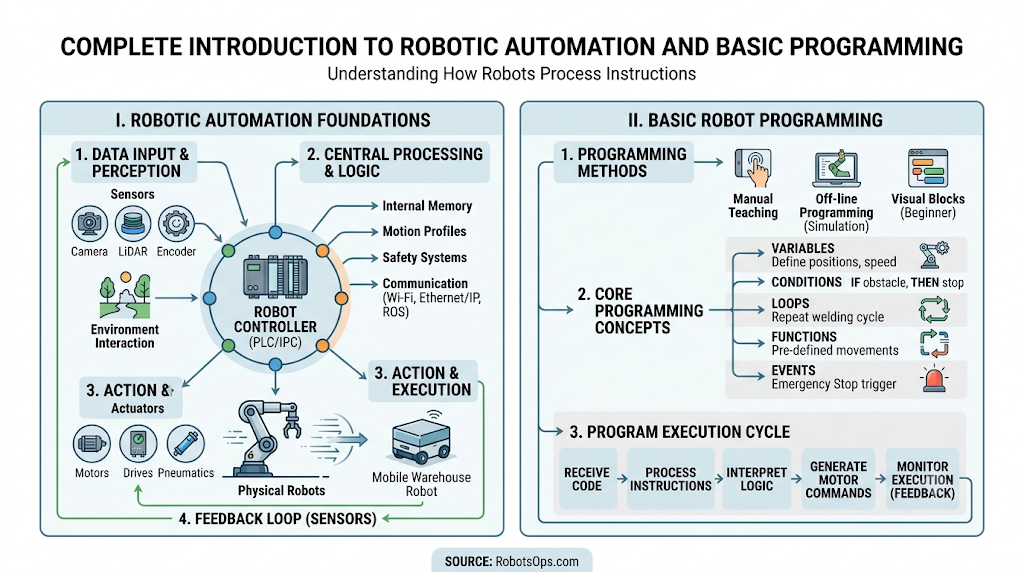
For a human, picking up a cup of coffee is a subconscious act. For a robot, this simple task requires a highly organized chain of events. A robot follows instructions by constantly moving through a loop of receiving, processing, and acting.
[ Receive Commands ] ---> [ Process Data ] ---> [ Make Decisions ]
         ^                                              |
         |------------- [ Feedback Loop ] <--------[ Execute Action ]
Receiving Commands
First, the robot must accept instructions. These commands can be pre-loaded into its memory, sent wirelessly via a local network, or input in real-time by a human operator using a handheld controller.
Processing Information
Once a command is received, the internal computer translates the high-level code into binary signals (1s and 0s) that the electronic circuits can easily comprehend. At this stage, the robot also processes incoming data from its surroundings to contextually understand its position.
Making Decisions
Using conditional logic embedded in its software, the robot evaluates its current state against its goals. For instance, if a warehouse robot detects an obstacle in its path, the program decides whether to stop or steer around it.
Executing Actions
After a decision is reached, the controller sends specific electrical currents to the motors, joints, or pneumatic valves. This voltage conversion causes physical components to move, translating digital code into physical work.
Feedback and Correction Mechanisms
Robots rarely operate blindly. Through a continuous feedback loop, sensors constantly monitor the outcomes of physical actions. If a robotic arm moves slightly off-course due to a heavy load, the software identifies the error and instantly recalculates the motor outputs to correct the path.
Core Components of a Robot Control System
To understand robotics programming for beginners, you must first become familiar with the foundational elements that make up robot control systems. These components work in perfect harmony to turn software logic into physical movement.
| Component | Primary Role | Real-World Analogy |
| Sensors | Gather environmental data | Eyes, ears, and skin |
| Controllers | Process instructions and logic | The human brain |
| Actuators | Execute physical movement | Muscles and tendons |
| Communication Systems | Exchange data with external networks | Nervous system / Speech |
| Software Programs | Direct behaviors and rulesets | Thoughts and learned skills |
Sensors
Sensors allow a robot to perceive its surroundings. They collect raw physical data, such as distance, light intensity, temperature, or pressure, and convert it into electrical signals for the controller to analyze.
Controllers
The controller is the central computer of the robot. It runs the active robot software systems, stores configuration files, processes sensor inputs, and calculates the math required to guide the machine’s paths safely.
Actuators
Actuators are the mechanisms responsible for moving the robot. This category includes electric motors, hydraulic pumps, and pneumatic cylinders. When the controller issues a command, actuators provide the physical force needed to move limbs, wheels, or grippers.
Communication Systems
Modern industrial and commercial robots do not work in total isolation. They use communication protocols (such as Wi-Fi, Ethernet, or Bluetooth) to talk to other machinery, centralized factory servers, and human-managed dashboards.
Software Programs
The software program binds all these components together. It defines the operational rules, dictates how sensor inputs alter the robot’s course, and sets safety thresholds to prevent workplace accidents.
Understanding the Robot Instruction Cycle
Every autonomous machine relies on a continuous loop known as the Instruction Cycle. This cycle runs hundreds or thousands of times every single second, ensuring the robot remains responsive to its environment.
+--------------------+
|     1. INPUT       | <-- Sensors gather environmental data
+--------------------+
          |
          v
+--------------------+
|    2. PROCESS      | <-- Controller translates data & calculates metrics
+--------------------+
          |
          v
+--------------------+
| 3. DECISION MAKING | <-- Logic dictates the best step forward
+--------------------+
          |
          v
+--------------------+
|     4. ACTION      | <-- Actuators execute physical movement
+--------------------+
          |
          v
+--------------------+
|    5. FEEDBACK     | <-- Sensors measure results and loop restarts
+--------------------+
Let’s look at how an automated delivery robot utilizes this specific cycle while crossing a street:
- Input: The robot’s onboard cameras and laser scanners notice a pedestrian walking directly into its path.
- Processing: The internal computer reads this visual data and calculates the pedestrian’s walking speed and vector.
- Decision Making: The software runs a check: “If obstacle distance is less than 5 feet, execute emergency stop.” The criteria are met.
- Action Execution: The controller stops sending power to the wheel motors and engages the electronic brakes.
- Feedback Collection: The wheel encoders confirm that the robot has come to a complete stop, and the sensors continue monitoring the pedestrian until the path clears.
Programming Languages Used in Robotics
Choosing the right language is a critical step in robotics coding. Different development platforms serve distinct purposes, balancing execution speed against ease of development.
Python
Python is the most popular language for robotics programming for beginners. It features a clean, highly readable syntax that allows developers to prototype applications rapidly. Python is heavily utilized in artificial intelligence, machine learning, and computer vision scripts for advanced robotics.
C++
When it comes to low-level control and raw execution speed, C++ remains the industry standard. Because it interacts directly with hardware components without heavy background overhead, engineers use C++ for real-time motor control, embedded microcontrollers, and time-critical industrial applications.
Java
Java offers excellent portability across different operating systems. In robotics, it is frequently used in educational programs, Android-based mobile robotics applications, and enterprise-level coordination software that connects fleets of machines to central business networks.
ROS-Based Development
The Robot Operating System (ROS) is not actually an operating system, but rather an open-source framework built on top of Linux. It provides a massive collection of tools, libraries, and drivers that simplify the creation of complex robot behaviors across Python and C++. It is widely considered a mandatory skill for modern robotics software developers.
Visual Programming Platforms
For younger students and absolute beginners, visual platforms like Scratch or LEGO Mindstorms use drag-and-drop blocks to represent programming logic. This layout allows beginners to learn loops, variables, and logic flow without worrying about syntax errors or missing semicolons.
Types of Robot Programming
Depending on the application, industry, and complexity of the machine, engineers utilize several distinct methods to program robots.
Manual Programming
In manual programming, an operator physically guides the robot through a series of physical movements. The controller records the precise encoder positions at each point, allowing the robot to repeat the recorded path exactly during production.
Offline Programming
Offline programming involves building the entire robot workspace inside a 3D digital simulation tool. Engineers write and test the robotics coding on a computer without interrupting production. Once the program proves stable, it is uploaded directly to the physical robot.
[ 3D Digital Simulator ] --(Verify & Test)--> [ Upload to Physical Robot ]
Teach Pendant Programming
A teach pendant is a handheld control terminal wired directly to an industrial robot. Operators use it to manually jog the robot’s joints to specific coordinates, save those positions, and construct functional operational logic step-by-step.
AI-Assisted Programming
With the rise of machine learning, modern systems can generate portions of code autonomously. Engineers use AI models to write foundational scripts, optimize trajectories, and debug existing programs, significantly shortening deployment timelines.
Autonomous Behavior Programming
This advanced technique focuses on programming rules and goals rather than fixed paths. Instead of telling a robot to “move 5 inches left,” the code instructs the robot to “find the blue box and place it on the conveyor.” The robot then uses its internal logic to figure out the pathing details on its own.
Basic Programming Concepts Every Robotics Beginner Should Know
To write effective instructions for a machine, you must master a few core software engineering principles. Here is how standard programming concepts apply directly to robotics fundamentals.
Variables
Variables act as digital storage boxes for information that can change over time. In robotics, a variable might store the current speed of a wheel motor, or hold the total number of items sorted on a conveyor belt.
Conditions
Conditional statements allow a robot to make logical choices based on data. They follow a clear structure: IF [something is true] THEN [do action] ELSE [do a different action].
Robotics Example:
IFthe battery drop level is under 15%,THENnavigate to the charging dock,ELSEcontinue scanning inventory.
Loops
Loops force a robot to repeat a block of code until a specific condition is met. This structure is essential for continuous operations. For instance, a robot arm can use a WHILE loop to continually weld car frames as long as parts keep arriving on the assembly line.
Functions
Functions are isolated, reusable blocks of code designed to perform a singular task. Instead of rewriting twenty lines of pathfinding math every time a robot needs to turn around, an engineer writes a single turnAround() function and calls it whenever needed.
Events
An event is a specific trigger that instantly interrupts the normal flow of a program. Pressing an emergency stop button, or a safety bumper hitting an obstacle, triggers an event that commands the robot to cease all operations immediately.
Data Handling
Robots process vast amounts of incoming data from multiple sources simultaneously. Proper data handling cleans, filters, and formats this raw sensor info so the controller can make accurate operational decisions without lag.
How Sensors Help Robots Follow Instructions
A robot cannot follow instructions accurately if it is blind to its environment. Sensors feed the software the objective real-world context it needs to execute code safely.
- Vision Sensors: Industrial cameras and LiDAR scanners allow robots to recognize object shapes, read barcodes, detect faces, and build complex 3D maps of their working environments.
- Distance Sensors: Ultrasonic and infrared sensors measure the time it takes for a wave to bounce off an object, helping mobile units avoid wall collisions.
- Touch Sensors: Bumper switches and tactile force sensors tell a robot when it has made physical contact with an object, or how tightly a gripper is squeezing a delicate component.
- Motion Sensors: Gyroscopes and accelerometers track orientation, balance, and velocity, ensuring self-balancing and aerial drones stay upright.
- Environmental Sensors: Thermal cameras, gas detectors, and humidity sensors allow specialized inspection robots to operate safely in hazardous industrial zones.
Real-World Examples of Robot Programming
To see how these concepts function outside the classroom, let’s explore how different industries leverage robotic automation on a daily basis.
Industrial Manufacturing Robots
In automotive assembly lines, articulating arms are programmed with precise spatial coordinates. They execute paths with sub-millimeter accuracy to weld chassis components, apply paint smoothly, and install windshields without human intervention.
Warehouse Robots
In modern fulfillment centers, fleets of mobile drive units navigate along grid systems. They receive orders wirelessly from a central inventory database, navigate to the correct shelf, lift it up, and transport it directly to a human packing station.
Delivery Robots
Compact, sidewalk-roving delivery robots use a blend of GPS waypoint navigation, computer vision, and machine learning models to safely navigate busy urban sidewalks, avoid pedestrians, and drop off food orders.
Medical Robots
Surgical robotic systems act as high-precision extensions of a surgeon’s hands. The software filters out natural hand tremors and scales down movements, allowing for highly precise, minimally invasive medical procedures.
Agricultural Robots
Autonomous tractors and weeding robots use computer vision models to distinguish between growing crops and invasive weeds. They navigate fields via GPS, applying targeted treatments or removing weeds mechanically without damaging the harvest.
Common Challenges in Robot Programming
Programming physical hardware introduces a wide variety of unpredictable real-world challenges that traditional software developers rarely encounter.
Hardware Limitations
Every physical component has limits. Motors can only spin so fast, joints have limited angles of rotation, and microcontrollers have constrained memory capacity. Programmers must write highly optimized code that respects these physical limits.
Sensor Inaccuracies
In perfect simulations, sensors provide flawless data. In reality, dust can blind cameras, sunlight can interfere with infrared sensors, and electrical noise can distort readings. Software must include digital filters to account for these inaccuracies.
Environmental Variability
A warehouse floor changes constantly throughout the workday. Pallets move, lighting shifts, and people walk across pathways. Programming an autonomous machine to adapt fluidly to a changing environment is incredibly challenging.
Software Bugs
A bug in a web application might cause a page to load incorrectly. A logic bug in a multi-ton industrial robot program can cause the machine to collide with a structural pillar, resulting in costly hardware damage or workplace injuries.
Communication Delays
In remote operations or cloud-linked setups, latency can cause severe issues. If data packets take too long to travel between the robot and its control server, the machine’s reaction times will slow down, increasing the risk of accidents.
Best Practices for Learning Robot Programming
If you want to start your journey in robotics programming for beginners, following a structured learning path will save you a lot of time and frustration.
Start with Simple Projects
Do not try to build an autonomous self-driving car on day one. Start small by programming a basic two-wheeled micro-robot to follow a black line drawn on a piece of paper, or write a script to blink an LED based on distance sensor data.
Learn Programming Fundamentals
Before diving deep into advanced robotics frameworks like ROS, build a rock-solid understanding of standard programming concepts using Python or C++. Master loops, object-oriented principles, and basic debugging workflows first.
Use Simulators
Hardware can be expensive and fragile. Utilizing free open-source robotics simulators like Webots or Gazebo allows you to write, test, and debug code safely on your computer without any risk of damaging physical components.
Experiment with Sensors
Spend time learning how different sensors read and format data. Connect an ultrasonic sensor to an Arduino or Raspberry Pi, print the raw distance outputs to your screen, and learn how to filter out erratic spikes in the data.
Build Practical Robotics Projects
Hands-on experience is irreplaceable. Buy a budget-friendly beginner robot kit, assemble the hardware yourself, and write the control code from scratch. Overcoming real assembly and calibration challenges is the best way to truly learn the craft.
Future of Robot Programming
The field of robotics is evolving rapidly, driven by breakthrough developments in compute power and software architecture.
[ Traditional Code ] --(Evolution)--> [ AI-Driven Self-Learning Systems ]
AI-Powered Robotics
Instead of manually hardcoding every single movement trajectory, future engineers will train robots using reinforcement learning. Through trial and error within simulated environments, machines will learn how to optimize their own movements.
Autonomous Decision-Making
As edge computing power grows, robots will process complex data locally. This advancement allows machines to evaluate unexpected obstacles and rewrite their own navigation paths in real-time without needing guidance from a central server.
Human-Robot Collaboration
The next generation of industrial automation features “cobots” (collaborative robots). These machines are programmed with advanced force-feedback loops, allowing them to work safely right alongside human factory workers without safety cages.
Cloud Robotics
By connecting robots directly to high-speed cloud infrastructure, individual machines can offload heavy processing loads like 3D mapping and voice recognition. This shift allows physical hardware to become lighter, cheaper, and more energy-efficient.
Self-Learning Systems
Future robotic fleets will share operational data over cloud networks. When one delivery robot discovers a safer way to navigate an obstacle, it will instantly upload that behavioral update to every other unit in the fleet.
Career Opportunities in Robotics Programming
As businesses around the world embrace automation, demand for skilled robotics professionals continues to skyrocket. Here are a few prominent career paths available in the industry:
- Robotics Engineer: Focuses on designing, building, testing, and maintaining complete robotic systems by combining mechanical engineering, electronics, and software development.
- Automation Engineer: Specializes in streamlining industrial production lines by integrating robotic arms, sensors, and programmable logic controllers (PLCs) into factories.
- Embedded Systems Developer: Writes highly optimized, low-level C and C++ code that runs directly on microcontrollers to manage hardware components with minimal latency.
- Robot Software Developer: Focuses primarily on high-level application code, developing advanced algorithms for computer vision, localization, mapping, and AI pathfinding.
- Controls Engineer: Specializes in the mathematical models behind system stability, ensuring that robotic joints and motors move smoothly, accurately, and safely under changing loads.
Common Misconceptions About Robot Programming
Myth: You need an advanced degree in mathematics to start.
Reality: While advanced math is necessary for high-end research roles, beginners can easily get started with basic algebra and logical reasoning skills. Modern software libraries handle most of the complex underlying calculus automatically.
Myth: Industrial robots are highly intelligent.
Reality: Most industrial assembly line robots are completely unaware of their surroundings. They simply execute the exact same hardcoded coordinate paths over and over again until an operator shuts them down.
Myth: One programming language works for all robots.
Reality: Robotics is highly fragmented. An engineer might use Python to write a computer vision script, C++ to control the precise motor movements, and a proprietary manufacturer language to configure an industrial work cell.
FAQ Section
1. What is the best programming language for a robotics beginner?
Python is widely considered the best language for absolute beginners. Its clear syntax allows you to focus entirely on learning core logic and robotics principles without getting bogged down by complicated coding syntax.
2. Do I need to buy expensive hardware to learn robot programming?
No, you can get started for free. High-quality, open-source simulators allow you to write real control code and test it out on virtual robot models directly from your computer.
3. What is the difference between a microcontroller and a robot controller?
A microcontroller is a small, single chip designed to execute simple tasks, like reading a sensor or spinning a single motor. A robot controller is an entire integrated computer system that handles complex software programs, multi-axis path calculations, and network communication.
4. What is ROS and do I need to learn it?
ROS stands for Robot Operating System. It is an open-source framework that provides pre-built tools, libraries, and device drivers for building complex robot behaviors. While not mandatory for basic hobby projects, it is a highly valued skill for professional robotics careers.
5. How do robots know where they are located in an open room?
Robots use a process called SLAM (Simultaneous Localization and Mapping). By combining data from wheel rotation counters, gyroscopes, and distance sensors or cameras, the robot builds a digital map of the space and tracks its own position within it.
6. Can artificial intelligence program robots automatically?
AI is increasingly being used to generate basic software code, optimize movement trajectories, and fix software bugs. However, human engineers are still absolutely necessary to architect systems, verify safety parameters, and manage hardware integration.
7. What is an actuator in a robotic control system?
An actuator is the component responsible for creating physical movement. It takes electrical control signals from the computer and converts them into mechanical force, using components like electric motors, hydraulic pumps, or pneumatic valves.
8. Is robot programming different from standard web or app development?
Yes. Web development operates entirely inside virtual environments where conditions are predictable. Robot programming interacts directly with the physical world, meaning your code must handle unpredictable real-world variables like friction, bad lighting, and physical wear.
9. What are collaborative robots or cobots?
Cobots are specialized robots designed to work safely alongside human operators without protective fencing. They are programmed with highly sensitive force sensors that cause them to stop moving instantly if they make accidental contact with a person.
10. How long does it take to learn the basics of robot programming?
If you already understand basic programming logic, you can easily grasp the fundamentals of robotics coding within a few weeks of hands-on practice using simulators or basic hardware development kits.
Final Summary
Understanding robot programming basics is the key to unlocking the massive potential of modern automation. At its core, the process relies on a continuous instruction cycle: gathering environmental data via sensors, analyzing that data within a controller, and executing physical actions via actuators. By mastering core concepts like variables, loops, conditional logic, and programming frameworks, you can direct physical hardware to perform complex, helpful tasks safely. As technology continues to advance, the line between software engineering and mechanical execution will grow even thinner. Developing skills in this area opens up a massive variety of rewarding career paths across manufacturing, logistics, healthcare, and aerospace.
