Introduction
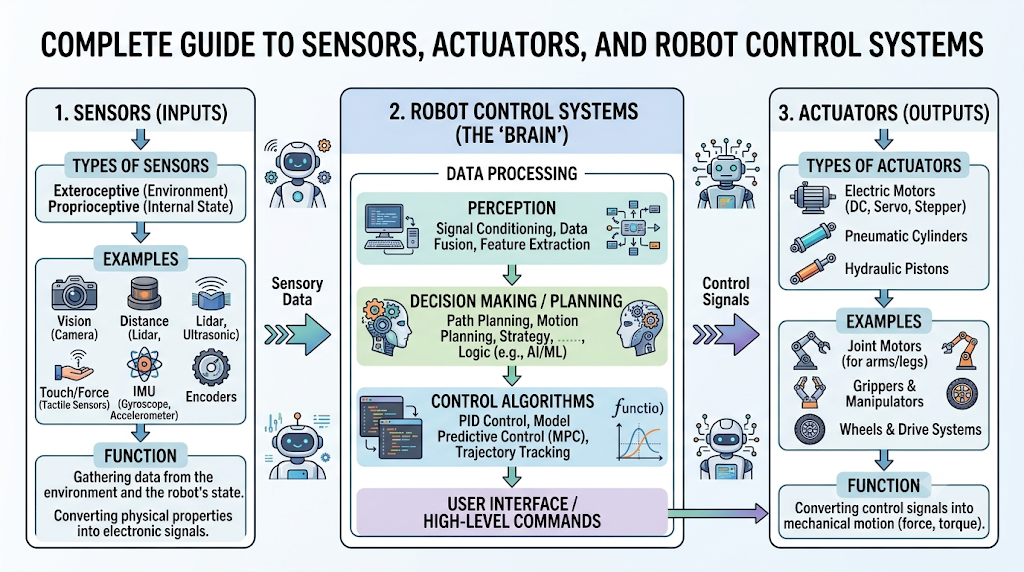
Robots are useful because they can sense what is happening around them and then take action. A robot that cannot sense its environment is like a person walking in a dark room without touching or seeing anything. A robot that cannot move or act is like a person who understands the situation but cannot respond. This is why sensors and actuators are two of the most important parts of any robotic system. Sensors help robots collect information. Actuators help robots perform movement or physical action. Together, they allow robots to detect, decide, and respond. Beginners who want to understand robot components, control systems, and automation concepts can explore RobotsOps.com for structured robotics learning. In this article, you will learn how sensors and actuators work together, why feedback is important, where these components are used, and how they form the foundation of robot control systems.
What Are Sensors?
Sensors are input devices that help a robot detect and measure information from its environment.
In simple words, sensors act like the eyes, ears, skin, and balance system of a robot. They collect data about distance, light, temperature, pressure, speed, position, force, and many other conditions.
A sensor does not usually make decisions by itself. Its job is to collect information and send that information to a controller, processor, or computer system.
For example, an ultrasonic sensor can measure how far an object is from a robot. A camera can help a robot recognize objects. A temperature sensor can detect heat in a machine or working environment.
Purpose of Sensors
Sensors help robots:
- Understand their surroundings
- Detect objects and obstacles
- Measure distance, speed, force, and temperature
- Track position and movement
- Improve safety and accuracy
- Support feedback-based control
Without sensors, robots would perform fixed actions without knowing what is happening around them.
How Sensors Collect Environmental Data
Sensors convert real-world physical conditions into electrical signals or digital data.
For example:
- A proximity sensor detects whether an object is nearby.
- A camera converts light into image data.
- A force sensor converts pressure into measurable values.
- A temperature sensor converts heat into an electrical reading.
This information is then sent to the robot control system. The controller analyzes the data and decides what should happen next.
Common Types of Robotic Sensors
Common robotics sensors include:
- Proximity sensors
- Ultrasonic sensors
- Infrared sensors
- Vision cameras
- Force and torque sensors
- Temperature sensors
- GPS and position sensors
- Inertial measurement units
- Encoders
- Touch sensors
Each sensor has a specific job. The right sensor depends on what the robot needs to detect.
What Are Actuators?
Definition
Actuators are output devices that convert control signals into physical movement or action.
If sensors are the robot’s senses, actuators are the robot’s muscles. They allow robots to move wheels, arms, grippers, joints, valves, doors, tools, and other mechanical parts.
An actuator receives a command from the control system and performs an action. This action may be rotation, pushing, pulling, lifting, gripping, opening, closing, or moving in a straight line.
Purpose
Actuators help robots:
- Move from one place to another
- Rotate robotic joints
- Open and close grippers
- Lift or lower objects
- Control valves and tools
- Perform automated industrial tasks
- Convert digital decisions into real-world action
A robot can process information, but it cannot physically respond without actuators.
Types of Actuators
The three major actuator categories used in robotics and automation are:
- Electric actuators
- Pneumatic actuators
- Hydraulic actuators
Each type has different strengths and is used in different robotic applications.
Electric Actuators
Electric actuators use electrical energy to create motion.
Common examples include:
- DC motors
- Servo motors
- Stepper motors
- Linear electric actuators
- Brushless motors
Electric actuators are widely used in robotics because they are easy to control, compact, and suitable for precise movement.
For example, a robotic arm may use servo motors to move its joints accurately. A mobile robot may use DC motors to drive its wheels.
Pneumatic Actuators
Pneumatic actuators use compressed air to create motion.
They are common in industrial automation because they are fast, clean, and simple. Many factory machines use pneumatic cylinders to push, pull, clamp, or lift objects.
For example, a packaging robot may use a pneumatic actuator to press a product into a box or move a small part quickly on an assembly line.
Hydraulic Actuators
Hydraulic actuators use pressurized fluid to create strong movement.
They are used when high force is required. Hydraulic systems are common in heavy-duty robots, construction machines, industrial presses, and large mechanical systems.
For example, a robotic system used for heavy material handling may use hydraulic actuators to lift large loads.
How Sensors and Actuators Work Together
Sensors and actuators work together through a control loop. Sensors collect information, the control system processes it, and actuators perform the required action.
This process happens continuously in most robotic systems.
Text-Based Workflow Diagram
Environment
   ↓
Sensors collect data
   ↓
Controller processes signals
   ↓
Decision-making logic selects action
   ↓
Commands are sent to actuators
   ↓
Actuators create movement
   ↓
Sensors check the result
   ↓
Feedback loop continues
This loop is the foundation of robot control systems.
Data Collection
The process starts when sensors collect data from the environment.
For example, a line-following robot uses infrared sensors to detect a black line on the floor. A robotic vacuum cleaner uses distance sensors to detect walls and furniture. An industrial robot may use vision sensors to locate a part on a conveyor belt.
The quality of data matters. If the sensor data is inaccurate, the robot may make poor decisions.
Signal Processing
After sensors collect data, the signals must be processed.
Some sensors produce analog signals. Others produce digital data. The robot controller may need to filter noise, convert signals, compare values, or combine data from multiple sensors.
For example, a camera may send image data to a processor. The processor identifies the position of an object. Then the control system decides how the robot should move its arm to pick up that object.
Decision Making
Decision making happens inside the robot controller, embedded system, PLC, microcontroller, or computer.
The controller uses the processed sensor data to decide what action is required.
For example:
- If an obstacle is close, stop the motors.
- If the object is too far, move forward.
- If the robotic arm is misaligned, adjust the joint angle.
- If the temperature is too high, activate a cooling system.
- If the gripper force is too low, increase gripping pressure.
Decision making may be simple rule-based logic or advanced software control.
Command Generation
Once the controller decides what to do, it generates a command for the actuator.
This command may control:
- Motor speed
- Motor direction
- Servo angle
- Cylinder extension
- Valve opening
- Gripper pressure
- Robotic arm position
For example, if a robot needs to turn left, the controller may reduce power to one wheel motor and increase power to the other.
Physical Movement
The actuator receives the command and creates physical movement.
This is where digital control becomes real-world action.
For example:
- A servo motor rotates a robotic arm joint.
- A DC motor moves a robot forward.
- A pneumatic cylinder pushes a part.
- A hydraulic actuator lifts a heavy load.
- A gripper closes around an object.
Actuators are responsible for executing the robot’s physical response.
Continuous Feedback Loop
After the actuator moves, sensors check whether the action was successful.
This feedback allows the robot to correct errors.
For example, if a robotic arm tries to move to a specific position, an encoder sensor can measure whether the joint reached the correct angle. If the position is slightly wrong, the controller adjusts the actuator again.
This continuous correction is called feedback control. It makes robots more accurate, stable, and reliable.
RobotsOps.com Guide to Sensors and Actuators
Understanding Robot Perception
Robot perception means the ability of a robot to understand its environment using sensors.
A robot does not “see” or “feel” like humans. Instead, it uses sensors to collect measurements. These measurements help the robot understand distance, position, object shape, temperature, pressure, and movement.
Learning robot perception is important because every smart robotic action begins with reliable sensing.
Learning Robot Motion Control
Motion control is the process of controlling how a robot moves.
Actuators create movement, but the controller decides how much movement is needed. Sensors confirm whether the movement happened correctly.
For example, a robotic arm needs motion control to move smoothly from one point to another. Without control, the arm may overshoot, shake, or miss the target.
Building Reliable Automation Systems
Reliable automation depends on the correct connection between sensors, controllers, and actuators.
In a factory, a sensor may detect that a product is in the right position. The controller then tells an actuator to push, pick, weld, cut, or package the product.
If the sensor fails, the actuator may act at the wrong time. If the actuator fails, the system may not complete the task. Reliability comes from proper design, testing, calibration, and maintenance.
Improving Robotics Performance
Robotic performance improves when sensors and actuators work together accurately.
Good sensor feedback helps robots:
- Move with better precision
- Avoid collisions
- Reduce errors
- Improve speed
- Handle changing conditions
- Perform repeatable tasks
Actuators must also be selected properly. A weak actuator may fail under load, while an oversized actuator may waste energy and increase cost.
Preparing for Advanced Robotics Projects
Beginners who understand sensors and actuators are better prepared for advanced topics such as:
- Autonomous robots
- Industrial robotics
- Embedded robotics
- Robot operating systems
- Computer vision
- Motion planning
- AI-powered automation
- Collaborative robots
RobotsOps.com helps learners build these fundamentals step by step before moving into complex robotics projects.
Types of Sensors Used in Robotics
Proximity Sensors
Proximity sensors detect whether an object is nearby without physical contact.
They are used in robots to avoid collisions, detect object presence, and trigger automated actions. Industrial robots often use proximity sensors to confirm whether a part is in place.
Ultrasonic Sensors
Ultrasonic sensors use sound waves to measure distance.
They send a sound pulse and measure how long it takes to return after hitting an object. These sensors are common in mobile robots, obstacle detection systems, and parking assistance systems.
Infrared Sensors
Infrared sensors use infrared light to detect objects, lines, or heat.
Line-following robots often use infrared sensors to detect contrast between light and dark surfaces. Some robots also use infrared sensors for short-range object detection.
Vision Cameras
Vision cameras help robots capture images and video.
They are used for object recognition, inspection, navigation, sorting, tracking, and quality control. In industrial robotics, vision cameras help robots identify parts and guide robotic arms.
Force and Torque Sensors
Force sensors measure pressure, load, or contact force. Torque sensors measure twisting force.
These sensors are important in robotic arms, surgical robots, collaborative robots, and assembly systems. They help robots apply the right amount of force without damaging objects.
Temperature Sensors
Temperature sensors measure heat.
They are used in robots working near machines, engines, furnaces, electronic systems, or medical environments. Temperature feedback can help prevent overheating and equipment damage.
GPS and Position Sensors
GPS sensors help outdoor robots understand location.
Position sensors, encoders, and inertial sensors help robots track movement, angle, speed, and orientation. These sensors are important in drones, autonomous vehicles, agricultural robots, and mobile robots.
Applications of Sensors and Actuators
Industrial Automation
In industrial automation, sensors detect parts, positions, temperature, pressure, and safety conditions. Actuators move conveyors, robotic arms, grippers, valves, and machines.
For example, a sensor may detect a bottle on a conveyor belt. The controller then commands an actuator to fill, cap, label, or move the bottle.
Autonomous Vehicles
Autonomous vehicles use cameras, radar, ultrasonic sensors, GPS, and other sensing systems to understand roads, obstacles, lanes, and nearby vehicles.
Actuators control steering, braking, acceleration, and other vehicle movements. Sensor feedback helps the vehicle respond safely to changing road conditions.
Healthcare Robots
Healthcare robots use sensors to detect position, force, patient movement, and environmental conditions.
Actuators help robotic systems move surgical tools, assist patients, deliver medicine, or support rehabilitation exercises. Accuracy and safety are especially important in healthcare robotics.
Warehouse Robotics
Warehouse robots use sensors to navigate aisles, detect shelves, avoid people, and locate packages.
Actuators move wheels, lift platforms, robotic arms, and grippers. Together, sensors and actuators help automate picking, sorting, moving, and inventory handling.
Agricultural Robotics
Agricultural robots use sensors to detect soil conditions, crop health, plant position, moisture, and field location.
Actuators help perform tasks such as spraying, harvesting, planting, cutting, and steering. This improves farming efficiency and reduces manual labor.
Home Automation
Home automation systems use sensors to detect motion, temperature, light, door position, smoke, and occupancy.
Actuators control lights, fans, locks, curtains, alarms, thermostats, and appliances. A smart thermostat is a simple example: it senses temperature and activates heating or cooling.
Sensors vs Actuators
| Feature | Sensors | Actuators |
|---|---|---|
| Primary Function | Detect and measure | Perform physical action |
| Input/Output | Input device | Output device |
| Purpose | Collect information | Execute commands |
| Examples | Camera, ultrasonic sensor, temperature sensor | Servo motor, hydraulic cylinder, robotic arm |
| Role in Robotics | Perception | Movement and control |
Sensors and actuators are different, but they depend on each other. Sensors provide information. Actuators perform actions based on that information.
A robot needs both to operate intelligently.
Benefits of Combining Sensors and Actuators
Better Accuracy
Sensors help robots measure real-world conditions. Actuators use that information to perform controlled movement.
For example, a robotic arm can use position sensors to place an object accurately instead of guessing where the object should go.
Real-Time Decision Making
Robots often need to react quickly.
Sensor feedback allows the controller to make real-time decisions. If a moving robot detects an obstacle, it can immediately stop or change direction using actuator control.
Improved Safety
Sensors help robots detect humans, obstacles, overheating, overload, and unsafe conditions.
Actuators can then stop movement, reduce speed, release pressure, or shut down equipment. This makes robotic systems safer in factories, hospitals, warehouses, and homes.
Increased Automation
Automation becomes more useful when machines can sense and respond without constant human input.
For example, an automated sorting system can detect product size and command actuators to move each item to the correct location.
Higher Operational Efficiency
When sensors and actuators work together, robots can reduce errors, save time, use energy better, and improve production quality.
This is especially important in industrial robotics, where small improvements in accuracy and speed can improve the entire workflow.
Common Challenges
Sensor Noise
Sensor noise means unwanted or inaccurate signals in sensor data.
This can happen due to vibration, electrical interference, poor lighting, dust, temperature changes, or low-quality components.
Practical solutions:
- Use signal filtering
- Select high-quality sensors
- Shield electrical wiring
- Place sensors correctly
- Combine data from multiple sensors when needed
Calibration Errors
Calibration means adjusting a sensor so it gives accurate readings.
If a sensor is not calibrated properly, the robot may receive incorrect information. For example, a distance sensor may report the wrong distance, causing poor movement decisions.
Practical solutions:
- Calibrate sensors regularly
- Follow manufacturer guidelines
- Test sensors under real operating conditions
- Record calibration values
- Recheck calibration after maintenance
Communication Delays
Communication delays happen when sensor data or actuator commands take too long to travel through the system.
Even small delays can affect fast robots. A robot may react late, move incorrectly, or become unstable.
Practical solutions:
- Use reliable communication protocols
- Reduce unnecessary data processing
- Keep control loops efficient
- Use real-time controllers where needed
- Test timing under actual load
Actuator Wear
Actuators are mechanical or electromechanical parts, so they can wear out over time.
Motors, gears, cylinders, bearings, and belts may lose performance with repeated use.
Practical solutions:
- Monitor actuator temperature, vibration, and current
- Schedule preventive maintenance
- Lubricate mechanical parts when required
- Avoid overloading actuators
- Replace worn parts before failure
Environmental Conditions
Robots often work in dusty, wet, hot, cold, or vibrating environments.
These conditions can affect both sensors and actuators. For example, dust may block a camera lens, and heat may reduce motor performance.
Practical solutions:
- Use protective enclosures
- Choose industrial-grade components
- Clean sensors regularly
- Control temperature when possible
- Test the robot in real working conditions
Best Practices
To build reliable robotic systems, follow these best practices:
- Select sensors appropriate for the application
- Regularly calibrate sensing devices
- Monitor actuator performance
- Use feedback control systems
- Perform preventive maintenance
- Match actuator strength to load requirements
- Protect wiring and connectors
- Test the system under real conditions
- Keep software logic simple and reliable
- Document sensor and actuator settings
Good robotics design is not only about choosing advanced components. It is about choosing the right components and making them work together reliably.
Career Opportunities
Understanding sensors and actuators is useful for many robotics and automation careers.
Robotics Engineer
Robotics engineers design, build, test, and improve robotic systems. They work with mechanical parts, electronics, sensors, actuators, and control software.
Automation Engineer
Automation engineers design systems that reduce manual work in factories, warehouses, plants, and industrial environments.
Embedded Systems Engineer
Embedded systems engineers work with microcontrollers, sensors, actuators, firmware, and real-time control logic.
Mechatronics Engineer
Mechatronics engineers combine mechanical engineering, electronics, control systems, and computing to build intelligent machines.
Industrial Robotics Specialist
Industrial robotics specialists work with robotic arms, production lines, PLC systems, machine vision, and safety systems.
Control Systems Engineer
Control systems engineers design feedback systems that help machines move accurately, smoothly, and safely.
Future of Robotics Sensors and Actuators
AI-Powered Robotics
AI-powered robotics uses sensor data to make smarter decisions.
For example, a robot may use camera data and AI models to recognize objects, understand patterns, or adapt to new environments. Actuators then perform actions based on those intelligent decisions.
Smart Sensor Networks
Smart sensor networks connect multiple sensors across a robot, factory, warehouse, or automation system.
These networks help robots collect richer data, detect problems early, and improve coordination between machines.
Soft Robotics
Soft robotics uses flexible materials and soft actuators instead of only rigid mechanical parts.
These robots are useful for handling delicate objects, working near humans, and operating in healthcare, agriculture, and research environments.
Collaborative Robots
Collaborative robots, also called cobots, are designed to work near humans.
They use sensors to detect contact, force, speed, and human presence. Their actuators are controlled carefully to improve safety and smooth movement.
Self-Adaptive Robotic Systems
Self-adaptive robots can adjust their behavior based on changing conditions.
For example, a robot may detect that an object is slippery and automatically reduce speed or adjust gripping force. This depends on strong coordination between sensors, control logic, and actuators.
Common Misconceptions
Sensors Make Decisions by Themselves
Sensors collect data, but they do not usually make final decisions.
The controller or software system processes sensor data and decides what action should happen.
Every Robot Uses the Same Sensors
Different robots need different sensors.
A drone, robotic arm, medical robot, warehouse robot, and farming robot all have different sensing needs.
Actuators Only Move Robot Arms
Actuators do much more than move robotic arms.
They can move wheels, open valves, control grippers, rotate cameras, lift platforms, adjust tools, and operate machine parts.
More Sensors Always Mean Better Performance
More sensors do not always improve a robot.
Too many sensors can increase cost, complexity, processing load, and maintenance needs. The goal is to use the right sensors, not the maximum number of sensors.
Robotics Is Only About Hardware
Robotics includes hardware, software, electronics, control systems, mechanics, data processing, and safety design.
Sensors and actuators are physical components, but they must work with intelligent control logic to create useful robotic behavior.
FAQ Section
- What is the main difference between sensors and actuators?
Sensors collect information from the environment, while actuators perform physical actions. Sensors are input devices, and actuators are output devices. - Why do robots need both sensors and actuators?
Robots need sensors to understand what is happening and actuators to respond. Without sensors, robots cannot adapt. Without actuators, robots cannot move or act. - Can a robot work without sensors?
Yes, some simple robots can follow fixed instructions without sensors. However, they cannot respond intelligently to changes in the environment. - Can a robot work without actuators?
A robot without actuators may collect or process data, but it cannot perform physical movement. Actuators are needed for real-world action. - What is sensor feedback in robotics?
Sensor feedback means using sensor data to check whether a robot’s action was successful. It helps the controller correct errors and improve accuracy. - Which actuator is best for beginner robotics projects?
Servo motors and DC motors are common choices for beginners because they are affordable, easy to control, and useful in many small robotics projects. - Which sensors are useful for obstacle detection?
Ultrasonic sensors, infrared sensors, proximity sensors, and cameras are commonly used for obstacle detection in mobile robots. - How do sensors improve robot safety?
Sensors can detect humans, obstacles, force, heat, and unsafe conditions. The controller can then slow down, stop, or adjust actuator movement. - What is a feedback control loop?
A feedback control loop is a repeated process where sensors measure results, the controller compares them with the desired outcome, and actuators make corrections. - Are sensors and actuators important in industrial robotics?
Yes. Industrial robots depend on sensors for detection and actuators for movement. Together, they improve speed, accuracy, safety, and automation quality.
Final Summary
Sensors help robots collect information from the environment. Actuators help robots perform movement and physical actions. Between them, the control system processes data, makes decisions, and sends commands. This relationship between sensing, decision-making, and movement is the foundation of robotics. Whether the robot is used in a factory, hospital, warehouse, vehicle, farm, or home, the same basic principle applies. Beginners should first understand robotics fundamentals before moving into advanced topics such as AI robotics, autonomous systems, cobots, and industrial automation.
