1. Introduction & Overview
What is Firmware Deployment?
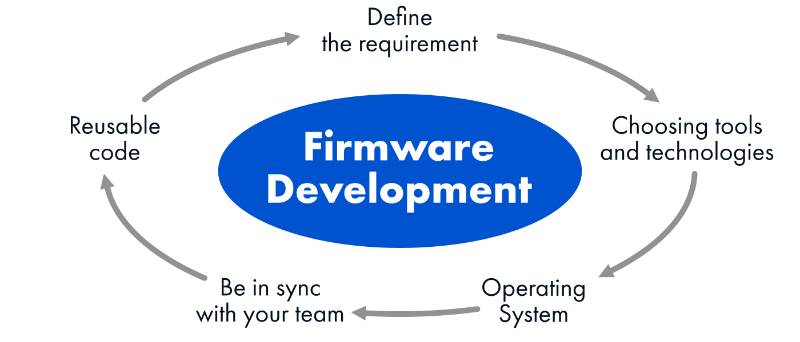
Firmware deployment refers to the process of delivering and updating low-level software (firmware) onto robots or robotic devices. Firmware acts as the bridge between hardware and higher-level applications, controlling sensors, actuators, and communication modules.
In RobotOps—the discipline combining robotics with DevOps principles—firmware deployment ensures robots receive consistent, secure, and efficient updates at scale.
History or Background
- Early Robotics (1980s–2000s): Firmware updates were manual, requiring physical connections and specialized tools.
- IoT & Edge (2010s): Over-the-Air (OTA) updates emerged, allowing remote upgrades of devices.
- RobotOps Era (2020s–present): With fleets of autonomous robots (drones, AGVs, service robots), scalable firmware deployment pipelines became essential for operational reliability.
Why is it Relevant in RobotOps?
- Robots are distributed systems with hardware constraints.
- Security patches, bug fixes, and performance improvements require frequent updates.
- RobotOps emphasizes automation, CI/CD pipelines, and observability. Firmware deployment is central to this cycle.
2. Core Concepts & Terminology
| Term | Definition |
|---|---|
| Firmware | Embedded software that controls hardware behavior of robots. |
| OTA (Over-the-Air) | Remote update mechanism that pushes firmware wirelessly. |
| Bootloader | Lightweight program enabling safe firmware updates and rollback. |
| Fleet Management | Managing a large number of robots with consistent updates. |
| RobotOps Lifecycle | Continuous integration, testing, deployment, and monitoring of robotic systems. |
How Firmware Deployment Fits into RobotOps Lifecycle
- Develop – Write and test firmware code.
- Build & Package – Cross-compile for robot hardware.
- Test – Run unit, integration, and hardware-in-the-loop tests.
- Deploy – Deliver firmware OTA or via wired connections.
- Monitor – Collect telemetry, logs, and update success metrics.
- Iterate – Rollback or redeploy if issues arise.
3. Architecture & How It Works
Components of Firmware Deployment in RobotOps
- Developer Environment: Cross-compilers, SDKs.
- CI/CD Pipeline: GitHub Actions, GitLab CI, or Jenkins for automated builds.
- Artifact Repository: Stores firmware binaries (e.g., Artifactory, S3).
- Deployment Service: Pushes updates to robots (via MQTT, HTTP, or custom protocols).
- Robot Bootloader: Validates and installs firmware.
- Monitoring & Feedback Loop: Telemetry dashboards (Grafana, Prometheus).
Internal Workflow
- Developer pushes firmware code → CI/CD builds binary.
- Binary stored in artifact repository.
- Deployment service schedules update to robots.
- Robot bootloader downloads, validates checksum, and installs.
- Telemetry confirms update success/failure.
Architecture Diagram (text description)
[Developer IDE] → [CI/CD Pipeline] → [Artifact Repo] → [Deployment Service]
        → [Robots w/ Bootloader] → [Monitoring & Telemetry Dashboard]
Integration with CI/CD and Cloud Tools
- CI/CD: Automate builds and tests (Jenkins, GitHub Actions).
- Cloud Storage: Host firmware binaries (AWS S3, Azure Blob).
- Fleet Managers: AWS IoT Device Management, Google IoT Core.
- Security: Integrate code signing (AWS KMS, HashiCorp Vault).
4. Installation & Getting Started
Prerequisites
- Development environment (Linux/Mac/Windows).
- Cross-compiler toolchain (e.g., ARM GCC).
- Git repository with firmware source.
- Cloud storage or OTA service.
Step-by-Step Setup Guide
- Set up toolchain:
sudo apt-get install gcc-arm-none-eabi
2. Clone repository:
git clone https://github.com/example/robot-firmware.git cd robot-firmware3. Build firmware binary:
make build
4. Upload to artifact repository:
aws s3 cp build/firmware.bin s3://robot-firmware-bucket/5. Deploy OTA (example using MQTT):
{
  "action": "deploy",
  "version": "1.2.0",
  "url": "s3://robot-firmware-bucket/firmware.bin"
}
6. Verify update success via telemetry dashboard.
5. Real-World Use Cases
- Autonomous Drones: Updating navigation firmware across 1,000+ drones.
- Factory Robots (AGVs): Rolling out security patches during off-hours.
- Service Robots: Updating AI inference engines in retail robots.
- Healthcare Robots: Ensuring compliance with medical regulations by frequent firmware validation.
6. Benefits & Limitations
Benefits
- Centralized, automated update management.
- Improved security posture (faster vulnerability patching).
- Reduced downtime with staged rollouts.
- Scalable across thousands of robots.
Limitations
- Requires reliable connectivity (OTA may fail in poor networks).
- Hardware constraints (limited storage, memory).
- Risk of bricking robots if update fails without rollback.
- Compliance requirements (must validate signed firmware).
7. Best Practices & Recommendations
- Security: Always use cryptographic signing (RSA/ECC).
- Performance: Implement delta updates to reduce bandwidth.
- Rollback: Ensure bootloader supports rollback to last working version.
- Monitoring: Track success/failure metrics with observability tools.
- Compliance: Follow ISO 13485 (medical), ISO 26262 (automotive).
- Automation: Integrate firmware deployment into CI/CD pipelines.
8. Comparison with Alternatives
| Approach | Pros | Cons | Best for |
|---|---|---|---|
| Manual Update (USB/Serial) | Simple, no infra needed | Not scalable, time-consuming | Small labs/prototypes |
| OTA Deployment | Scalable, automated | Needs connectivity, risk of failures | Large robot fleets |
| Containerized Apps (ROS + Docker) | Easy rollback, modular updates | Requires powerful hardware | High-performance robots |
9. Conclusion
Firmware deployment in RobotOps is more than flashing binaries—it is about building secure, automated, and scalable pipelines for robotic fleets. With OTA updates, CI/CD integration, and monitoring, RobotOps teams can ensure robots remain safe, efficient, and reliable.
Future Trends
- AI-driven rollout strategies (predictive update success).
- Blockchain-based firmware signing.
- Zero-downtime rolling updates for robot fleets.
