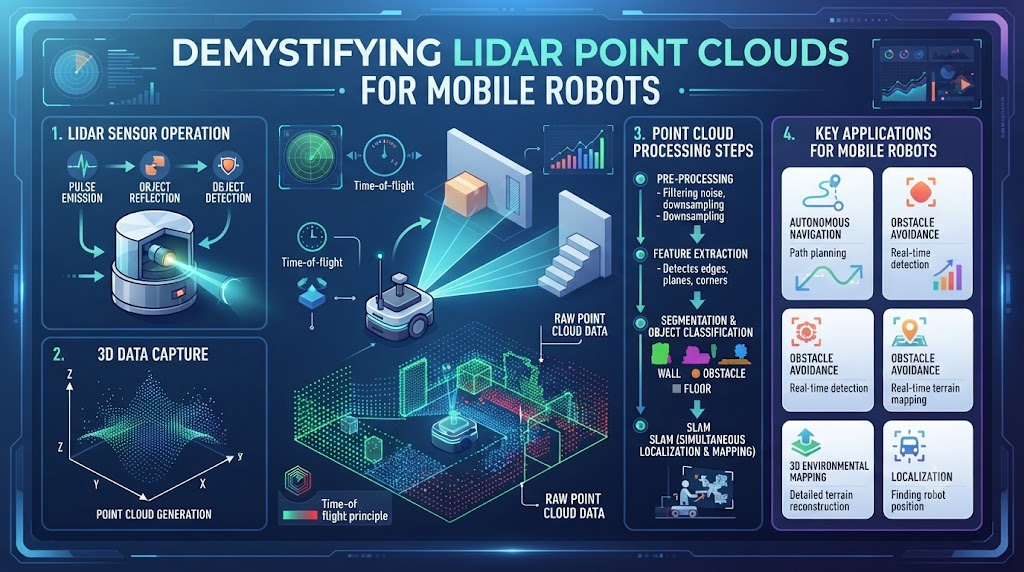
When your autonomous robot gets lost in a warehouse, it stops making money. You need a reliable way for your machine to see obstacles, map rooms, and move safely. That is where LIDAR steps in as the eyes of your machine.
At RobotsOps.com, we help teams build smarter and safer autonomous systems every single day. LIDAR shoots invisible laser pulses out into the space around the robot. These pulses bounce off walls and objects, then return to the sensor to measure exact distances.
By gathering thousands of these points every second, the robot builds a clear 3D map of its surroundings. You can avoid costly crashes, reduce downtime, and keep your automated fleet running smoothly. Let us break down how this technology works and how you can use it.
What is LIDAR and How Does It Work?
LIDAR stands for Light Detection and Ranging. It is a remote sensing method that uses light in the form of a pulsed laser. The sensor measures how long it takes for each laser pulse to hit an object and bounce back.
Light travels at a constant, incredible speed. Because we know this speed, the sensor can calculate distances with extreme accuracy. It does this millions of times every single second to map out the entire space.
You get a stream of precise distance data that feeds directly into the brain of the robot. The robot uses this data to figure out where it is located in the room. It also uses the data to spot moving or stationary obstacles in real time.
The Core Components of a Robotic LIDAR Setup
Every LIDAR unit contains a few vital hardware pieces working together. Understanding these parts helps you choose the right sensor for your specific robot project.
First, you have the laser diode. This part emits the pulses of light outward into the environment. It must be powerful enough to reach distant walls while remaining safe for human eyes.
Second, you have the optical scanner and receiver. The scanner directs the laser beam across a wide field of view. The receiver catches the returning photons and converts them into electrical signals for processing.
Time-of-Flight vs. Phase-Shift Measurement Methods
Engineers use two main ways to measure distance with light. Each method has distinct strengths depending on your robot’s operating environment.
Time-of-Flight measures the exact travel time of a single laser pulse. It works exceptionally well over long distances in large outdoor spaces. It gives you great range but can be slightly more expensive.
Phase-shift measurement compares the wave pattern of the sent light with the returned light. It excels at close range and provides very dense data points quickly. You often see this method used in indoor automated guided vehicles.
Solid-State vs. Mechanical LIDAR Systems
Mechanical LIDAR units use a spinning motor to sweep lasers around a full circle. They give you a complete 360-degree view of the world. However, moving parts can wear out over time due to constant vibrations.
Solid-state LIDAR systems have zero moving parts inside them. They use electronic arrays to steer the light beam securely. This design makes them much tougher against physical shocks and heavy vibrations.
Choosing between them depends on your budget and mechanical durability needs. Rugged outdoor robots often benefit from solid-state setups, while indoor warehouse robots use mechanical units reliably.
How Robots Process Point Clouds in Real Time
A raw collection of LIDAR distance points is called a point cloud. This cloud looks like a ghostly 3D outline of the room. Your robot cannot use raw points immediately without some smart software help.
First, the robot software filters out noise from dust, rain, or stray light. Next, it groups the remaining points into distinct objects like walls, boxes, or people. This step is called segmentation.
Finally, the robot runs SLAM algorithms. SLAM stands for Simultaneous Localization and Mapping. The robot updates its internal map while figuring out its exact coordinates on that map simultaneously.
LIDAR vs. Cameras and Radar: A Comparative Look
Choosing the right sensor requires comparing LIDAR against other common sensing technologies. Each option has unique benefits and drawbacks for robotic navigation tasks.
Cameras are cheap and provide rich color and texture data. However, they struggle in poor lighting conditions and cannot measure exact depths easily without heavy computing.
Radar uses radio waves and works great in heavy fog or severe weather. Yet, radar lacks the fine angular resolution that LIDAR provides for detailed shape recognition.
| Feature | LIDAR Sensors | Standard Cameras | Radar Units |
| Primary Output | 3D Point Clouds | 2D Images / Video | Radio Reflections |
| Lighting Independence | High (Works in dark) | Low (Needs light) | High (Penetrates fog) |
| Depth Accuracy | Extremely High | Moderate to Low | Low to Moderate |
| Unit Cost | High | Low | Moderate |
Environmental Challenges: Dust, Rain, and Sunlight
Real-world environments are messy and unpredictable for delicate optical sensors. Dust kicked up by warehouse floors can scatter laser beams and cause false readings.
Raindrops and snow flakes act like tiny mirrors for lasers. They bounce light back prematurely and create ghost obstacles in the point cloud. Your software must filter out these transient weather artifacts.
Bright direct sunlight can also overwhelm the laser receiver with unwanted ambient photons. You must select sensors with high dynamic range and proper optical filtering to handle outdoor sunlight safely.
Real-World Case Studies in LIDAR Robotics
- An automated forklift in a crowded logistics hub avoided a major collision by detecting a fallen box within milliseconds using a 360-degree mechanical LIDAR sensor.
- An agricultural weeding robot navigated tight crop rows at night because its solid-state LIDAR ignored darkness completely and mapped plant stems with pinpoint accuracy.
- A hospital delivery robot successfully mapped a dynamic corridor layout filled with moving staff and patients by updating its localization point cloud sixty times per second.
- A last-mile delivery rover operating on public sidewalks used dual-plane LIDAR to detect low-hanging tree branches that standard front-facing cameras completely missed.
- An indoor security patrol unit detected an unauthorized intruder in a pitch-black warehouse by relying entirely on its active laser reflection mapping capabilities.
- A mining automation vehicle maintained safe operations in thick underground dust clouds by combining heavy-duty pulse LIDAR with advanced vibration-damping mounts.
- A cleaning robot in a large airport terminal avoided glass partition crashes by adjusting its laser intensity thresholds to recognize transparent reflective surfaces.
- A warehouse inventory drone used a lightweight mini-LIDAR payload to measure vertical shelf heights and verify stock levels without relying on GPS signals.
- A port container crane automation system tracked fast-moving spreader bars accurately in heavy coastal fog using ruggedized weather-sealed LIDAR hardware units.
- A hazardous materials inspection robot mapped a collapsed structural interior safely while keeping human operators entirely out of harm’s way.
Common Mistakes and Pitfalls in LIDAR Integration
- Mistake: Mounting the LIDAR sensor too low on the chassis. Solution: Raise the sensor mounting height to eliminate blind spots caused by the robot’s own body panels.
- Mistake: Ignoring power supply voltage drops during high motor acceleration. Solution: Use a dedicated, regulated power bus for your optical sensors to prevent unexpected hardware reboots.
- Mistake: Failing to secure data cables against repetitive flexing fatigue. Solution: Route all ethernet and power cables through strain-relief channels and use industrial torsion-rated wiring.
- Mistake: Relying on factory default point cloud filtering without tuning. Solution: Write custom voxel grid filters to strip out ground plane data and reduce your CPU processing load.
- Mistake: Overlooking thermal management inside enclosed sensor housings. Solution: Add passive heat sinks or active cooling fans to keep operating temperatures well within manufacturer specifications.
- Mistake: Neglecting regular optical lens cleaning routines in dusty environments. Solution: Implement automated lens wiper attachments or schedule mandatory daily maintenance checks for field technicians.
- Mistake: Misaligning the sensor coordinate frame with the robot base frame. Solution: Use precise calibration targets and software tools like ROS transform packages to lock down accurate spatial offsets.
- Mistake: Selecting short-range indoor sensors for high-speed outdoor vehicles. Solution: Calculate maximum stopping distances at top speeds and select sensors with adequate range capabilities.
- Mistake: Skipping firmware update protocols across distributed robot fleets. Solution: Establish a centralized deployment pipeline to keep sensor firmware synchronized and secure across all active units.
- Mistake: Assuming LIDAR can detect all colored surfaces equally. Solution: Test sensor response on ultra-dark or highly reflective target materials before deploying robots into specialized environments.
Step-by-Step Implementation Roadmap for Robot LIDAR
- Define Operational Boundaries: Outline the exact physical environment where your robot will operate, noting lighting, weather, and maximum speed requirements.
- Select Sensor Hardware: Choose between mechanical and solid-state LIDAR units based on your range, durability, and budget constraints.
- Design Mounting Placement: Mount the sensor securely on the robot to maximize field of view and minimize physical obstruction from chassis parts.
- Establish Power Connections: Wire the sensor to a clean, isolated power source with proper surge protection and voltage regulation.
- Configure Network Interfaces: Connect the LIDAR unit to your on-board computer via industrial Ethernet or high-speed serial links.
- Calibrate Spatial Transforms: Measure and input exact 3D spatial offsets so the robot software knows where the sensor sits relative to its center.
- Integrate Driver Software: Install official manufacturer drivers or open-source ROS wrappers to ingest raw data packets into your system.
- Implement Voxel Filtering: Write and test point cloud filter nodes to strip out ground points, rain noise, and unnecessary ambient data.
- Deploy SLAM Mapping: Run mapping algorithms while driving the robot manually to build a clean baseline reference map of your workspace.
- Test Obstacle Avoidance: Run live navigation tests at low speeds to verify that the robot stops or reroutes safely when new obstacles appear.
Final Recommendation and Next Steps
You now have a clear roadmap for understanding and implementing LIDAR in your robotics operations. Start small by bench-testing a single sensor unit on a development cart before rolling it out to your full production fleet. Focus heavily on clean data filtering and robust mechanical mounting to ensure years of trouble-free navigation. Keep testing your setups in real-world conditions and refine your software pipelines as your operational needs grow.
Frequently Asked Questions
1. What does LIDAR stand for in robotics?
LIDAR stands for Light Detection and Ranging. It is an active remote sensing technology that uses laser light pulses to measure exact distances and build 3D maps of the environment.
2. Can LIDAR sensors work in complete darkness?
Yes, LIDAR sensors emit their own light source via laser diodes. They do not rely on ambient room light, making them fully functional in pitch-black warehouses or night environments.
3. How does a point cloud help a robot navigate?
A point cloud is a collection of distance data points that outlines surrounding objects. The robot processes this cloud to detect walls, identify obstacles, and update its location on a map.
4. What is the difference between solid-state and mechanical LIDAR?
Mechanical LIDAR uses a spinning motor to rotate lasers 360 degrees, while solid-state LIDAR uses stationary electronic chips with zero moving parts for higher physical durability.
5. Why do robots need both LIDAR and cameras?
LIDAR provides unmatched depth accuracy and works in the dark, while cameras provide color and texture details. Combining both gives the robot complete environmental awareness.
6. How do weather conditions affect LIDAR performance?
Heavy rain, dense snow, and thick dust particles can scatter laser light pulses prematurely. This scattering creates false distance readings that require software filtering to remove.
7. What is SLAM in autonomous robotics?
SLAM stands for Simultaneous Localization and Mapping. It is the process where a robot builds an unknown map of its room while keeping track of its own position within it.
8. How often should robot LIDAR lenses be cleaned?
Lenses should be inspected daily in dusty or industrial environments. Regular cleaning prevents dust buildup from blocking laser beams and degrading sensor accuracy over time.
9. What is the typical range of a standard robotic LIDAR?
Standard indoor robotic LIDAR units typically range from ten to thirty meters, while heavy outdoor industrial models can measure distances up to two hundred meters or more.
10. How do I choose the right LIDAR for my project?
Evaluate your operating environment, required range, vehicle speed, budget, and mechanical shock conditions to select a sensor model that matches your exact performance goals.
