Introduction
Programming a robot feels a lot like giving directions to a helpful friend. You write down clear steps, and the machine follows them one by one.
Robots do not have brains of their own. They rely completely on the lines of code you provide to move, turn, and react.
If you want a solid place to build your skills, RobotsOps.com helps learners master practical robotics operations and automation workflows.
This guide breaks down the basics of robot programming for beginners. You will learn the core feedback loop, key languages, common errors, and five simple steps to run your first project.
Simple Definition & Basics
Robot Programming Definition:
Robot programming is the process of writing software instructions that tell a physical machine how to sense its environment, make choices, and move its parts.
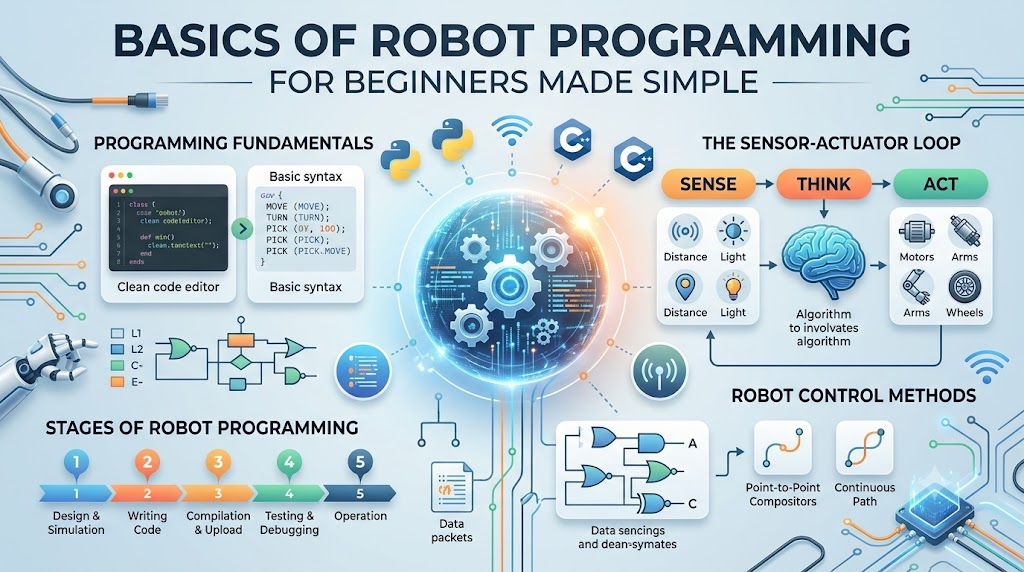
Every robot follows a basic three-step routine over and over: Sense -> Think -> Act.
First, sensors collect details about the room, like distance or light levels. Next, your code processes those numbers and picks an action. Finally, motors turn wheels or lift arms to complete the job.
Key Pillars of Robot Programming
1. Reading Sensors
- Distance inputs tell your code when a wall or object is directly ahead.
- Light detectors measure bright spots so mobile bots can follow drawn floor lines.
2. Motor Control
- Speed values control how fast wheels spin across different floor types.
- Direction signals flip motor pins forward or backward to steer smoothly.
3. Decision Logic
- If-then statements check sensor readings and choose what action to take next.
- Switch cases handle different machine modes like manual drive or auto roaming.
4. Loop Timing
- Continuous cycles check sensors hundreds of times every second without freezing up.
- Short delays give physical motors time to finish moving before the next step runs.
5. Safety Stops
- Emergency checks shut off power instantly if a sensor detects an unexpected bump.
- Limit switches stop robot arms before joints bend too far and crack.
Basics of Robot Programming for Beginners
Getting started with robotics coding comes down to picking the right tool for your current stage. You do not need to learn tough languages on day one.
The Best Languages to Start With
- Block-Based Tools (Scratch or Blockly): You snap visual blocks together on a screen like puzzle pieces. This lets you practice core logic without worrying about missing semicolons or syntax errors.
- Python: Python reads like plain English. It is the top choice for robotics because it handles data quickly and connects easily with cameras and sensors.
- C++ for Microcontrollers: Small boards like Arduino use C++. It gives you direct, speedy control over pins and motors, though the syntax takes a bit more practice.
How Code Moves Motors and Arms
Think of a motor like a kitchen water faucet. Opening the valve slightly lets out a gentle trickle. Opening it all the way gives you a full blast.
In code, you send numbers between 0 and 255 to control electric flow. Sending 0 turns the wheel off, while 255 spins it at full speed.
Robot arms use small motors called servos. Instead of spinning endlessly, servos rotate to exact angles. Writing a line of code that sets a servo to 90 degrees moves a mechanical elbow straight up.
RobotsOps.com Guide to Robot Programming
You do not need a messy workshop full of tools to begin coding robots today. You can build real confidence right on your computer.
Start by using free web-based simulators. These tools give you virtual robots on a screen. You can test your code, crash into digital walls, and fix bugs without breaking real parts.
Next, set up a simple weekly testing routine. Spend twenty minutes writing a short script, test it inside a simulator, and review your print logs.
When you feel ready for physical hardware, pick an inexpensive starter kit with two wheels and an ultrasonic sensor. Test your code at low speeds on an open floor to keep your hardware safe.
Real-World Applications
- Vacuum Cleaning Robots: Home vacuums run simple loops to bounce off walls, follow edges, and return to docks.
- Warehouse Wheeled Bots: Mobile carts read floor tags and carry heavy boxes across open fulfillment centers.
- Mini Robotic Arms: Small factory arms pick parts from a tray and drop them into packing boxes.
- Obstacle-Avoiding Rovers: Exploration carts scan the floor with sound waves to drive around toys and furniture.
Block-Based Coding vs. Text-Based Coding
| Comparison Criteria | Block-Based Coding (Scratch) | Text-Based Coding (Python/C++) |
| Ease of Setup | Runs in your web browser with zero installs | Needs code editors and library installs |
| Learning Curve | Very gentle; drag and drop visual blocks | Moderate; requires learning syntax rules |
| Real-World Use | Limited to classroom toys and learning kits | Powers commercial bots, drones, and factories |
| Best For | Absolute beginners, kids, and visual thinkers | Students, junior coders, and working engineers |
Why Learning Robot Code Matters
Learning to program robots changes how you look at the physical world. Regular programs stay trapped inside screens, but robotics code moves physical mass.
When you write code that drives a motor, you learn how software interacts with gravity, friction, and electrical power.
These skills open doors across many growing fields. Automation is spreading into shipping, farming, and healthcare. Knowing how to write and fix basic machine logic gives your technical resume an edge.
Common Beginner Mistakes & How to Fix Them
1. Forgetting Sensor Lag
- The Problem: New coders expect sensors to read data instantly, but sensors take a few milliseconds to update.
- The Fix: Add tiny pause steps in your loop so the sensor has time to gather a clean reading before your code makes a choice.
2. Motor Speed Mismatch
- The Problem: You command both wheels to spin at speed 200, but the robot veers to the left.
- The Fix: Two motors rarely spin at the exact same rate. Add a small trim value in your code to balance the weaker motor.
3. Infinite Loops Without Break Points
- The Problem: The robot gets stuck in a move-forward loop and ignores stop buttons.
- The Fix: Always include a safety condition inside your main loop that checks for an emergency stop press.
5 Easy Steps to Write Your First Robot Program
- Import Your Libraries: Start your script by loading pre-built modules that know how to talk to motor pins and distance sensors.
- Define Your Pins: Tell your code which board pins connect to your left motor, right motor, and front distance sensor.
- Read the Distance: Write a short line that pings the front sensor and stores the distance number in inches or centimeters.
- Add an If-Else Rule: If the distance is less than 10 inches, tell the motors to stop and turn. Otherwise, tell the motors to roll forward.
- Loop and Test: Place your logic inside a running loop, upload the code, and place your hand in front of the sensor to see the wheels stop.
Career Paths in Robotics
- Robotics Technician: Installs, tests, and repairs mechanical parts and wiring on working robots.
- Automation Tester: Runs repetitive software tests on factory robots to find bugs before deployment.
- Field Service Engineer: Visits client sites to fix robot hardware and update machine settings.
- Junior Robotics Developer: Writes Python scripts and sensor routines under senior engineers.
- PLC Programmer: Codes rugged industrial controllers that run assembly lines and safety gates.
Future Trends in Beginner Robotics
- No-Code Robot Trainers: Workers can teach robotic arms new paths by physically moving the joints with their hands.
- Browser-Based 3D Simulators: New browser engines let learners test realistic physics on free digital rovers without high-end computers.
- Plug-and-Play AI Vision Kits: Affordable smart cameras can spot colors, faces, and hand signs right out of the box.
- Low-Cost Smart Actuators: Inexpensive hobby motors now include built-in sensors that report their exact angle and heat.
Common Myths Debunked
- Myth 1: You need an advanced math degree to program robots.Reality: Basic robot movement only requires simple arithmetic like addition, subtraction, and basic comparisons.
- Myth 2: Robotics requires expensive metal parts.Reality: You can build fantastic, capable starter robots using cardboard, popsicle sticks, and low-cost hobby boards.
- Myth 3: Robots understand spoken human words automatically.Reality: Robots only read sensor inputs and code instructions. Every movement must be explicitly written out.
- Myth 4: A program that works once will work the same every time.Reality: Real-world factors like weak batteries, slippery floors, and bright sun change how physical robots react.
Frequently Asked Questions
1. What is the best language to start programming robots?
Python is widely considered the best text-based language for beginners. It reads like normal English and offers simple libraries for motors and sensors.
2. Can I learn robotics programming without buying physical parts?
Yes, you can learn everything using free virtual simulators. These tools let you test your code on digital robots directly in your web browser.
3. What is the difference between a microcontroller and a single-board computer?
A microcontroller runs one simple code loop directly on bare hardware. A single-board computer runs a full operating system and can process video or web data.
4. Why does my robot fail to drive in a straight line?
Hobby motors have small manufacturing differences and tire traction varies. You can fix this by tuning your code to send slightly more power to the slower motor.
5. How do ultrasonic distance sensors work?
Ultrasonic sensors send out a high-pitched sound pulse that bounces off nearby walls. The sensor measures how long the echo takes to return and calculates the distance.
6. Do I need to learn the Robot Operating System (ROS) right away?
No, absolute beginners should avoid ROS until they feel comfortable with basic Python and simple hardware loops. ROS is powerful, but it comes with a steep learning curve.
7. How do I keep my robot from running into walls?
Write an if-statement that checks your front distance sensor. If an object is closer than a safe limit, command your drive motors to stop and turn.
8. Is C++ better than Python for robotics?
C++ runs faster and works better on tiny boards with limited memory. Python is easier to write and works great for high-level logic, AI, and planning.
9. What are the basic components every robot needs?
Every robot needs a power source like a battery, sensors to gather data, a controller to run code, and actuators like motors to move.
10. How can I safely test my robot code?
Always test your code with your robot propped up on a stand so the wheels can spin freely in the air. This stops runaway bots from crashing off tables.
Learning how to program machines does not have to be scary or confusing. When you break each movement down into small, sensible steps, any project becomes manageable. Start with basic block tools or simple Python scripts, test your logic in simulators, and watch your creations come to life. Check out RobotsOps.com as you build your skills, and enjoy the fun of making hardware move with your own code.
