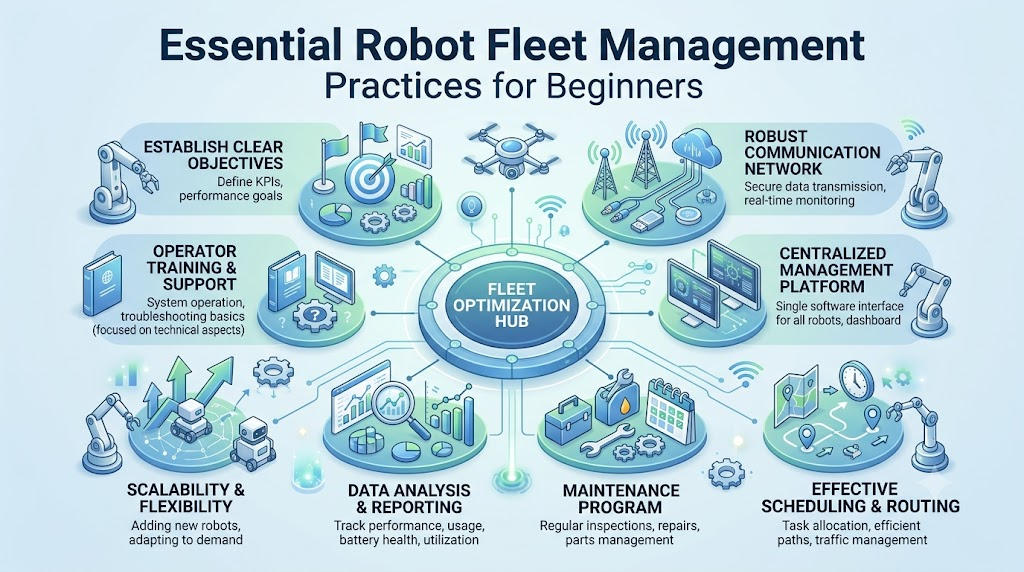
Imagine a warehouse where 50 mobile robots move products throughout the day. Everything works well until a few robots lose connection, one stops in the middle of an aisle, and another needs a software update. The operations team must find each problem, check the robots manually, and restore service. As the fleet grows, this process becomes harder to manage. This is where RobotOps becomes useful. It brings software engineering, automation, monitoring, and lifecycle management practices into robotics. Instead of treating every robot as a separate machine, teams build a more organized way to develop, deploy, monitor, and maintain robotic systems. But what exactly is RobotOps? Why does Robot Fleet Management matter? And how can you start learning these practices? Let’s explore these questions using simple explanations and practical examples.
What Is RobotOps?
RobotOps is the practice of applying software engineering, DevOps, automation, and monitoring methods to develop and operate robotic systems.
It helps teams manage robots throughout their lifecycle, from simulation and deployment to monitoring, maintenance, and updates.
Think of RobotOps as a connection between robotics development and daily operations. A robotics engineer may focus on building navigation or perception systems. RobotOps focuses on how those systems run reliably across real robots.
For example, a developer creates software for an autonomous mobile robot (AMR). RobotOps practices help the team test that software, deploy it, observe robot performance, and respond when something goes wrong.
Why Is RobotOps Different From Traditional Robotics?
Traditional robotics work often focuses on building a robot and making its software function correctly. That work remains essential, but operating multiple connected robots introduces additional challenges.
You also need to consider:
- How will you deploy software to 100 robots?
- How will you identify a robot that stops responding?
- How will you track battery health and system performance?
- How will you roll out updates without disrupting operations?
- How will you investigate repeated failures?
RobotOps addresses these operational questions through structured processes and supporting tools.
You can explore the broader concepts through RobotOps learning resources to understand how software operations practices apply to robotic systems.
Why RobotOps Matters for Robotics Operations
Building a robot that works in a laboratory is one challenge. Keeping many robots working in a real environment is another.
Robots operate in changing conditions. They may encounter obstacles, network problems, battery limitations, sensor failures, or unexpected software behavior. These problems can affect production, warehouse movement, or other tasks.
RobotOps helps teams prepare for these situations instead of relying entirely on manual intervention.
1. Reducing Unplanned Robot Downtime
Robot downtime happens when a robot cannot perform its assigned task.
A robot might stop because of a low battery, communication failure, sensor problem, or software issue. If the team discovers the problem late, the interruption may last longer.
Monitoring tools can help identify abnormal conditions and guide technicians toward the affected robot.
Example: A warehouse robot repeatedly stops because its battery drains faster than expected. Monitoring data helps the team notice the pattern and investigate the cause.
RobotOps cannot prevent every failure, but it can support faster detection and more organized troubleshooting.
2. Improving Software Deployments
Robotic software often includes navigation logic, sensor processing, control functions, and communication components.
A change that works in testing may behave differently on a real robot. Differences in hardware, environment, or configuration can create problems.
RobotOps encourages teams to test changes, document versions, and use controlled deployment processes.
This makes it easier to identify which software version is running on each robot.
3. Reducing Manual Monitoring
Checking every robot individually takes time. It also makes it difficult to maintain a consistent view of the entire fleet.
Centralized monitoring brings useful information into one place. Teams can review robot status, connectivity, alerts, and other available data.
Think of it like a control room where operators can see the condition of many machines without walking around the facility.
4. Supporting Safety and Reliability
Robots work around people, equipment, and physical obstacles. Software problems can create operational and safety concerns.
RobotOps supports safety through testing, controlled updates, monitoring, and incident procedures. However, software operations alone cannot replace physical safety systems, risk assessments, or appropriate regulatory compliance.
Safety requirements depend on the robot, environment, and application.
What Is Robot Fleet Management?
Robot Fleet Management is the process of monitoring, coordinating, maintaining, and managing multiple robots from a structured system.
A fleet may include warehouse robots, delivery robots, inspection machines, or industrial systems. Fleet management helps teams understand what each robot is doing and whether it needs attention.
Imagine managing 60 delivery vehicles. You would want to know their locations, fuel levels, maintenance needs, and operating status.
Robot fleets have similar management requirements, although their data and control systems differ.
Common Functions of Robot Fleet Management
Depending on the platform and robot type, fleet management may include:
- Robot status monitoring: Check whether robots are online, idle, busy, or experiencing problems.
- Task assignment: Assign jobs to robots based on the system’s rules and capabilities.
- Battery monitoring: Track battery-related information and charging needs.
- Software management: Organize software versions and update processes.
- Remote diagnostics: Investigate problems using information collected from the robot.
- Fleet reporting: Review operational data and recurring issues.
Not every fleet management platform provides all these functions. Capabilities depend on the robot hardware, software architecture, and selected tools.
Centralized vs. Decentralized Fleet Management
| Feature | Centralized Management | Decentralized Management |
|---|---|---|
| Control | A central system coordinates fleet operations | Robots or local systems share more decision-making |
| Monitoring | Fleet information can be collected in one place | Information may be distributed across systems |
| Management | Central policies and workflows can simplify coordination | Local autonomy can support certain operating conditions |
| Limitation | Network or central service issues may affect operations | Coordination and visibility can become more complex |
Neither approach works best for every situation. Your choice depends on network reliability, robot autonomy, safety requirements, and system architecture.
Key Concepts You Should Understand
RobotOps combines several technical areas. You do not need to master everything immediately, but understanding the basic terms will help.
1. Telemetry
Telemetry is data sent by a robot to help teams understand its condition and activity.
Examples include battery level, temperature, speed, sensor readings, and connection status.
For example, a robot might send battery information every few seconds. The monitoring system can display that information and help operators identify unusual changes.
Telemetry is useful, but collecting too much data can increase storage, network, and processing requirements.
2. Observability
Observability is the ability to understand what is happening inside a system by examining its available data.
In robotics, this may include logs, metrics, traces, and diagnostic information.
- Logs: Records of events or messages.
- Metrics: Measurable values such as CPU usage or battery voltage.
- Traces: Records that help follow an operation across connected software components.
Suppose a robot takes longer than usual to complete a task. Observability data may help you investigate whether the delay comes from navigation, communication, or another component.
3. Robot Lifecycle Management
Robot lifecycle management covers the different stages of a robot’s operational life.
These stages may include:
- Software development
- Simulation and testing
- Deployment
- Monitoring
- Maintenance
- Updates
- Retirement or replacement
A robot is not finished when it leaves the development lab. Its software and hardware need attention throughout its useful life.
4. Predictive Maintenance
Predictive maintenance uses equipment data and analysis to identify signs of potential problems before a failure occurs.
For example, a robotic arm may show unusual vibration or changes in motor behavior. A maintenance team can investigate the information and determine whether further action is needed.
Predictive maintenance is not the same as predicting every failure accurately. Data quality, equipment condition, and the analysis method all affect the results.
5. Incident Management for Robots
Incident management is the process of identifying, responding to, and learning from operational problems.
A robotics incident could involve a disconnected robot, navigation failure, unexpected shutdown, or repeated task errors.
A basic incident process includes:
- Detecting the problem
- Assessing its impact
- Taking appropriate corrective action
- Recording the cause and response
- Reviewing ways to prevent similar issues
This creates a repeatable approach instead of handling every incident differently.
Skills Needed for RobotOps
RobotOps combines robotics knowledge with software operations. The skills you need depend on your role and the type of robots you work with.
1. ROS 2
ROS 2 (Robot Operating System 2) is a robotics software framework that provides tools and communication features for building robotic applications.
It is not a traditional operating system like Windows or Linux. ROS 2 helps different software components communicate and work together.
You should understand basic concepts such as:
- Nodes
- Topics
- Services
- Actions
- Parameters
- Launch files
For example, a camera node may publish image data, while another node uses that data for object detection.
2. Robotics Middleware
Middleware is software that helps different components communicate and exchange information.
In robotics, middleware connects parts of a system, such as sensors, navigation software, and control components.
ROS 2 uses communication mechanisms that support distributed robotics applications. Learning how these components interact helps you troubleshoot communication problems.
3. Simulation Tools
Robot simulation allows you to test robotic behavior in a virtual environment instead of using physical hardware for every experiment.
Simulation can help you test navigation, sensor behavior, and software changes.
It does not perfectly reproduce every real-world condition. Physical testing remains necessary for validating the behavior of a robotic system.
4. Navigation and Perception
Navigation helps a robot determine how to move through its environment.
Perception allows a robot to gather and interpret information from sensors.
For example, a mobile robot may use cameras or lidar to detect obstacles and navigation software to plan a route.
5. DevOps and Automation Basics
You should also understand basic DevOps practices, including:
- Version control
- Automated testing
- Deployment workflows
- Monitoring
- Configuration management
- Incident response
These practices help you manage robotics software more consistently.
How to Build a RobotOps Workflow
You can start with a small project and gradually introduce more operational practices.
Step 1: Understand the Robot and Its Environment
Start by learning what the robot does, where it operates, and which components it uses.
Identify its sensors, computing hardware, communication methods, and software dependencies.
Example: A warehouse robot may need reliable wireless communication, obstacle detection, and access to charging stations.
Understanding the environment helps you choose relevant tests and monitoring signals.
Step 2: Simulate Before Deploying
Build or use a simulation environment to test software changes before trying them on physical hardware.
You can use simulation to explore navigation, obstacles, sensor inputs, and robot behavior.
| Simulation Testing | Real-World Testing |
|---|---|
| Tests software in a virtual environment | Tests behavior with physical hardware |
| Can support repeatable experiments | Reveals physical and environmental factors |
| Reduces dependence on hardware during early testing | Helps validate real sensors, mechanics, and safety |
| May not reproduce every real-world condition | Requires suitable facilities and safety controls |
Example: Before changing a robot’s navigation logic, test it in a simulated warehouse with narrow aisles and obstacles.
Step 3: Create a Controlled Deployment Process
Organize your software versions and deployment steps.
Record which version is installed on each robot. Test updates on a limited group before expanding the rollout when appropriate.
A staged rollout can help teams identify issues before they affect the entire fleet. It does not eliminate deployment risks.
Step 4: Set Up Centralized Monitoring
Choose the information you need to monitor across your robots.
Start with basic signals such as:
- Connectivity
- Battery status
- Software version
- Error messages
- Robot availability
Avoid collecting data without a clear purpose. Monitoring should help people understand and act on operational problems.
Step 5: Add Remote Diagnostics
When a robot fails, technicians should have a practical way to investigate the issue.
Remote diagnostics may include viewing logs, checking system health, reviewing recent errors, and examining configuration details.
The available capabilities depend on the robot’s hardware, software, and connectivity.
Step 6: Document Incident Procedures
Create simple instructions for common failures.
For example, your procedure for a disconnected robot might include checking connectivity, reviewing the robot’s last reported status, and following approved recovery steps.
Documenting the process helps teams respond consistently.
Best Practices for Robot Fleet Management
Managing a fleet requires more than installing a monitoring dashboard. You also need processes that people can follow.
Centralized Monitoring
Use a shared monitoring system when it fits your architecture and operational needs.
A central view can help operators identify patterns across multiple robots. Make sure alerts are useful and do not overwhelm the team with unnecessary notifications.
Remote Diagnostics
Provide appropriate access to diagnostic information.
Technicians should be able to investigate common problems without physically visiting every robot. Remote access must follow security policies and operational safety requirements.
Scheduled Software Updates
Plan software updates rather than treating them as unexpected tasks.
Before deployment, test the change and confirm compatibility with the robot’s hardware and software environment.
Consider maintenance windows, rollback procedures, and a staged rollout strategy.
Regular Safety Checks
Safety checks should cover the robot, its operating environment, and the relevant control systems.
Do not assume that a successful software test proves that a robot is safe in every physical situation.
Incident Response Plans
Prepare procedures for common failures, such as:
- Robot disconnection
- Navigation errors
- Sensor malfunction
- Unexpected shutdown
- Failed software update
The response plan should identify who handles the incident and what steps they should follow.
Common RobotOps Mistakes and How to Avoid Them
Even technically strong teams can face operational problems when they overlook basic processes.
Mistake 1: Skipping Simulation
Some teams test software directly on physical robots without sufficient early testing.
How to avoid it: Use simulation where practical, then validate important behaviors on real hardware.
Mistake 2: No Centralized Monitoring
When each robot has a separate monitoring process, operators may struggle to see fleet-wide problems.
How to avoid it: Build a shared view of relevant robot health and operational data.
Mistake 3: Ignoring Software Update Cycles
Robots may continue running old software because teams lack a clear update process.
How to avoid it: Track software versions and establish a repeatable testing and deployment workflow.
Mistake 4: Collecting Data Without a Purpose
More telemetry does not automatically mean better operations.
How to avoid it: Decide which data supports a specific monitoring or troubleshooting goal.
Mistake 5: Treating Every Failure as a One-Time Problem
A team may fix a robot and move on without investigating recurring issues.
How to avoid it: Record incidents, identify patterns, and review whether process or software changes are needed.
Tools and Platforms Used in RobotOps
RobotOps does not depend on one universal tool. Different projects require different combinations of software.
The best choice depends on your use case, budget, hardware, technical requirements, and team skills.
1. Simulation Tools
Used to test robot behavior in virtual environments.
Examples include:
- Gazebo
- Webots
- Isaac Sim
These tools offer different features and workflows. Check compatibility with your robotics framework and project requirements.
2. Middleware
Used to support communication between robotics software components.
Examples include:
- ROS 2
- DDS-based communication systems
Your choice depends on the system architecture and communication requirements.
3. Navigation
Used to support robot movement and route planning.
Examples include:
- Nav2 for ROS 2-based navigation
- Custom navigation systems
- Navigation software provided by robot manufacturers
The right option depends on the robot type and operating environment.
4. Telemetry and Monitoring
Used to collect and review information about system health and behavior.
Examples include:
- Prometheus
- Grafana
- OpenTelemetry
These tools have different capabilities and integration requirements. They may need additional configuration to work with robotics systems.
5. Fleet Monitoring and Management
Used to coordinate and monitor multiple robots.
Options include:
- Robot manufacturer fleet management platforms
- Custom fleet management software
- Robotics operations platforms
When evaluating a platform, check its supported robot types, integration options, security features, and operational capabilities.
Real-World Example: A Warehouse Robot Loses Connection
Consider a warehouse with several autonomous mobile robots. One robot suddenly stops reporting its status to the fleet management system.
The operator sees that the robot is no longer responding. Without centralized monitoring, the team might discover the issue only when a task remains incomplete.
With an appropriate RobotOps workflow, the team can begin by checking the last available telemetry and connection information.
A Possible Response Process
1. Detect the incident
The monitoring system identifies that the robot has stopped reporting.
2. Check available information
The operator reviews the robot’s last status, recent errors, and network-related information.
3. Assess the situation
The team determines whether the problem affects one robot or multiple robots.
4. Follow recovery procedures
Technicians use approved troubleshooting steps. These may include checking network connectivity or inspecting the robot physically when required.
5. Record the incident
The team documents what happened and what action resolved the problem, if known.
6. Review recurring patterns
If similar connection failures happen repeatedly, the team investigates whether network coverage, hardware, configuration, or software contributes to the issue.
This example illustrates how RobotOps supports structured responses. The exact solution depends on the robot’s design and operating environment.
How to Start Learning RobotOps
If you are new to RobotOps, you do not need to learn every technology at once.
Start with robotics fundamentals, then gradually build your software operations skills.
A Simple Learning Path
Step 1: Learn Robotics Basics
Understand sensors, actuators, robot control, navigation, and perception.
Step 2: Study ROS 2
Learn nodes, topics, services, actions, and basic communication patterns.
Step 3: Practice Simulation
Create a small project using a simulated robot. Test movement, sensor data, or navigation behavior.
Step 4: Learn Software Engineering
Practice version control, testing, configuration management, and basic automation.
Step 5: Explore Monitoring
Learn how metrics, logs, and telemetry help you understand system behavior.
Step 6: Build a Small Fleet Project
If possible, simulate multiple robots or use a suitable test environment. Explore how you would track robot status and manage software versions.
What Should You Look for in Learning Resources?
Choose resources that include:
- Clear explanations of robotics fundamentals
- Hands-on exercises
- Simulation-based projects
- Practical ROS 2 examples
- Monitoring and troubleshooting concepts
- Step-by-step project guidance
A good learning resource should help you understand why a process works, not just ask you to copy commands.
You can explore Robotics Operations topics to find concepts related to fleet management, automation, and robotics software.
FAQs
1. What is RobotOps in simple words?
RobotOps is a way to manage robotic software and operations using engineering, automation, and monitoring practices.
It helps teams develop, deploy, and maintain robots more systematically.
2. Why is Robot Fleet Management important?
Robot Fleet Management helps teams monitor and coordinate multiple robots.
It can support task management, software updates, diagnostics, and fleet-wide visibility, depending on the platform.
3. Is RobotOps only for industrial robots?
No. RobotOps practices can apply to different robotic systems, including warehouse robots, autonomous mobile robots, and industrial equipment.
The tools and processes depend on the robot’s design and operating environment.
4. How does ROS 2 support RobotOps?
ROS 2 provides communication and software development capabilities for robotics applications.
Its concepts help developers build, connect, and troubleshoot robotic software components.
5. Can beginners learn RobotOps?
Yes. Beginners can start with robotics fundamentals, ROS 2, simulation, and basic software engineering.
Small practical projects can help you understand how these skills connect.
6. What is the difference between RobotOps and DevOps?
DevOps focuses on software development and operations. RobotOps applies similar practices to systems that include robots and physical environments.
RobotOps also needs to consider hardware, sensors, safety, and physical behavior.
7. Why should robots be tested in simulation?
Simulation lets teams test certain software behaviors in a virtual environment.
It can reduce dependence on physical hardware during early testing, but real-world validation remains necessary.
8. What does robot telemetry include?
Telemetry is information collected and reported by a robot or its systems.
Examples include battery status, sensor readings, system metrics, and connectivity information.
9. What is predictive maintenance in robotics?
Predictive maintenance uses equipment data to identify signs of possible problems.
It can help maintenance teams investigate issues earlier, but its usefulness depends on data quality and analysis methods.
10. What should I learn first for RobotOps?
Start with robotics basics, ROS 2, simulation, and software development practices.
Then learn monitoring, deployment workflows, and incident management through practical projects.
Conclusion
RobotOps brings robotics development and software operations together. It helps teams approach robot monitoring, deployment, maintenance, and troubleshooting in a more organized way. Robot Fleet Management becomes increasingly relevant when you operate multiple robots and need better visibility into their condition and performance. Start with the basics, practice in simulation, and gradually build your monitoring and automation skills.
