Robots work in modern warehouses, factories, and hospitals every day. Many teams believe that simply buying a robot makes work fast. Deploying a machine is not enough on its own. If a mobile base carries a box across a warehouse floor in two minutes, but waits twenty minutes for an operator to unload it, the job is still slow.
A robotic setup involves software, sensors, physical machines, and human operators working together. When these pieces fail to coordinate, robots sit idle, pathways block up, and operations stall.
Discovering how to keep machines moving smoothly and safely is the core mission at RobotsOps. This guide explains how robotics workflow efficiency keeps automated systems coordinated, productive, and reliable.
What Is Robotics Workflow Efficiency?
A robotics workflow is the entire sequence of steps a robot takes to complete an assigned task from start to finish.
Efficiency means completing that work without wasting time, energy, or materials.
Robotics workflow efficiency measures how smoothly the entire robotic process runs. It does not just look at how fast an arm moves or how quickly wheels roll. It checks the whole system:
- How quickly the software assigns the job.
- How easily the robot reads its environment using sensors.
- How cleanly the machine hands off parts to human coworkers.
Making a single robot move twice as fast rarely fixes a slow operation. If a robot races to a door that remains shut, speeding up the motor only wastes battery. Real robotic workflow optimization focuses on the entire process, removing idle pauses between steps.
What Is a Robotics Workflow?
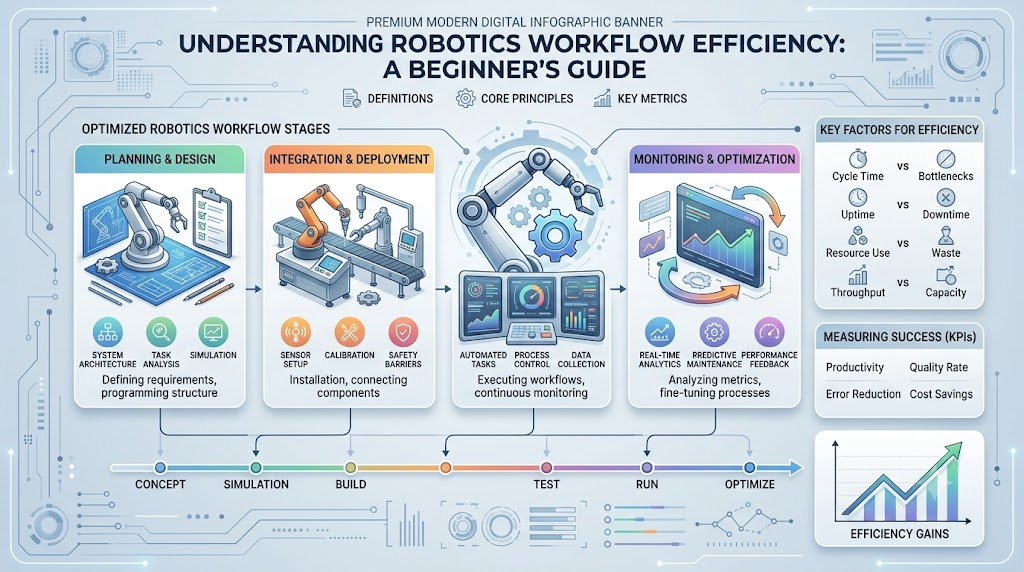
Every robotic task follows a step-by-step pipeline. The exact steps vary between an autonomous mobile robot (AMR) carrying shelves and a stationary robotic arm welding car doors, but most physical robots follow this basic loop:
- Task Assignment: Central software receives a job order and routes it to an available robot.
- Input and Data Collection: The robot reads job data, checking where items belong and confirming system status.
- Environment Perception: Built-in cameras, LiDAR, and ultrasonic sensors scan the room for obstacles, workers, or open pathways.
- Task Planning: The onboard computer calculates the safest, shortest route or arm motion.
- Action Execution: The robot activates its motors, moves across the floor, or picks up an object.
- Monitoring: Internal sensors track motor heat, position, and battery drain in real time.
- Feedback: The robot signals central control once the action finishes, reporting any delays or issues.
- Improvement: Engineers inspect operational logs to adjust paths or schedules for the next run.
Why Is Robotics Workflow Efficiency Important?
Optimizing robotic workflows keeps systems predictable and operations steady. When operations run efficiently, organizations gain clear operational benefits:
- Reduced Idle Time: Machines spend more time working and less time waiting for jobs, clear paths, or battery power.
- Consistent Task Execution: Robots repeat assigned tasks within predictable time windows, simplifying planning.
- Better Resource Utilization: Fleets need fewer excess units because active machines are organized effectively.
- Fewer System Delays: Workstations do not run out of parts, preventing downstream pauses.
- Safer Human-Robot Interaction: Coordinated navigation routes prevent traffic jams in spaces shared with workers.
- Smoother Scaling: Adding new machines to an organized fleet avoids gridlock.
- Predictable Maintenance: Tracking machine effort helps teams service equipment before parts wear down completely.
Main Factors That Affect Robotics Workflow Efficiency
Robots operate inside dynamic spaces where many variables influence performance:
- Task Scheduling: Software must assign tasks logically so machines finish nearby jobs before crossing the facility.
- Robot Location: Starting a task from the far side of a building burns extra battery and time.
- Battery Levels: If a robot runs out of power mid-task, other machines must detour around it.
- Sensor Performance: Dusty camera lenses or blocked laser scanners force units to slow down or halt.
- Software Reliability: Bugs or dropped signals leave machines stranded, awaiting basic instructions.
- Path Planning: Smart routing avoids crowded intersections and narrow doorways.
- Workspace Design: Wide lanes, clear signs, and organized loading docks keep mobile units moving smoothly.
- Communication Systems: Stable Wi-Fi or private wireless networks ensure immediate dispatch and status updates.
- Human Interaction: Hand-offs between staff and machines must be intuitive so neither side waits.
- Maintenance: Lubricated joints and clean wheels prevent unexpected stops.
- Workload Distribution: Balancing tasks prevents single-unit burnout while other machines sit parked.
How to Identify Robotics Workflow Bottlenecks
A bottleneck is any single point in a workflow that slows down or stops the entire operation. Think of it like water trying to exit through a narrow bottle neck.
Common robotics bottlenecks include:
- A mobile robot waiting minutes for a human operator to sign off on a delivery.
- Three mobile carts trying to enter the same narrow warehouse aisle at once.
- A robotic arm waiting for a conveyor belt that feeds parts too slowly.
- A dead battery forcing an arm to pause during an active shift.
- A computer vision camera taking several seconds to identify an item in dim lighting.
Bottlenecks are rarely caused by machine motors alone. Operations teams locate bottlenecks using specific operational tools:
- Workflow Mapping: Drawing every step out on paper to reveal unnecessary handoffs.
- Log Reviews: Checking error messages to see where machines pause most often.
- Monitoring Dashboards: Tracking real-time fleet locations to spot congestion points.
- Cycle Timing: Timing individual sub-tasks to find where seconds are lost.
- Worker Feedback: Asking floor operators where machines interrupt their daily tasks.
Important Metrics for Robotics Workflow Efficiency
Teams track clear, objective numbers to gauge system health:
| Metric | What It Means | Why It Matters | Warning Sign |
| Task Completion Time | Total time taken to finish a single assigned job | Confirms overall operational pace | Time steadily rises without workload changes |
| Cycle Time | Time required to complete one full repetitive process | Measures production rhythm | Inconsistent times across identical tasks |
| Robot Utilization | Percentage of operational time spent doing active work | Shows if fleet size matches demand | Numbers drop below planned levels |
| Idle Time | Total minutes a robot sits still waiting for input or paths | Pinpoints workflow friction directly | Machines wait longer than they travel |
| Task Success Rate | Ratio of tasks completed correctly on the first attempt | Reflects output quality and stability | Frequent manual human interventions needed |
| System Throughput | Total units moved, sorted, or packed over a shift | Shows broad facility productivity | Drops despite machines remaining active |
| Error Frequency | Number of faults or safety stops per hour | Points to hardware wear or layout problems | Spikes during specific shifts or weather |
| Charging Time | Hours spent parked at a charging dock | Balances active work against power needs | Batteries charge slower than normal |
Ways to Improve Robotics Workflow Efficiency
Optimizing a robotics setup requires structured adjustments across hardware, layout, and software.
Task Scheduling
Assign work based on robot location, battery state, and priority. If Robot A sits five feet from an urgent tote, do not dispatch Robot B from across the plant.
Route and Path Optimization
Set up virtual one-way lanes in high-traffic hallways. Directing mobile units along organized circuits stops head-on standoffs in narrow doorways.
Workload Balancing
Distribute tasks evenly. Running three robots hard while four sit idle wears out components quickly and slows down the overall system.
Sensor Optimization
Keep sensors clean, properly aligned, and shielded from harsh glare. Clean sensor inputs let onboard computers make confident navigation decisions without pausing.
Workflow Automation
Automate task hand-offs between separate software systems. When an inventory platform logs a pick order, it should notify the robot fleet dispatcher instantly without manual data entry.
Real-Time Monitoring
Watch system metrics continuously. Spotting a localized traffic jam on a central console allows operators to re-route units before work backs up.
Predictive Maintenance
Monitor vibration, motor temperatures, and wheel wear patterns. Tracking mechanical stress allows teams to service hardware during planned downtime rather than dealing with breakdowns during live shifts.
Role of Robotics Software in Workflow Efficiency
Physical robots rely on layered software stacks to coordinate actions:
- Robot Control Software: Onboard code managing individual motor speeds, arm angles, and emergency brakes.
- Robot Operating System (ROS): A flexible open-source framework providing libraries and tools to build robot applications across platforms.
- Fleet Management Platforms: Central programs coordinating multi-robot navigation, task assignments, and charging schedules.
- Communication Middleware: Software layers handling messaging between individual hardware sensors, controllers, and cloud servers.
- Monitoring Dashboards: Visual interfaces showing real-time maps, battery bars, and live alert streams.
Software capabilities differ widely across vendors, but their shared purpose is turning isolated machines into a unified team.
Robotics Workflow Monitoring
Monitoring means keeping a continuous eye on system performance. It answers a simple question: Are operations proceeding as planned right now?
[ Central Fleet Manager ]
         │
         ├─── Monitors Robot Locations & Battery States
         ├─── Tracks Job Queue & Handoff Milestones
         └─── Flags Safety Pauses & Sensor Warnings
There is a significant difference between monitoring an individual machine and monitoring the complete workflow:
- Monitoring a single robot verifies that Motor A is running at safe temperatures and the battery shows 82%.
- Monitoring the workflow confirms that the parts the robot delivers are processed smoothly by the next workstation without delays.
A healthy robot operating inside a broken, unmonitored workflow will still deliver poor overall results.
Role of Automation and AI
Modern robotics often incorporates artificial intelligence (AI) and advanced automation to handle dynamic environments:
- Computer Vision: Identifying packages of varying sizes placed randomly on a conveyor belt.
- Dynamic Path Planning: Recalculating travel routes around temporary obstacles like dropped pallets or cleaning carts.
- Anomaly Detection: Spotting unusual changes in motor power draws that suggest mechanical issues.
AI is not mandatory for every automated workflow. Simple, fixed routines—such as a robotic arm moving between two hardcoded positions in a gated cell—run reliably using standard logic.
AI also brings practical limitations:
- Machine learning models can misidentify items in dim or changing light.
- Edge cases outside training data can cause erratic navigation stops.
- Complex systems require regular software validation and human supervision to run safely.
Robotics Workflow Efficiency in Different Industries
Robots handle distinct operational workflows across various sectors:
Manufacturing
Robotic arms and automated guided vehicles (AGVs) work along assembly lines, spot-welding components, lifting heavy stampings, and delivering parts. Efficiency here relies on precise cycle timing so machines match the speed of the production line.
Warehousing and Logistics
Mobile robots transport pallets, assist order pickers, and sort parcels into shipping bins. Optimization focuses on route management, avoiding aisle congestion, and coordinating battery charging during breaks.
Healthcare
Service robots transport clean linens, meals, and laboratory samples across hospital wings. These systems prioritize pedestrian safety, navigating around doctors, patients, and gurneys without causing disruptions.
Agriculture
Autonomous tractors and harvesting units navigate open fields to weed, spray, or gather crops. Variable weather, soft soil, and uneven terrain demand dynamic path planning and careful battery management.
Service Environments
Automated scrubbers clean airport terminals and commercial venues overnight. Efficiency depends on complete floor coverage while steering clear of late-night maintenance crews.
Robotics Workflow Efficiency vs. Robot Speed
Higher speed does not guarantee better efficiency.
Fast Robot:  [ Travel: 1 min ] ───────► [ Bottleneck Wait: 15 min ]  Total: 16 mins
Steady Robot: [ Travel: 3 min ] ───────► [ Direct Handoff:  1 min ]  Total: 4 mins
Imagine a warehouse runner robot programmed to travel at top speed:
- It rushes down a corridor in sixty seconds.
- It stops abruptly at an unstaffed packing bench.
- It sits idle for fifteen minutes waiting for an operator to clear the tray.
Now consider a robot moving at half that speed:
- Its arrival is synchronized with an available worker.
- The box is lifted immediately upon arrival.
- The entire job wraps up in four minutes.
Running robots at top speed also increases tire wear, drains batteries rapidly, and triggers more safety stops near workers. Coordinated, steady motion consistently outperforms erratic speed bursts.
Common Challenges and Solutions
Operating robotics workflows comes with real-world operational friction:
- Traffic Congestion in Narrow HallwaysSolution: Map designated one-way transit loops and virtual staging zones in your fleet management software.
- Sensor Blind Spots and Dust AccumulationSolution: Establish regular shift cleaning checklists and verify sensor placement during initial setup.
- Dropped Wireless ConnectionsSolution: Install reliable local access points along all operating routes and configure robots to halt safely if communication drops.
- Premature Battery DepletionSolution: Implement opportunistic charging, sending units to top off power during brief natural pauses in the workflow.
- Unexpected Physical ObstaclesSolution: Keep common transit lanes clear of temporary storage boxes, and train staff to keep pathways open.
- Incompatible Software PlatformsSolution: Use open communication protocols or dedicated middleware to bridge warehouse management systems with fleet dispatchers.
Best Practices for Efficient Robotics Workflows
- Map the Process First: Document your entire manual workflow step-by-step before introducing robotic hardware.
- Define Specific Goals: Focus on concrete targets, like reducing idle pauses, rather than vague goals like “making things fast.”
- Limit Monitored Metrics: Track a few clear metrics—such as cycle time, idle time, and task success rates—to avoid information overload.
- Test in Simulation: Run route updates or fleet additions through simulation tools before deploying changes on live facility floors.
- Involve Floor Operators Early: Gather practical feedback from the workers sharing floor space with machines every day.
- Establish Safe Recovery Steps: Provide clear instructions so staff can safely reset, steer, or clear stopped machines.
- Roll Out Changes Gradually: Adjust one route or schedule parameter at a time to clearly measure its actual impact.
Robotics Workflow Efficiency and Safety
Safety must always come before workflow speed. A fast operation that compromises worker safety is fundamentally flawed.
- Speed Regulations: Machines must run at speeds that allow them to stop smoothly before reaching any detected obstacle.
- Certified Safety Sensors: Use safety-rated laser scanners and bumpers wired directly to emergency stop circuits.
- Clear Workspace Demarcation: Paint floor paths and post clear signage so workers know where mobile machines turn and stage.
- E-Stop Access: Maintain working physical and software emergency stop buttons within easy reach of human workstations.
- Rigorous Risk Assessments: Re-evaluate safety hazards whenever you modify paths, payloads, or operating speeds.
Beginner-Friendly Practical Example: Warehouse Delivery
This illustrative walk-through shows how a mobile robot completes a simple warehouse delivery:
[1. Order In] ──► [2. Select Best Robot] ──► [3. Route Planned]
                                                      │
[6. Safe Delivery] ◄── [5. Obstacle Avoided] ◄───────┘
- Order Received: A warehouse database logs a request to bring five rolls of tape to Packing Station 4.
- Selecting the Unit: Fleet software scans the area. Robot C is selected because it is closest, holds an 85% battery charge, and carries an empty cargo bed.
- Route Planning: Central software generates a path through wide, clear aisles, steering clear of a busy forklift lane.
- Transit and Sensing: Robot C moves down the hallway. Its LiDAR detects an unattended trash bin jutting into the path.
- Dynamic Adjustment: The robot slows down, charts an adjustment around the bin, clears the obstruction, and resumes travel.
- Task Completion: Arriving at Packing Station 4, the robot sounds an alert chime. The operator unloads the tape and presses the screen confirmation button.
- Next Step Assessment: Robot C signals central control that the run is complete. The system logs a four-minute completion time and directs the unit to a nearby staging area for its next assignment.
How Beginners Can Learn Robotics Workflow Optimization
Building expertise in robotics operations involves a step-by-step learning progression:
- Grasp the Core Basics: Learn the differences between industrial arms, cobots, and mobile bases (AMRs/AGVs).
- Study Sensing and Motion: Review how cameras, LiDAR, and wheel encoders collect real-world data to guide motors.
- Practice Workflow Mapping: Diagram simple everyday processes—like packing a school lunch—to spot unnecessary steps and delays.
- Explore Fleet Concepts: Study how central dispatchers route traffic and balance task queues across multiple units.
- Experiment with Simulation: Use beginner-friendly physics simulators to build basic environments and test navigation logic safely.
- Analyze Operational Data: Practice tracking cycle times and idle delays using basic spreadsheets.
- Prioritize Safety Standards: Learn how presence-sensing devices, physical guards, and emergency stop systems protect people around machinery.
Common Beginner Mistakes
- Focusing Only on Hardware Speed: Cranking up motor speeds often causes sensor errors and traffic jams. Focus on minimizing idle pauses instead.
- Ignoring Idle Time: Looking only at run times misses the twenty minutes machines spend waiting for work or clearance.
- Tracking Too Many Data Points: Monitoring dozens of numbers creates confusion. Start by tracking cycle times, idle delays, and task success rates.
- Skipping Floor Staff Input: Technicians who work alongside robots daily understand system bottlenecks better than isolated charts suggest.
- Deploying Untested Route Changes: Rolling out path changes directly to active production floors causes surprises. Test adjustments in controlled settings first.
- Treating All Robots Alike: A stationary arm, an autonomous floor scrubber, and an automated guided cart have distinct sensing and routing needs.
Frequently Asked Questions
What is robotics workflow efficiency?
Robotics workflow efficiency measures how smoothly, quickly, and accurately an automated system completes entire jobs from initial dispatch to final handoff without wasting time or energy.
Why is workflow efficiency important in robotics?
It prevents expensive equipment from sitting idle, keeps work cycles predictable, reduces operating strain, and ensures human workers and machines coordinate safely.
How can robot idle time be reduced?
You can reduce idle time by improving task scheduling, organizing travel paths to prevent traffic jams, balancing jobs evenly, and speeding up physical handoffs.
Which metrics measure robotics workflow efficiency?
Key metrics include task completion time, cycle time, robot utilization rate, idle time, task success rate, system throughput, and error frequency.
What is a robotics workflow bottleneck?
A bottleneck is a point of congestion or delay—such as a crowded hallway, slow sensor read, or manual approval step—that slows down the entire operating chain.
How does task scheduling improve robot operations?
Smart scheduling assigns work to the most suitable machine based on its current position, battery level, and workload, preventing long, unnecessary trips across a facility.
Can AI improve robotics workflow efficiency?
Yes, AI can assist with dynamic path planning, recognizing unstructured items, and spotting mechanical wear patterns, though standard rule-based software still handles many routine tasks best.
How does monitoring support robotic workflows?
Monitoring provides real-time visibility into machine health, fleet locations, error codes, and operational delays, allowing teams to catch and resolve issues before systems stall.
Why is safety important when optimizing robot workflows?
Efficiency gains mean nothing if they create hazards; operating speeds, sensor clearances, and emergency stops must always meet safety standards to protect workers.
How can beginners learn robotics workflow optimization?
Beginners can start by studying core robotics hardware, learning to map process steps, exploring fleet management software, and running experiments inside software simulators.
Conclusion
Robotics workflow efficiency focuses on optimizing the complete operational journey rather than raw mechanical speed. A successful system balances smart task scheduling, clean sensor data, reliable communications, and safe physical interactions with staff. By tracking meaningful metrics like cycle time and idle delays, operations teams spot bottlenecks early and keep systems running reliably. Prioritizing deliberate process design, steady monitoring, and consistent safety practices ensures your automated fleet delivers dependable results every shift.
