Introduction
A busy dinner service can feel like a storm. Phones ring nonstop. Guests walk in without bookings. Staff rush between tables. One wrong move leaves empty seats and unhappy diners.
Every restaurant owner knows this pressure. You want full tables, happy guests, and calm staff. But paper logs and guesswork make this hard.
This is where modern booking tools help. Platforms like DineGlobe connect online reservations with real front-of-house table control. This guide explains how these systems work in plain English. You will learn about table maps, waitlists, walk-ins, and direct bookings. No hard words. No confusing tech talk. Just clear, useful ideas you can apply today.
Why Modern Dining Rooms Need Digital Reservation Systems
Think about how most restaurants take bookings. A guest calls. A host writes the details on paper. Then another guest calls. The host writes again. Soon the page is full of crossed-out names and messy notes.
This old method causes problems. Notes get lost. Two guests get booked at the same table. Staff waste time flipping pages instead of greeting people.
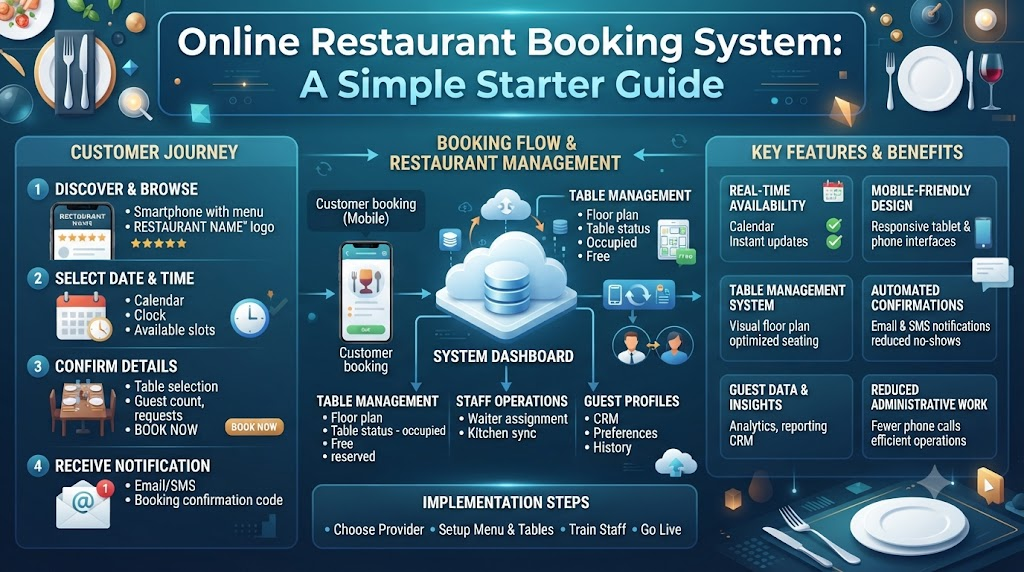
Restaurant Reservation Software fixes this. It is a simple computer tool that takes bookings day and night. Guests book online while your team focuses on hospitality. The software stores every detail in one place. It also stops double bookings before they happen.
Good software also helps you plan table turns. A table turn means the time one group uses a table before the next group sits down. When you know your average turn time, you can seat more guests without stress.
So digital booking tools do more than replace paper. They give your team calm control during the busiest hours.
Direct Bookings vs Third-Party Dining Marketplaces
Where guests book matters a lot. Direct bookings keep guest data in your hands. Third-party marketplaces charge fees for every cover they bring. A cover means one seated guest.
Owning your guest data helps you build real relationships. You learn names, food likes, and visit habits. You also avoid costly per-cover fees that eat into thin profits.
Here is a simple look at each booking channel.
| Booking Channel | Guest Data Ownership | Per-Cover Commission Fees | Brand Experience | Operational Control |
|---|---|---|---|---|
| Direct Restaurant Booking Page | Full ownership by the restaurant | None | Your own brand look and feel | Complete control of rules and slots |
| Third-Party Marketplace App | Limited, often shared | Often charged per seated cover | Marketplace brand dominates | Limited say in guest flow |
| Traditional Phone Bookings | Basic contact details only | None, but staff time costs | Personal but slow | High, yet prone to errors |
| Walk-In Only Operations | Almost none | None | Depends on luck and location | Very low, hard to plan |
Custom booking links help you grow loyalty. Share your link on social pages and receipts. Guests book straight with you. They return to you, not to a marketplace. This builds steady, repeat business over time.
Direct Restaurant Booking System and Customer Relationships
A Direct Restaurant Booking System lets guests book straight from your own website. No middleman sits between you and the diner. This means no per-cover fees and no lost guest data.
The guest picks a date, time, and party size. The system checks your real table space. Then it confirms the booking in seconds.
Clear confirmation codes matter here. A guest gets a simple code or message. They show it at the door. Your host finds the booking fast. No confusion, no long queue at the entrance.
Self-service cancellation links also help. Guests can change or cancel their booking without calling. This frees your phone lines. It also updates your table map right away, so the open slot goes back into your Online Restaurant Booking System.
You also keep full control of diner notes. Notes may include allergies, birthdays, or seating wishes. These details stay with you. They do not disappear into a third-party app.
Direct bookings build trust. Guests feel they deal with your restaurant, not a faceless platform. That trust brings them back.
Restaurant Table Management Software and Live Seating
Picture a tool that shows every table on one screen. Green means open. Red means seated. Yellow means the table needs cleaning. This is Restaurant Table Management Software at work.
The software links each booking to a real, physical table. When a guest books, the system locks that table for the right time slot. No other guest can take it. This stops double bookings completely.
Seating buffers are a key idea here. A buffer is a small gap between bookings. It covers cleaning time and small delays. For example, add ten minutes after a two-hour dinner slot. This keeps service smooth.
Meal duration tracking also helps. The software learns how long guests usually stay. A quick lunch may take 45 minutes. A weekend dinner may take two hours. With this data, you plan table turns with real numbers, not guesses.
The screen also shows occupied versus clean tables. Your team always knows which table is ready. Hosts seat guests faster. Servers start service sooner. The whole dining room runs on live, accurate facts.
Restaurant Floor Plan Software and Layout Optimization
Restaurant Floor Plan Software gives you a visual map of your dining room. Think of a bird’s-eye view. You see every table, booth, and patio spot on one screen.
This map is not just a picture. It is a live tool. You can drag and drop tables. You can mark which spots are open or held.
Large parties need special care. A family of eight may need two small tables pushed together. The software shows if this combo fits. It also blocks both tables at once, so nobody else books them.
Reservation holds are another useful feature. A hold means you keep a table free for a short time. For example, hold a good booth for a regular guest’s anniversary dinner. If they do not confirm, the table opens again.
Server sections also stay balanced. The map shows how many tables each server covers. You can shift tables between sections. This keeps work fair and stops one server from drowning during the rush.
A clear floor plan means fewer mistakes. Hosts seat guests with confidence. Servers know their zones. Managers see the whole room at a glance.
Restaurant Waitlist Management Software for Peak Hours
Friday and Saturday nights fill up fast. Every table is taken. Guests still walk in, hoping for a seat. This is where Restaurant Waitlist Management Software saves the day.
The tool keeps a live list of waiting guests. Your host adds each party with a name and party size. The software tracks them in order.
Accurate wait times are the biggest win. The system checks real table data. It sees which guests are close to paying. Then it estimates a realistic wait. No more guessing “twenty minutes” when the truth is forty-five.
Guests also get notified when their table is free. A simple text message tells them to come back. They can relax nearby instead of standing at the door. This improves their mood and your lobby space.
The list also tracks party sizes. A table for two opens. The software matches it to the next two-person party. Small tables do not sit empty while big groups wait.
During peak hours, this calm system keeps everyone informed. Guests wait happily. Staff work without chaos. Tables fill faster.
Restaurant Host Stand Software for Smooth Shift Handovers
The host stand is the front door of your restaurant. It sets the first impression. Restaurant Host Stand Software gives this desk one central screen for all service details.
Think of it as the command center. Every booking, walk-in, and table status appears here. Hosts do not juggle papers or check three devices. One screen shows everything.
Welcoming guests becomes easier. The host finds the booking in seconds. They see guest notes, like a window seat request. Then they walk the guest to the right table with a smile.
Tracking party arrivals is simple too. The host marks each guest as arrived. The table status changes on the map. Servers see the update right away.
Shift handovers improve a lot. When one host leaves and another starts, the new host reads the same screen. No details get lost in conversation. Managers also stay informed. They see live covers, open tables, and waiting guests from any device.
Smooth handovers mean steady service. The dinner rush does not stop when staff change. Guests feel the same warm welcome all night.
Restaurant Walk-In Management Software for Spontaneous Diners
Not every guest plans ahead. Many people decide to eat out on a whim. Restaurant Walk-In Management Software helps your team welcome these guests without breaking the booking flow.
The host balances two streams of guests. One stream has advance online reservations. The other stream walks in from the street. The software shows both on one screen.
Quick guest registration is key. The host enters a name and party size in seconds. The guest joins the waitlist or gets a table right away.
The tool also finds open gap times. Say a booked table stays free from 6:00 to 7:30. The software spots this gap. The host seats a walk-in party there. The table earns money instead of sitting empty.
Table availability updates on the fly. As bookings change, the map refreshes. Hosts always see the true picture. They never turn away a guest based on old information.
This balance keeps both groups happy. Reserved guests get their tables on time. Spontaneous diners feel welcome too. Your restaurant earns more covers without extra stress.
Essential Front-of-House Shift Readiness Checklist
A smooth shift starts before the doors open. Smart teams review their dining room plan first. This short checklist helps hosts and managers get ready. Run through it before the dinner rush begins.
Here are the key checks to complete before service.
| Check Point | What to Review | Operational Impact |
|---|---|---|
| Table Availability & Holds | Open tables, held spots, and blocked slots | Prevents double bookings and lost tables |
| Combined Table Layouts | Joined tables for large parties | Ensures big groups seat without delay |
| Expected Shift Covers | Total booked guests per time slot | Helps plan staff and food prep |
| Walk-In Seating Buffer | Free tables kept for walk-ins | Keeps spontaneous guests happy |
| Server Station Balance | Tables assigned to each server | Keeps work fair and service fast |
| Special Guest Notes | Allergies, birthdays, seating wishes | Creates memorable, safe experiences |
Reviewing bookings before the rush changes everything. Hosts spot problems early. They fix table conflicts before guests arrive. Managers adjust staff if covers look heavy. A ten-minute check saves hours of stress later.
Restaurant Reservation Software for Small Restaurants
Small restaurants face big pressure. An independent bistro may have eight tables. A family diner may run with two hosts. A neighborhood cafe may have no host at all.
Restaurant Reservation Software for Small Restaurants fits these teams. It is simple, light, and affordable. Owners do not need costly hardware or a dedicated reception desk.
A small team can manage bookings from one tablet. The owner sets up the floor plan once. Then bookings flow in automatically, day and night.
Compact teams love the shared screen. Servers check table status between tasks. The owner sees the whole room from the kitchen. Nobody needs to stand at a desk all evening.
Small venues also save money. Fewer staff hours go to phone calls and paper logs. The software handles routine tasks. Your people focus on food and guests.
Neighborhood cafes and boutique eateries gain real benefits. They look professional with online booking. They compete with bigger brands. And they keep their warm, personal touch, which guests love.
Free Restaurant Reservation System and Pilot Programs
Trying new software feels risky for many owners. Budgets are tight. Long contracts feel scary. This is why pilot programs matter.
A Free Restaurant Reservation System lets you test modern tools at zero cost. You try the features first. You pay nothing while you learn.
Most pilots include core tools. You get online reservations and table layouts. You also get waitlist tools and staff logins. Each staff member gets a role-based login, which means each person sees only what they need.
Transparent terms are important. A good pilot states clear limits. You know what is free and what comes later. No hidden fees. No surprise charges.
Pilots help owners make smart choices. You see real results in your own dining room. You learn what your team actually uses. Then you decide with facts, not sales pressure.
This low-risk path suits small and mid-size venues best. Test first. Commit later. Grow with confidence.
Multilingual Support and Modern Operations with DineGlobe
Modern restaurants serve guests from everywhere. An international hotel may greet travelers from many countries. A city bistro may host tourists every night.
DineGlobe brings reservations, table layouts, waitlists, and arrival tracking into one platform. Your team works from a single, clear screen. No more jumping between tools.
Multilingual interfaces make a real difference. The platform works in English, Japanese, and Arabic. Staff switch languages in seconds during a shift. A host who speaks Japanese can serve those guests with ease. Arabic-speaking team members feel at home in the tool.
This support helps diverse teams work together. It also welcomes global travelers. A guest sees booking details in a familiar language. That small touch builds trust and comfort.
DineGlobe keeps the focus on hospitality. The software handles the busywork. Your people handle the warm welcomes. Together, they create smooth, memorable dining experiences for every guest who walks in.
Real-Life Dining Room Scenarios
Here are four real situations that show these tools in action.
- A busy downtown bistro seats walk-in couples at high-top tables. Meanwhile, it holds dining booths for reserved anniversary dinners. The floor plan shows both needs clearly, so nobody gets seated in the wrong spot.
- A neighborhood family restaurant joins two square tables into an eight-person banquet setting. Visual floor-plan controls make this quick. The software blocks both tables at once, so no double booking happens.
- An independent sushi bar uses direct booking links to skip third-party per-cover commissions. It also tracks guest dietary preferences. Regulars feel known, and the owner keeps more of every bill.
- A multi-language dining room team in an international hotel switches host stand screens between English, Japanese, and Arabic during shifts. Every host serves every guest with confidence, no matter the language.
Common Mistakes to Avoid in Restaurant Table and Booking Management
Watch out for these eight common errors. Each one has a simple fix.
- Taking reservations on paper slips that get misplaced during busy lunch services. Fix: use digital booking software that stores every detail in one searchable place.
- Overbooking peak dining hours without leaving physical seating buffers for delayed diners. Fix: add small time gaps between bookings to cover cleaning and delays.
- Relying entirely on third-party food portals and losing direct communication with loyal guests. Fix: build your own direct booking page and collect guest data yourself.
- Forgetting to update table statuses when seated guests finish paying their bill. Fix: train hosts to mark tables clean right after payment, so open tables show up live.
- Turning away walk-in diners because the host team cannot see upcoming reservation gap times. Fix: use software that highlights free gaps between bookings on one screen.
- Guessing table wait times without checking real-time dining room turn averages. Fix: let waitlist software estimate waits using live table data and real turn times.
- Failing to set up role-based logins, allowing accidental edits to shift policies. Fix: give each staff member a login with only the access they truly need.
- Locking small venues into rigid, high-fee reservation contracts before evaluating free pilot systems. Fix: test a free pilot first, then choose a plan based on real results.
Simple Reservation Setup and Service Checklist
Follow these steps to get your booking system running smoothly.
- Set up and customize direct online booking pages with clear opening hours. Guests should see real available times at a glance.
- Build visual dining room floor plans with exact table numbers and chair counts. A correct map stops seating mistakes from day one.
- Establish default dining turn times based on party size. Small groups may turn faster, while big parties need more time.
- Train host teams on registering walk-ins and updating live table occupancy. Practice during a quiet shift before a busy weekend.
- Configure automatic confirmation messages and self-service reservation adjustment links. Guests then manage their own changes without calling.
Frequently Asked Questions
1. What is the difference between direct booking systems and third-party restaurant portals?
A direct booking system lives on your own website. Guests book with you, and you keep their data. You pay no per-cover fees. A third-party portal is a separate marketplace app. It brings guests but charges fees and keeps much of the guest data. Direct bookings build stronger, cheaper long-term relationships.
2. How does online table management software stop double bookings during busy shifts?
The software links each booking to a real, physical table. When one guest books a table, the system blocks that time slot. No second guest can take it. The live map updates in seconds. Staff see true availability at all times. Human error drops, and conflicts disappear.
3. Can small independent cafes benefit from digital reservation platforms?
Yes, small cafes benefit a lot. Simple software runs on one tablet. Owners do not need a dedicated host or costly hardware. Cafes gain online bookings, clear table maps, and fewer phone calls. They look professional and compete with bigger brands while keeping their personal, welcoming feel.
4. How does restaurant floor plan software handle large party table combinations?
The floor plan shows every table on one screen. For a large party, the host selects two or more tables and joins them digitally. The software blocks all combined tables at once. No other guest can book them. When the party leaves, the tables split back to normal in seconds.
5. What is the best way to handle walk-in diners during fully booked evenings?
Use walk-in management software to see both bookings and free gaps on one screen. Register walk-ins quickly. Match each party to open gap times between reservations. Give honest wait estimates. Notify guests by text when their table is free. This keeps walk-ins happy without breaking reserved plans.
6. How does digital waitlist software estimate accurate return times for waiting guests?
The software reads live table data. It sees which guests are close to finishing. It also knows average meal durations for each party size. Using these facts, it calculates a realistic wait time. Updates happen as tables clear. Guests get fair estimates, not guesses.
7. Can guests modify or cancel their reservations without calling the restaurant?
Yes. Good booking systems send self-service links with each confirmation. Guests click the link to change the time, party size, or cancel. The table map updates right away. Your phone lines stay free. The open slot returns to your system for other guests to book.
8. What hardware or devices do host teams need to run modern host stand software?
Most modern systems run on devices you already own. A tablet, a laptop, or a desktop computer works fine. A stable internet connection is the main need. Some teams add a small printer for guest slips. No expensive servers or special machines are required.
9. How do role-based staff permissions protect restaurant booking data?
Role-based permissions give each staff member a login with limited access. A host can seat guests but cannot change pricing rules. A manager sees full settings. Staff only touch what their role needs. This stops accidental edits and protects guest details from misuse.
10. Why is multilingual platform support useful for modern hospitality teams?
Multilingual support helps diverse teams work smoothly. Staff read menus and screens in their own language. Global travelers see booking details in a familiar language too. This reduces mistakes during busy shifts. It also makes every guest feel welcome and understood.
11. What features are included in a free restaurant reservation system pilot?
Most free pilots include the core tools. You get online reservations and visual table layouts. Waitlist tools and walk-in tracking are usually included. Staff get role-based logins. Terms stay transparent, so you know exactly what is free and what comes later. Test first, then decide.
12. How does DineGlobe combine table management, waitlists, and bookings in one tool?
DineGlobe brings reservations, table layouts, waitlists, and arrival tracking into one platform. Your team works from a single screen. Bookings link to real tables. Waitlists estimate true times. Multilingual support covers English, Japanese, and Arabic. One tool handles the whole front-of-house flow.
Conclusion
Great hospitality comes from calm, organized systems. Balanced guest care and live table capacity make every service smoother. Direct bookings keep guests close and fees low. Front-of-house coordination keeps staff steady during the rush. Together, these tools turn chaos into quiet control.
Every restaurant can reach this calm. Start with one clear step. Build a simple booking page. Map your tables. Train your team. Then watch the difference.
Smooth, organized table systems do more than fill seats. They create memorable dining experiences. Guests feel welcome. Staff feel confident. And your restaurant earns the loyalty that keeps it thriving for years.
