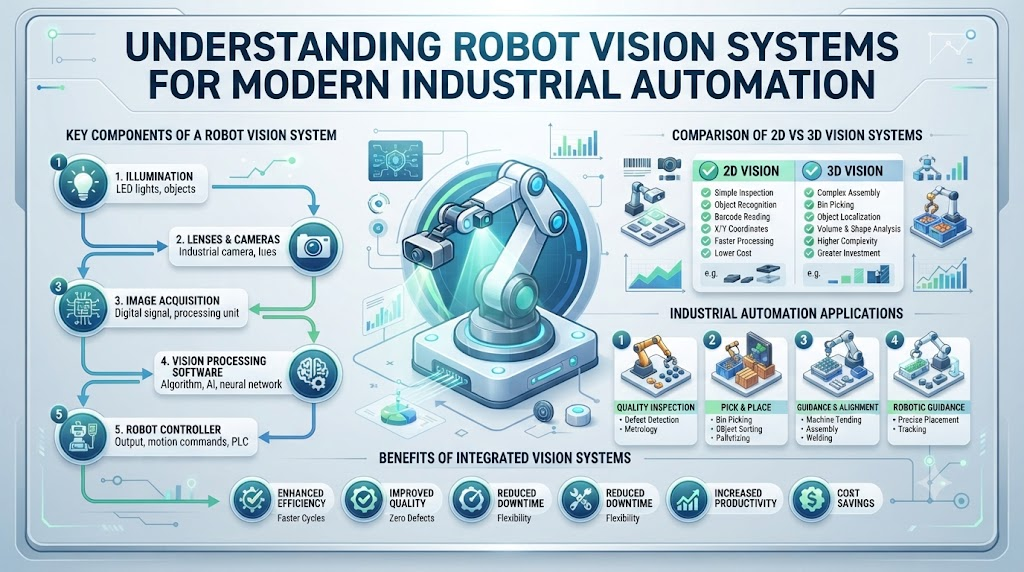
When your automated robot loses track of its path, your entire production line halts. You need a reliable way for your machine to interpret visual data, spot parts, and avoid obstacles in real time. That is where robot vision systems act as the intelligent eyes of your hardware.
At RobotsOps.com, we help engineering teams build robust, clear, and dependable automated systems every single day. Vision systems capture raw pixel data from cameras and translate it into actionable physical coordinates. By processing these images quickly, your robot can sort items, navigate corridors, and inspect product quality with high precision.
You can reduce costly assembly errors, eliminate line bottlenecks, and keep your automated fleet operating at peak efficiency. Let us break down how machine vision technology works and how you can integrate it into your own workflows.
What Are Robot Vision Systems?
Robot vision systems combine physical cameras, lighting hardware, and specialized software. They allow machines to perceive and understand their physical surroundings.
Instead of just recording video, the system analyzes every single frame. It extracts meaningful details like shape, color, size, and distance.
This visual feedback loop empowers robots to make smart choices independently. Your machine adapts to changing environments without constant human intervention.
The Evolution of Machine Perception
Early industrial robots worked blindly inside rigid cages. They repeated pre-programmed mechanical motions without knowing if a part was actually present.
Modern machines require dynamic flexibility on the factory floor. They must handle random part placement and varying lighting conditions safely.
Vision technology bridges this gap by giving robots human-like sight capabilities. This shift transforms simple machines into adaptable, intelligent automation partners.
Core Hardware Components of Robot Vision
Every machine vision setup relies on several essential hardware parts. Understanding these physical elements helps you design a resilient system.
First, you need a high-quality industrial camera sensor. This sensor captures light photons and turns them into digital image arrays.
Second, you need specialized lenses tailored to your working distance. Lenses focus light sharply onto the sensor surface to avoid blurry frames.
The Importance of Structured Illumination
Cameras need adequate light to capture clear images consistently. Poor lighting leads to missed parts and costly system errors.
Engineers use structured lighting like ring lights or backlights. These lights highlight specific features on parts and eliminate harsh shadows.
Good illumination design matters just as much as expensive camera hardware. Stable lighting ensures your vision software processes clean data every single time.
Monocular vs. Stereo Camera Systems
Choosing the right camera layout dictates how your robot perceives depth. Different setups suit different physical tasks.
Monocular setups use a single camera lens to capture flat images. They work well for barcode reading and simple 2D part sorting.
Stereo setups use two cameras spaced apart like human eyes. They compare two viewpoints to calculate exact depth and 3D positioning coordinates.
RGB-D Cameras and Depth Perception
RGB-D cameras add a dedicated depth sensor to standard color imaging. The letter D stands for depth information.
These units project invisible infrared light patterns onto the scene. By measuring pattern distortion, the camera calculates distance per pixel instantly.
You get rich color data paired with accurate 3D spatial points. This data fuels advanced collision avoidance and object manipulation tasks.
Lighting Challenges in Industrial Settings
Factory environments rarely feature perfect, stable lighting conditions. Sun rays from windows can wash out camera frames entirely.
Overhead fluorescent lights can cause annoying flicker in high-speed video feeds. Your software must filter out these optical disruptions cleanly.
Using monochromatic infrared filters and pulsed LED strobes helps solve this. These tools block ambient interference and keep your images sharp.
How Image Sensors Capture Light
Image sensors convert incoming photons into electrical voltage signals. Two main sensor types dominate the robotics market today.
CCD sensors offer exceptional image clarity and low electrical noise. They capture high-end inspection images with incredible detail.
CMOS sensors process pixels individually at much higher speeds. They consume less power and cost less to integrate into mobile robots.
The Role of Graphics Processing Units
Processing high-resolution video streams requires massive computing power. Standard central processors quickly bottleneck under heavy image loads.
Graphics processing units handle thousands of parallel calculations simultaneously. They accelerate neural network inferences for real-time object detection.
Pairing your cameras with a dedicated edge GPU unlocks instant frame analysis. Your robot reacts to obstacles in milliseconds rather than seconds.
Edge Computing vs. Cloud Processing
Deciding where to run your vision software impacts system latency. Network delays can cause dangerous collisions on the floor.
Edge computing runs all image processing directly on the robot. It ensures instant response times without relying on Wi-Fi stability.
Cloud processing handles heavy historical data logging and fleet analytics. It frees up on-board robot hardware for immediate safety tasks.
Object Detection and Segmentation Basics
Raw images mean nothing until software identifies specific objects inside them. Detection algorithms draw bounding boxes around target items.
Segmentation goes a step further by outlining exact pixel boundaries. It separates a target part from its cluttered background completely.
Modern deep learning models handle these tasks with high accuracy. They recognize trained parts even when rotated or partially obscured.
Optical Flow and Motion Tracking
Mobile robots must track moving objects while moving themselves. Optical flow calculates apparent motion across consecutive image frames.
By analyzing pixel shifts, the robot predicts where a moving obstacle will go. It adjusts its driving path proactively to avoid contact.
This capability is vital for collaborative robots working near humans. Smooth motion tracking keeps workspace accidents close to zero.
Calibration and Camera Extrinsics
Cameras must align mathematically with the physical robot base. Misaligned frames lead to grasping errors and failed picks.
Calibration uses checkerboard targets to measure lens distortion and offsets. Software corrects these optical imperfections before processing data.
Extrinsic calibration defines the exact 3D pose of the camera. It ensures pixel coordinates match real-world physical dimensions precisely.
Comparative Table: Vision Technologies
| Feature | Standard 2D Cameras | Stereo Vision Systems | RGB-D Depth Cameras |
| Primary Output | Flat Color Images | 3D Point Clouds | Color + Depth Data |
| Depth Accuracy | None (Flat data) | Moderate | High (Short range) |
| Computational Load | Low | High | High |
| Cost | Low | Moderate | Moderate to High |
Real-World Case Studies in Robot Vision
- A manufacturing arm in an electronics plant sorted tiny circuit boards at high speeds by using high-resolution 2D cameras and custom edge filters.
- An autonomous pallet jack in a massive warehouse navigated narrow aisles safely by combining stereo depth cameras with real-time obstacle segmentation algorithms.
- A fruit-harvesting agricultural robot identified ripe strawberries hanging under green leaves by processing high-contrast RGB color channels through a trained neural network.
- A robotic welding cell inspected seam quality instantly after each pass by mounting a structured laser line sensor directly onto the welding torch.
- An automated pharmaceutical pill counter detected cracked tablets on a fast-moving conveyor belt using high-speed industrial CMOS sensors and ring illumination.
- A hospital delivery robot avoided moving staff in crowded hallways by using wide-angle depth cameras to track human foot traffic patterns proactively.
- A textile cutting machine tracked printed fabric patterns dynamically to align blades perfectly with complex woven designs without manual fabric marking.
- A recycling sorting robot identified clear plastic bottles versus aluminum cans instantly by merging color imagery with infrared material reflection data.
- A container crane automation system aligned spreader twist-locks with shipping box corners automatically using overhead stereo vision guidance units.
- A hazardous nuclear inspection rover mapped radioactive pipe interiors accurately while keeping human operators safely outside the contaminated zone.
Common Mistakes and Pitfalls in Vision Integration
- Mistake: Mounting cameras where physical vibration blurs the image. Solution: Use rigid aluminum mounting brackets and rubber vibration dampening pads to stabilize the optics.
- Mistake: Relying on factory overhead lighting without local task lights. Solution: Install dedicated LED ring lights around the camera lens to ensure consistent target illumination.
- Mistake: Skipping regular lens cleaning routines in dirty factories. Solution: Set up automated air purge nozzles or schedule daily maintenance checks to keep lenses spotless.
- Mistake: Using slow consumer-grade USB cameras for industrial tasks. Solution: Upgrade to industrial GigE or USB3 Vision cameras with locking connectors for reliable data transfer.
- Mistake: Overloading the main robot CPU with heavy image processing tasks. Solution: Offload neural network workloads to a dedicated on-board edge graphics processing unit.
- Mistake: Neglecting proper camera-to-robot spatial calibration procedures. Solution: Use precision checkerboard targets and software calibration tools to lock down exact coordinate transforms.
- Mistake: Selecting lenses with incorrect focal lengths for working distances. Solution: Calculate exact field of view requirements and select proper lens magnifications before installation.
- Mistake: Ignoring ambient infrared interference in bright workspaces. Solution: Choose camera sensors with built-in IR cut filters or use narrow-band lighting matches.
- Mistake: Storing raw, uncompressed video streams and choking network bandwidth. Solution: Compress data streams at the edge and transmit only vital metadata points over the network.
- Mistake: Failing to test vision systems under worst-case lighting shifts. Solution: Simulate factory glare and darkness conditions during staging tests before live floor deployment.
Step-by-Step Implementation Roadmap for Robot Vision
- Define Visual Requirements: Outline the exact inspection or navigation goals, noting target sizes, required speeds, and lighting conditions.
- Select Camera Hardware: Choose between 2D, stereo, or RGB-D depth cameras based on your depth perception and color data needs.
- Design Illumination Setup: Install dedicated industrial lighting fixtures to eliminate shadows and guarantee high-contrast image capture.
- Mount Optical Hardware: Secure cameras and lights onto rigid mechanical frames, ensuring zero movement from robot vibrations.
- Establish Data Connections: Wire cameras to your edge computer using industrial-grade cables with secure locking mechanisms.
- Configure Driver Software: Install manufacturer software development kits and camera drivers to ingest raw image frames cleanly.
- Perform Intrinsic Calibration: Run calibration routines to measure and remove lens distortion and pixel imperfections.
- Execute Extrinsic Alignment: Map camera coordinates to the robot base frame so pixel data translates to exact physical reaches.
- Deploy Processing Models: Install object detection or segmentation software pipelines on your on-board edge graphics processor.
- Test and Tune Performance: Run live trials at low operational speeds to verify accuracy, response latency, and obstacle clearance.
Frequently Asked Questions
1. What is a robot vision system?
A robot vision system combines cameras, lighting, and software to let machines capture, process, and understand visual data from their physical environment.
2. Why do robots need computer vision?
Computer vision gives robots the ability to identify parts, measure distances, and navigate dynamic spaces without requiring rigid guidance structures.
3. What is the difference between 2D and 3D vision?
Standard 2D vision captures flat color images for sorting or reading codes, while 3D vision measures depth coordinates to map objects in physical space.
4. How does lighting affect robot vision performance?
Inconsistent or harsh lighting causes shadows and glare, which leads to missed parts and processing errors. Stable lighting ensures high data accuracy.
5. What is edge computing in robot vision?
Edge computing processes image data directly on the robot using local hardware, ensuring instant response times without relying on network connections.
6. How do stereo cameras calculate depth?
Stereo cameras capture two separate viewpoints of the same scene and compare pixel shifts to calculate exact distance coordinates.
7. What causes camera motion blur on robots?
Vibrations from the robot chassis or fast movement shutter speeds cause blur. Using rigid mounts and fast electronic shutters solves this issue.
8. How often should industrial camera lenses be cleaned?
Lenses should be inspected daily in dirty factories. Regular cleaning prevents dust buildup from degrading image clarity and system accuracy.
9. What is camera calibration in robotics?
Calibration is the mathematical process of removing lens distortion and aligning pixel coordinates with real-world physical dimensions.
10. How do I choose the right camera for my project?
Evaluate your target object size, working distance, lighting conditions, and whether you need 3D depth data to select the right sensor.
Final Recommendation and Next Steps
You now have a complete framework for understanding and integrating robot vision systems into your operations. Start small by bench-testing a single camera and light setup before scaling to a full production line. Focus heavily on stable illumination and rigid mechanical mounting to ensure years of reliable performance. Keep testing your software pipelines against real-world lighting shifts to keep your automated fleet running smoothly.
