Your drone lands after a long inspection flight. The battery log is missing. The video sits on one pilot’s phone. Your manager wants a report by noon.
This is the moment most teams learn a hard truth. A drone alone is not enough. You also need a system that plans, flies, tracks, and stores everything.
That system is a drone robotics platform. It joins the drone, the software, and the data into one working flow. It turns a lone gadget into a repeatable tool.
RobotsOps.com is a useful place to follow robotics operations topics like this one. In this guide, we explain how these platforms work in plain words. You will learn the parts, the risks, the mistakes, and a 10-step plan you can start today.
What Is a Drone Robotics Platform?
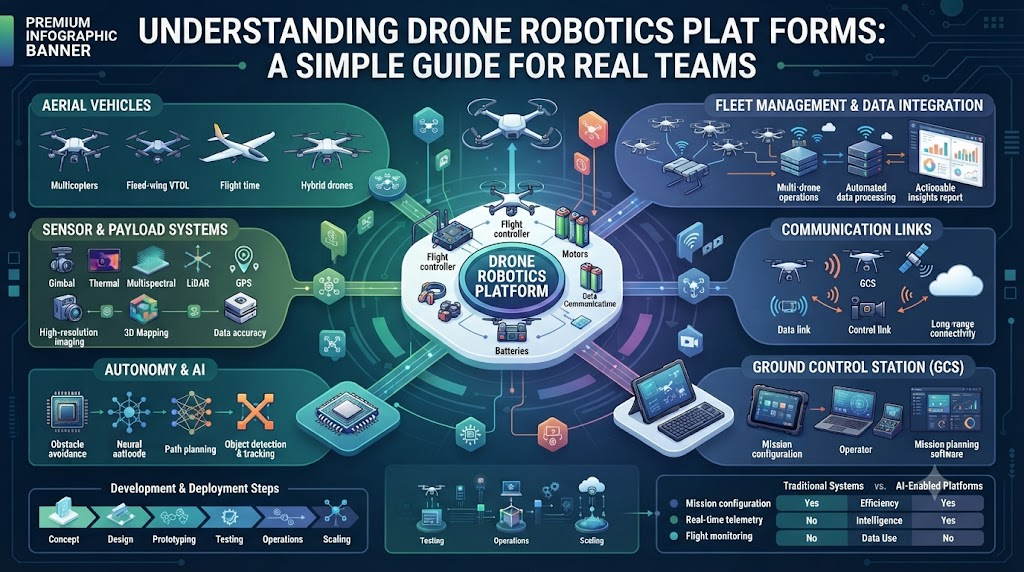
A drone robotics platform is a connected system that plans, controls, and manages drones and their data. It includes the drone itself, the control software, the sensors, and the cloud or server tools behind them.
Think of it like a restaurant kitchen. The drone is the chef. The platform is the whole kitchen: the orders, the tools, the timing, and the cleanup.
Without the kitchen, one chef can cook one meal. With it, a team can serve hundreds.
A platform helps you do five things:
- Plan a mission before takeoff
- Fly it by hand or with automatic routes
- Watch the drone live
- Store photos, video, and sensor data
- Review what happened afterward
So the platform is not just flying. It is the full life of a mission, from first idea to final report.
The Core Layers of a Drone Platform
Every platform has layers. Each layer does one job. When one layer fails, the whole mission feels it.
The Hardware Layer
This is the part you can touch. It includes the frame, motors, battery, camera, and sensors. Sensors might include GPS, lidar (a laser that measures distance), and thermal cameras.
The flight controller sits here too. It is the small computer that keeps the drone steady in the air. It reads sensor data many times each second and adjusts the motors.
The Software Layer
Software is the brain of the platform. It includes mission planning tools, a ground control station, and fleet management tools.
The ground control station is the screen your pilot uses. It shows the map, the battery, the signal, and the camera feed. Fleet tools add more power. They track many drones, many pilots, and many jobs at once.
The Data Layer
Every flight creates data. This layer saves it, labels it, and makes it easy to find. Good data tools tag each photo with time, place, and drone name.
Next, many platforms add analysis tools. These tools can count objects, spot cracks, or measure crop health. That is where the real business value often appears.
How a Drone Mission Works From Start to Finish
A mission follows the same path each time. Knowing the path helps you spot weak points.
Step one is planning. You draw the area on a map. You set the height, the speed, and the camera angles. You also check weather and airspace rules.
Step two is the pre-flight check. The platform tests the battery, the GPS lock, and the radio link. A good system blocks takeoff if something looks wrong.
Step three is the flight. The drone follows the route on its own or under pilot control. The pilot watches live data and stays ready to step in.
Step four is the return. The drone lands by itself or by hand. If the signal drops, it should fly home on its own. This is called return-to-home.
Step five is the review. The platform uploads the data. Your team checks the results and writes the report.
Because every step is logged, you can repeat a good flight. You can also learn from a bad one.
Single Drone vs. Drone Platform
Many beginners start with one drone and one phone app. That works for a while. But it breaks down as soon as you add a second pilot or a second site.
Here is a simple comparison.
| Feature | Single Drone With App | Full Drone Robotics Platform |
|---|---|---|
| Mission planning | Manual, one flight at a time | Saved templates, repeat routes |
| Team access | One pilot, one phone | Roles for pilots, managers, and reviewers |
| Data storage | Phone or memory card | Central, searchable storage |
| Safety checks | Pilot memory | Built-in checklists and alerts |
| Fleet view | None | Live map of all drones |
| Reports | Hand-made | Auto-built from flight logs |
| Best for | Hobby and small jobs | Business, inspection, and public safety |
The table shows one clear pattern. A single drone is fine for learning. A platform is better when others depend on your results.
Where Teams Use Drone Robotics Platforms
Drones now work in many fields. A platform makes each use easier to repeat and prove.
Infrastructure inspection. Teams check bridges, towers, and power lines. Drones reach high places without climbing. That cuts risk for workers.
Farming. Growers fly over fields to spot dry patches and pests. They then treat only the problem areas. This saves water and money.
Construction. Site managers map progress every week. They compare the plan with the real site and catch errors early.
Public safety. Search and rescue teams use thermal cameras to find missing people. Fire teams scout a blaze before crews enter.
Delivery and logistics. Some companies move small parcels over short routes. They need strong tracking and clear safety rules.
Energy and utilities. Crews inspect solar farms and wind blades. Thermal images show hot spots that the eye cannot see.
In each case, the platform gives proof. You can show what you flew, when you flew it, and what you found.
Safety, Rules, and Trust
Safety is the base of every drone program. Rules vary by country, so check your local aviation authority first.
In the United States, for example, small commercial drone pilots usually follow the FAA’s Part 107 rules. Those rules include keeping the drone in sight, flying below 400 feet in most cases, and holding a remote pilot certificate. Many regions also require remote ID, which acts like a digital license plate for your drone.
A good platform helps you follow these rules. It can set height limits, mark no-fly zones, and keep a log of every flight.
Trust also matters. Your clients want to know that their data is safe. So choose a platform that uses strong passwords, role-based access, and encrypted storage. Ask where your data lives and who can see it.
Finally, plan for failure. Batteries die. Signals drop. Software crashes. A strong platform expects these problems and has a backup plan for each.
Levels of Autonomy Explained
Not every drone flies itself. Autonomy comes in levels. Knowing them helps you pick the right tool.
| Level | What the Drone Does | Pilot’s Role | Common Use |
|---|---|---|---|
| Manual | Follows stick commands only | Full control | Training, tricky spaces |
| Assisted | Holds position and height | Steers and decides | Photo and video work |
| Waypoint | Follows a saved route | Watches and approves | Mapping and inspection |
| Smart autonomy | Avoids obstacles and adapts | Supervises | Complex sites |
| Fleet autonomy | Many drones share tasks | Manages the mission | Large operations |
Higher autonomy is not always better. It brings more software risk and more testing work. So match the level to your real need.
Start simple. Move up only when your team can explain how each feature works.
Real-World Stories: What Goes Right and Wrong
These are composite scenarios based on patterns common in field operations. They are not tied to any named company. Each one teaches a clear lesson.
- The cloud server that went dark. A survey team lost its cloud link mid-mission. The drones kept flying, but live maps froze. The lesson: pick a platform that lets drones finish a mission without a constant connection.
- The missing battery log. A crew crashed a drone after a battery sag. No one had tracked the pack’s age. The fix was a platform that records each battery’s cycle count and warns before it gets weak.
- The tower inspection that saved a week. One utility team replaced a climbing crew with drone flights. They finished in two days and reviewed every photo on a shared screen. The lesson: central data makes review fast.
- The farm that sprayed too much. A grower treated whole fields from habit. After using plant-health maps, they treated only the weak zones. They cut chemical use and kept the same yield.
- The pilot who left the company. A firm kept all flight files on one pilot’s laptop. When she quit, years of data vanished. A shared platform with backups would have kept every record.
- The no-fly zone surprise. A new pilot launched near a restricted area. The platform had no airspace alerts. A better system would have blocked the takeoff and warned the pilot.
- The search team that found a hiker. A rescue group flew a thermal drone at dusk. The platform shared the live feed with ground teams. They reached the hiker within an hour.
- The update that broke a route. A software update changed a setting overnight. The next morning, drones flew the wrong height. Teams now test every update on a spare drone first.
- The construction map that caught an error. A weekly map showed a wall built 30 centimeters off plan. The team fixed it before concrete cured. Early data prevented costly rework.
- The fleet that outgrew its tools. A company went from three drones to twenty. Spreadsheets failed fast. Moving to a fleet platform gave them one live view and clear job lists.
Cloud vs. On-Premise: Where Should Your Platform Live?
Your platform can run on the internet or on your own servers. Each choice has trade-offs.
| Factor | Cloud Platform | On-Premise Platform |
|---|---|---|
| Setup speed | Fast, often in days | Slow, needs hardware |
| Upfront cost | Low | High |
| Data control | Shared with the provider | Fully yours |
| Remote access | Easy from anywhere | Harder to set up |
| Internet need | Strong link required | Works on a private network |
| Best for | Growing teams and mixed sites | Strict security and remote areas |
Many teams pick a hybrid. They keep sensitive data on their own servers and use the cloud for planning and sharing.
Ask one question before you choose. What happens to your mission if the internet fails? The answer tells you a lot.
Common Mistakes and Pitfalls
Most drone programs fail for simple reasons. Here are ten mistakes and how to fix each one.
- Buying the drone first. Teams pick hardware before they know the job. Fix it by writing your use case first, then choosing the platform and drone to match.
- Skipping pilot training. A strong platform cannot save an untrained pilot. Fix it with regular practice, written checklists, and simulator time.
- Ignoring battery care. Old or hot batteries cause many crashes. Fix it by tracking cycles, storing packs at the right charge, and retiring weak ones.
- Trusting one data copy. Files on a single phone are easy to lose. Fix it by saving every flight to central storage with automatic backups.
- Flying without a pre-flight check. Rushed pilots skip steps. Fix it by using a platform checklist that blocks takeoff until each item passes.
- Forgetting local rules. Laws change often. Fix it by naming one person to track rules and by keeping airspace alerts switched on.
- Overbuying autonomy. Fancy features add risk if no one understands them. Fix it by starting with waypoint missions and growing slowly.
- Skipping update tests. New software can change old settings. Fix it by testing each update on a spare drone before field use.
- Weak access control. Shared passwords put your data at risk. Fix it by giving each person a login and the lowest access level they need.
- Measuring nothing. Without numbers, you cannot prove value. Fix it by tracking flight hours, issues found, time saved, and cost per job.
Step-by-Step Implementation Roadmap
Follow these ten steps to build a drone program that lasts.
- Define your goal. Write one sentence about the problem you want to solve. For example, “Inspect 40 towers each quarter.”
- Check the rules. Learn the aviation laws, privacy rules, and permit needs in your region. Write them down.
- List your needs. Note the sensors, flight time, and range you need. Also list how many pilots will use the system.
- Compare platforms. Score each option on safety tools, data storage, ease of use, and support. Use a simple table.
- Run a small pilot. Test one platform on one real job. Use two pilots and one spare drone.
- Train your team. Teach the pre-flight checklist, emergency steps, and data handling. Practice each one until it feels easy.
- Set clear roles. Name a lead pilot, a data reviewer, and a safety owner. Give each one the right access level.
- Build repeatable missions. Save your best routes as templates. Reuse them so results stay consistent.
- Track your results. Measure time saved, issues found, and flight safety. Review the numbers every month.
- Improve and scale. Fix weak spots, add drones slowly, and update your rules as you learn.
FAQs
1. What is a drone robotics platform?
A drone robotics platform is a connected system that plans, flies, and manages drones. It joins the drone, sensors, control software, and data storage. This helps teams run safe, repeatable missions and keep clear records of every flight.
2. How is a drone platform different from a regular drone app?
A regular app controls one drone for one pilot. A platform manages many drones, pilots, and jobs. It adds shared storage, safety checks, team roles, and reports. So it fits business work better than hobby flying.
3. What parts make up a drone robotics platform?
A platform has three main layers. The hardware layer holds the drone and sensors. The software layer holds mission planning and fleet tools. The data layer stores and analyzes photos, video, and logs. All three must work together.
4. Do drone platforms need an internet connection?
Not always. Many drones can finish a saved mission without a live link. But cloud tools, live sharing, and remote teams need internet. Ask each provider how the drone behaves if the connection drops during flight.
5. How do drone platforms improve safety?
They add pre-flight checks, no-fly zone alerts, height limits, and battery warnings. They also record each flight for later review. These tools reduce human error and help pilots follow local aviation rules more easily.
6. What industries use drone robotics platforms?
Many fields use them. Common ones include construction, farming, energy, public safety, mapping, and logistics. Each uses drones to see places that are hard, risky, or slow to reach by people on foot.
7. How much autonomy do I need?
Start with waypoint flights, where the drone follows a saved route. Move to higher autonomy only after your team understands the risks. More automation adds power, but it also adds testing and training work.
8. Should I choose a cloud or on-premise platform?
Choose cloud for speed, low cost, and easy sharing. Choose on-premise for strict data control or remote sites with weak internet. Many teams use a mix of both. Pick based on your security needs and site conditions.
9. What are the biggest mistakes new teams make?
Common errors include buying hardware first, skipping training, ignoring battery care, and saving data in one place. Many teams also forget local rules. Each mistake is easy to fix with clear checklists and shared tools.
10. How do I start a drone program the right way?
Define one clear goal and check your local rules. Compare platforms, then run a small pilot on one real job. Train your team, set roles, and track results. Scale only after the pilot proves its value.
Final Recommendation and Next Steps
Start with the job, not the gadget. Know what problem you must solve. Then pick the platform that solves it with the least risk.
Choose safety and data control before fancy features. A drone that flies well but loses your files will cost you more than a simple one that keeps every record. Ask each provider how they handle backups, updates, and signal loss.
Next, run a small pilot this month. Pick one site, one team, and one clear goal. Measure what happens. Share the results with your leaders so they can see the value.
Finally, keep learning. Drone rules, tools, and sensors change fast. Follow trusted robotics operations sources, review your process each quarter, and let your team’s real experience guide every upgrade.
