1. Introduction & Overview
What is WebSockets for Robots?
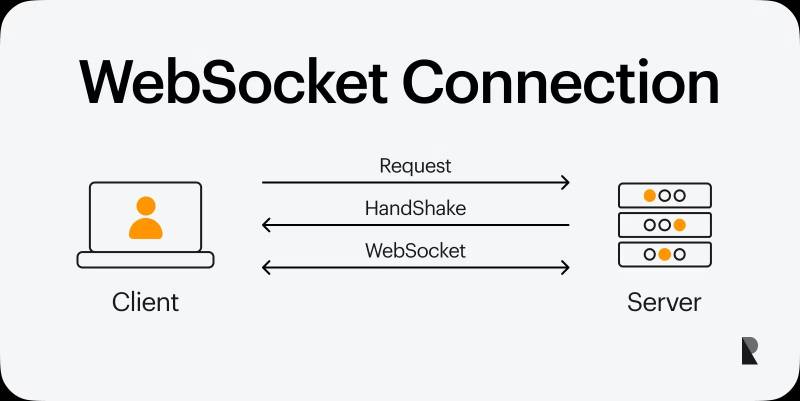
WebSockets provide full-duplex, real-time communication channels over a single TCP connection. In the context of RobotOps, WebSockets allow robots, sensors, controllers, and cloud services to exchange messages instantly and reliably. Unlike traditional request/response models (like HTTP), WebSockets enable bi-directional, event-driven messaging, which is crucial for robots that need real-time updates and low-latency communication.
For example:
- A robot can stream sensor data (temperature, movement, LiDAR scans) to a cloud dashboard in real-time.
- Operators can send control commands instantly back to the robot.
History or Background
- 2008–2011: WebSockets were introduced by W3C and standardized in RFC 6455 (2011).
- Pre-WebSockets: Robots relied on polling APIs, which wasted bandwidth and increased latency.
- Today: WebSockets are a backbone in robotics platforms, enabling real-time telemetry, live monitoring, remote control, and collaborative robotic systems.
Why is it Relevant in RobotOps?
RobotOps focuses on the operational lifecycle of robots—development, deployment, monitoring, updates, and automation.
WebSockets play a key role in:
- Continuous Monitoring: Robots streaming health metrics to cloud dashboards.
- Remote Operations: Teleoperation, remote maintenance, and command control.
- CI/CD Integration: Robots receiving live deployment triggers and streaming back test results.
- IoT Integration: Connecting robots to smart factories, autonomous vehicle systems, or logistics networks.
2. Core Concepts & Terminology
Key Terms
| Term | Definition |
|---|---|
| WebSocket | Protocol for full-duplex communication over TCP. |
| Full-duplex | Both client (robot) and server (operator/cloud) can send/receive data simultaneously. |
| Event-driven | Data flows as soon as events happen—no polling required. |
| RobotOps | A DevOps-like framework for managing robotic systems across their lifecycle. |
| Telemetry | Data sent from robot sensors (position, speed, battery, etc.) to operators. |
How It Fits into the RobotOps Lifecycle
- Development: Engineers test robot communication using WebSocket endpoints.
- Deployment: Robots connect to WebSocket servers upon startup.
- Monitoring: Continuous telemetry feeds provide real-time observability.
- Incident Response: Operators send emergency stop or reconfiguration commands instantly.
- Automation: WebSocket-based CI/CD pipelines deliver live updates and orchestrate robot fleets.
3. Architecture & How It Works
Components
- Robot Client – Runs WebSocket client code to connect to a server.
- WebSocket Server – Receives telemetry, forwards commands.
- Cloud/Operator Dashboard – UI for real-time monitoring & control.
- CI/CD Pipeline – Integration with deployment tools (GitHub Actions, Jenkins).
- Data Processors – Analytics or ML inference systems connected via WebSockets.
Internal Workflow
- Robot initiates connection → Opens WebSocket with server.
- Handshake occurs → HTTP upgraded to WebSocket protocol.
- Data flow begins:
- Robot → sends telemetry (
{"battery": 70, "temp": 32}). - Server → pushes commands (
{"move": "forward"}).
- Robot → sends telemetry (
- Bidirectional messaging continues until connection closes.
Architecture Diagram (Text Representation)
+----------------+         +-------------------+          +----------------+
|   Robot Client | <-----> | WebSocket Server  | <----->  | Cloud Dashboard|
| (Telemetry +   |         | (Message broker)  |          | (Monitoring +  |
| Control logic) |         |                   |          | Control Panel) |
+----------------+         +-------------------+          +----------------+
         ^                          ^
         |                          |
         v                          v
   CI/CD Pipeline           Analytics/ML Systems
Integration Points with CI/CD or Cloud Tools
- GitHub Actions/Jenkins: Trigger robot software updates via WebSockets.
- AWS IoT Core / Azure IoT Hub: WebSocket-based device communication.
- Kubernetes: Stream pod-to-robot communication using WebSocket sidecars.
- Grafana/Prometheus: Real-time visualization of robot telemetry.
4. Installation & Getting Started
Prerequisites
- Node.js or Python environment
- WebSocket library (
wsfor Node.js,websocketsfor Python) - A robot simulation or device with network connectivity
Hands-on Setup: Example (Node.js)
Step 1: Install WebSocket Server
npm install ws
Step 2: Create a WebSocket Server
// server.js
const WebSocket = require('ws');
const server = new WebSocket.Server({ port: 8080 });

server.on('connection', ws => {
  console.log('Robot connected');
  ws.on('message', msg => console.log(`Telemetry: ${msg}`));
  ws.send(JSON.stringify({ command: "start" }));
});
Step 3: Robot Client (Simulated)
// robot.js
const WebSocket = require('ws');
const ws = new WebSocket('ws://localhost:8080');

ws.on('open', () => {
  console.log("Connected to server");
  ws.send(JSON.stringify({ battery: 80, temp: 35 }));
});

ws.on('message', msg => {
  console.log("Received command:", msg.toString());
});
Run with:
node server.js
node robot.js
5. Real-World Use Cases
- Autonomous Vehicles
WebSockets stream LiDAR, GPS, and camera data to control centers, while operators push safety overrides. - Industrial Robots
Factory robots stream performance metrics; supervisors issue adjustments live. - Drone Fleet Management
WebSockets manage drone telemetry (altitude, GPS) and deliver mission updates instantly. - Healthcare Robots
Surgical robots or hospital delivery bots use WebSockets for low-latency operator commands.
6. Benefits & Limitations
Key Advantages
- Low Latency: Real-time data transfer (ms response).
- Efficient: Avoids constant polling overhead.
- Bi-directional: Supports telemetry + command flows simultaneously.
- Scalable: Works for single robots or fleets.
Limitations
- Connection Stability: Requires reliable network (may fail in weak signal areas).
- Security Risks: WebSockets are vulnerable to MITM, DoS attacks if not secured.
- Complex Debugging: Event-driven messaging is harder to debug than HTTP logs.
7. Best Practices & Recommendations
- Security:
- Always use WSS (WebSocket Secure) with TLS.
- Implement authentication & authorization (JWT, OAuth).
- Validate messages against schemas.
- Performance:
- Use binary frames for large telemetry (e.g., LiDAR).
- Compress messages when possible.
- Maintenance:
- Implement heartbeat pings to detect dropped connections.
- Centralize logging with ELK or Grafana.
- Compliance:
- For healthcare robots → HIPAA compliance.
- For industrial robots → ISO/IEC 62443.
8. Comparison with Alternatives
| Feature | WebSockets | HTTP Polling | MQTT |
|---|---|---|---|
| Latency | Very Low | High | Very Low |
| Direction | Bi-directional | Request-Response | Pub/Sub |
| Overhead | Low | High | Low |
| Use Case | Real-time control, telemetry | Simple APIs | IoT, constrained devices |
When to choose WebSockets over MQTT?
- If robots require real-time two-way commands (not just pub/sub).
- If dashboards need live streaming (video, sensors).
- If web-based operator UIs are required (WebSocket native in browsers).
9. Conclusion
WebSockets are a cornerstone in RobotOps for enabling real-time robot-to-cloud and operator-to-robot communication. They bridge the gap between autonomous execution and human-in-the-loop oversight.
Future Trends
- WebRTC + WebSockets for video-enabled teleoperation.
- Hybrid MQTT + WebSockets for scalable robot fleets.
- AI-driven streaming: WebSockets feeding ML models in real-time.
Next Steps
- Explore Socket.IO for advanced features.
- Integrate with CI/CD pipelines for robotic deployments.
- Experiment with Grafana dashboards for telemetry visualization.
Official References
- MDN WebSockets Documentation
- RFC 6455 – The WebSocket Protocol
- Socket.IO Official Site
