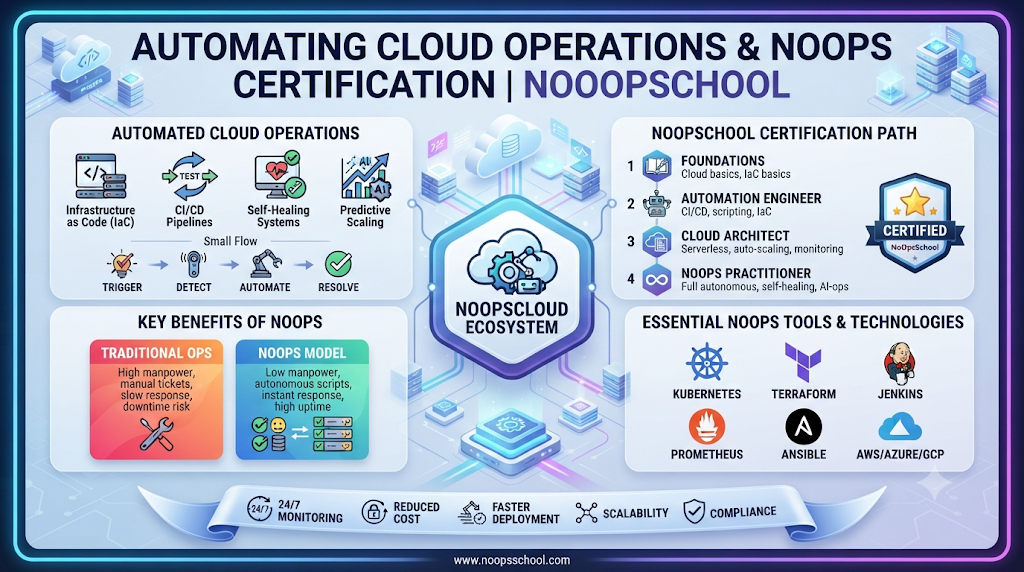
Most software teams do not struggle because their developers write slow code. They struggle because everything around the code—spinning up test servers, applying security patches, tuning alerts, and nursing deployments into production—still relies on manual tickets and human handoffs.
That everyday operational drag is why IT leaders and cloud engineers keep asking what is NoOps and how far automation can realistically take a software organization. Rather than treating servers and clusters as pets that require constant manual care, NoOps uses declarative code, automated delivery loops, and self-healing platforms to run routine operations smoothly.
Written from the perspective of an automation practitioner and engineering advisor, this guide explains how autonomous cloud workflows function in real environments, how NoOps vs DevOps compares on the ground, which tools anchor the stack, and how structured training or outside specialists help teams adopt automation safely. For courses, certifications, consulting, and freelancer resources built around autonomous cloud operations, explore NoOpsSchool.
Understanding What NoOps Means in Real Cloud Environments
The term “No Operations” can sound misleading if taken literally. NoOps does not mean firing operations teams or running production systems without human oversight. Instead, it means eliminating repetitive manual tasks so engineers no longer spend their days clicking through cloud consoles or running routine maintenance scripts by hand.
Think of it like modern commercial banking transfers. Customers do not call a bank clerk to move money between accounts anymore—automated clearing systems validate balances, check fraud rules, and settle transactions in seconds, while engineers and risk specialists design the rules, audit the platform, and step in when unusual exceptions occur.
In modern IT operations, NoOps rests on four practical pillars:
- Declarative Configurations: Teams describe desired networks, clusters, and permissions in version-controlled files rather than manual setup guides.
- Automated Guardrails: Security checks, budget limits, and compliance policies execute automatically inside deployment pipelines.
- Self-Healing Runtimes: Health probes and autoscaling rules detect failing containers or traffic surges and restore normal service without waking an engineer.
- Human Governance: Architects and engineering leaders remain responsible for system design, risk decisions, cost strategy, and complex incident response.
NoOps vs DevOps: How Modern Operational Models Fit Together
Engineers frequently ask how NoOps vs DevOps differs in practice. DevOps transformed software delivery by uniting development and operations teams around shared ownership, continuous integration, and rapid feedback. NoOps builds directly on that DevOps culture—alongside cloud-native and platform engineering practices—by pushing routine operational execution further into automated, self-service systems.
| Operational Dimension | Traditional IT Operations | DevOps Approach | NoOps Practice |
| Infrastructure Setup | Manual tickets and console configuration | Scripted Infrastructure as Code (IaC) | Self-service templates with automated policy enforcement |
| Application Releases | Scheduled maintenance windows | Automated CI/CD pipelines with team review | Continuous GitOps reconciliation and automated rollbacks |
| Incident Recovery | Manual troubleshooting and service restarts | Automated alerts routed to on-call staff | Self-healing health checks resolve routine faults automatically |
| Daily Engineering Focus | Ticket handling and server patching | Building, shipping, and supporting software | Designing automation, reliability policies, and architecture |
In practice, organizations blend these approaches. Stateless web services and ephemeral test environments often run with high autonomy, while core databases and regulated financial workflows retain explicit human approval steps.
Core Technologies Behind NoOps Automation Tools
No single platform delivers autonomous operations by itself. Instead, teams connect NoOps automation tools across five complementary layers:
1. Infrastructure as Code (Terraform and OpenTofu)
Terraform and OpenTofu define cloud networks, compute clusters, and security policies as version-controlled code. Teams gain repeatable environments and clear pull-request audit trails, though state files and provider upgrades require disciplined management.
2. Containers and Self-Healing Orchestration (Docker and Kubernetes)
Docker packages applications with their exact runtime dependencies so builds behave consistently everywhere. Kubernetes schedules those containers across nodes, scales replicas automatically under load, and replaces unhealthy pods without manual intervention. While Kubernetes excels at automated workload recovery, cluster security and upgrades still require solid engineering expertise.
3. Continuous Delivery and GitOps (GitHub Actions, GitLab CI/CD, Argo CD)
CI pipelines in GitHub Actions or GitLab CI/CD run automated tests, builds, and vulnerability scans on every code commit. Pairing CI with a GitOps controller like Argo CD ensures live cluster state continuously matches Git—automatically correcting unauthorized configuration drift.
4. Observability and Intelligent Pattern Detection
Safe automation requires clear visibility. OpenTelemetry, Prometheus, and Grafana collect metrics, logs, and distributed traces so teams can verify system health in real time. AIOps platforms analyze large telemetry streams to surface unusual anomalies early, though clean instrumentation remains essential to avoid false alarms.
5. Managed Cloud Services and Serverless Platforms
Cloud providers—AWS, Microsoft Azure, and Google Cloud—offer serverless runtimes and managed databases that remove host OS patching and capacity planning from daily team responsibilities.
Five-Step Roadmap for Adopting Automation Safely
Attempting to automate every legacy process overnight creates fragile scripts and operational blind spots. Use a steady, low-risk rollout instead:
- Pinpoint Repetitive Manual Work: Survey your team to find which routine tasks consume the most hours—such as creating QA environments, renewing certificates, or promoting builds.
- Clean Up Inconsistent Workflows First: Standardize naming, permissions, and deployment steps before encoding them into automation.
- Store Infrastructure Definitions in Git: Move cloud provisioning into Infrastructure as Code with peer reviews and automated syntax checks.
- Embed Automated Security and Testing: Run secret detection, container scanning, and integration tests automatically inside every pipeline run.
- Enable Controlled Self-Healing and Audit Logs: Turn on readiness probes, autoscaling, and automated canary rollbacks for predictable workloads while keeping human approval gates on destructive database or network changes.
YAML
apiVersion: apps/v1
kind: Deployment
metadata:
  name: payment-gateway
spec:
  replicas: 3
  selector:
    matchLabels:
      app: payment-gateway
  template:
    metadata:
      labels:
        app: payment-gateway
    spec:
      containers:
        - name: gateway
          image: registry.example.com/payment-gateway:3.0.1
          readinessProbe:
            httpGet:
              path: /ready
              port: 8080
            initialDelaySeconds: 5
            periodSeconds: 10
This Kubernetes configuration defines a readinessProbe that automatically removes a slow or unhealthy container from load-balancer traffic until it recovers, protecting end users without manual intervention.
Developing Skills and Career Paths in Cloud Automation
As manual ticket queues shrink, organizations need engineers and leaders who can design, secure, and govern automated systems. Valuable technical foundations include Linux administration, networking, cloud architecture, scripting, Docker, Kubernetes, Infrastructure as Code, CI/CD, GitOps, observability, and cloud security.
Within automation-focused organizations, responsibilities generally span three distinct career tracks:
- NoOps Engineer: Builds and maintains IaC modules, CI/CD workflows, GitOps pipelines, container clusters, and self-healing configurations.
- NoOps Architect: Designs scalable cloud-native systems, defines automation patterns, balances reliability with cloud cost, and establishes security guardrails.
- NoOps Manager: Guides organizational automation strategy, oversees operational risk and governance, aligns workflows with business priorities, and supports team skill growth.
Completing a structured NoOps training course helps practitioners connect individual tools into reliable end-to-end workflows. Pursuing a NoOps certification—across tracks such as NoOps engineer certification, NoOps architect training, or NoOps manager certification—provides a clear milestone for validating role-specific capabilities alongside hands-on lab practice.
Everyday Scenarios, Honest Trade-Offs, and Common Pitfalls
Consider two practical examples of how automation improves daily engineering life:
- Ephemeral Pull-Request Environments: When a developer opens a pull request, an automated pipeline provisions a tagged, isolated test environment with mock data, runs end-to-end checks, and destroys the resources automatically once the code merges.
- Automated Error-Spike Rollbacks: During a live deployment, telemetry detects a sudden jump in HTTP 500 errors. Instead of waiting for an engineer to investigate manually, the rollout controller shifts traffic back to the previous healthy version within seconds.
Realistic Benefits and Limitations
Well-built automation reduces repetitive toil, accelerates environment delivery, enforces consistent configurations, and lowers human error on routine tasks. At the same time, teams must plan for upfront engineering effort, steeper learning curves across cloud-native tools, ongoing maintenance as cloud APIs evolve, and the risk of propagating configuration mistakes rapidly if automated tests are weak.
Four Mistakes That Undermine Automation
- Automating Broken Processes: Encoding a confusing manual workflow into scripts only creates faster confusion.
- Hardcoding Secrets in Repositories: Store credentials in dedicated secret managers and use short-lived identities rather than static keys.
- Eliminating Human Visibility: Automated workflows still require clear dashboards, audit trails, and tested break-glass procedures during major outages.
- Skipping Recovery Drills: Automated provisioning does not replace regular backup restore tests and multi-zone failover exercises.
How NoOpsSchool Supports Professionals and Organizations
NoOpsSchool is built specifically around NoOps education, professional certification, and practical automation advisory. Individuals looking to build structured expertise can explore role-aligned learning and certification tracks—including NoOps engineer certification, NoOps architect training, and NoOps manager certification programs—focused on Terraform, Kubernetes, GitOps, CI/CD, and cloud-native operations.
For organizations planning broader operational modernization, NoOps consulting services offer structured automation assessments, cloud architecture guidance, and CI/CD implementation planning. When teams need specialized capacity for targeted projects, choosing to hire NoOps freelancers with proven experience in Terraform, Kubernetes, or automated observability provides flexible execution—provided clear deliverables, security boundaries, and documentation handovers are defined up front.
Frequently Asked Questions (FAQs)
1. What is NoOps in simple terms?
NoOps is an operational approach that uses declarative code, automated pipelines, and managed cloud platforms to handle routine infrastructure setup, scaling, deployment, and basic fault recovery with minimal manual intervention.
2. How does NoOps vs DevOps compare for growing engineering teams?
DevOps aligns development and operations around shared ownership and automated delivery, while NoOps builds on those foundations by automating repetitive operational tasks even further into self-service platforms.
3. Does adopting NoOps mean human engineers are no longer needed?
No. Engineers, architects, and managers remain critical for designing systems, enforcing security and cost policies, refining automation, and resolving complex incidents.
4. Which NoOps automation tools are most commonly used together?
Many teams combine Git for version control, Terraform or OpenTofu for Infrastructure as Code, Docker and Kubernetes for containers, GitHub Actions or Argo CD for delivery, and OpenTelemetry with Prometheus for observability.
5. What skills should beginners build before taking a NoOps training course?
Familiarity with Linux command-line basics, Git version control, fundamental networking, and basic cloud concepts makes learning Infrastructure as Code, containers, and automated pipelines much smoother.
6. How do NoOps engineer certification and NoOps architect training differ?
The engineer path focuses on hands-on pipeline, Terraform, and Kubernetes implementation, whereas architect training emphasizes multi-team cloud design, scalability, security boundaries, and automation strategy.
7. Who benefits most from a NoOps manager certification?
Engineering managers, IT leads, and technical decision-makers who oversee automation roadmaps, operational governance, risk management, and team capability planning.
8. What is the biggest risk when introducing automated infrastructure workflows?
Without peer reviews, automated tests, and approval gates for destructive actions, a faulty configuration change can propagate across environments quickly.
9. When should an organization consider NoOps consulting services?
Consulting is useful when teams need an objective automation readiness assessment, a standardized IaC and GitOps blueprint, or guidance modernizing legacy operational workflows.
10. What precautions should companies take when they hire NoOps freelancers?
Verify practical experience with your target cloud and automation tools, define clear scope and documentation deliverables, and enforce strict least-privilege access controls.
Conclusion
Automating cloud operations is not about chasing hype or removing human accountability from production systems. It is about freeing skilled engineers from repetitive manual maintenance so they can focus on architecture, reliability, security, and building better software.
Take one small step this week: pick a single recurring manual task in your workflow, move its configuration into version control, and wrap it in an automated check. Whenever you are ready to explore role-based courses, certifications, consulting, or specialist support, visit NoOpsSchool.
