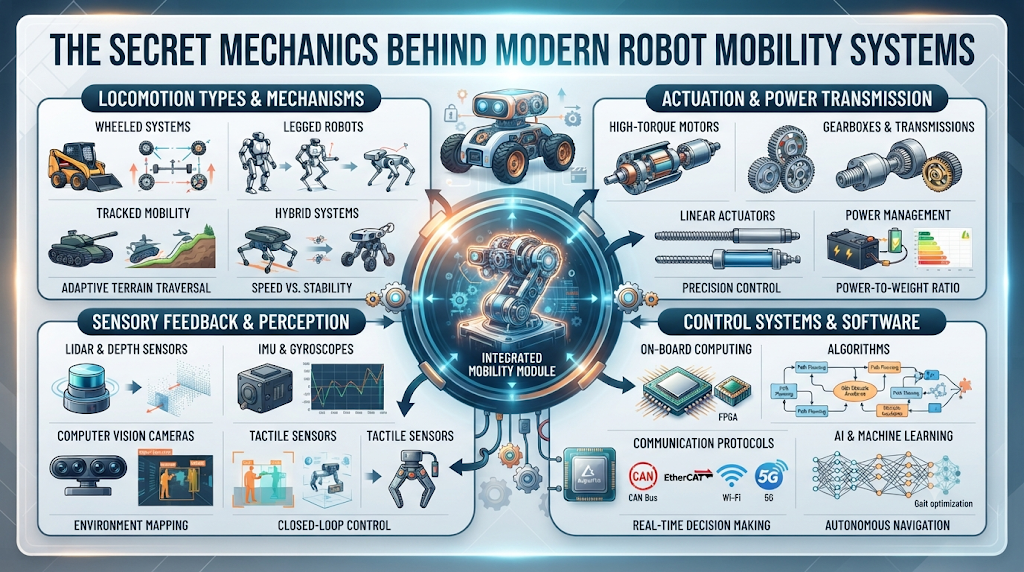
Think about the last time you watched a small automated vacuum clean your living room floor. It did not bump into your sofa by accident. It turned, shifted, and rolled smoothly because of clever engineering.
We live in a world where machines move around us every single day. From hospital delivery carts to warehouse pickers, automated movement is changing how things get done.
If you want to know how these machines move safely, you are in the right place. To explore more expert guides on automation tools, check out RobotsOps.
Understanding how machines move helps us build better tools for our homes and jobs. Let us break down the exact parts that make robot movement possible.
What Is Robot Mobility?
Robot mobility is the way a machine travels from one spot to another. It sounds simple, but it takes a lot of planning. A machine needs to know where it is right now. It also needs to know where it wants to go.
Think of it like walking through a dark room. You use your feet to feel the floor and your eyes to spot chairs. Robots do the same thing using metal frames and digital sensors.
Wheels Versus Legs: Choosing the Right Base
Most machines use wheels because they are fast and easy to build. Four-wheel drives work great on flat factory floors.
Two-wheel robots use a smart balance trick to stay upright. But wheels get stuck in deep mud or on rough steps. That is why some engineers build robots with legs.
Legs let a machine climb over rocks and step across gaps. It mimics how humans and animals walk through tough spaces.
The Role of Sensors in Navigation
A machine cannot move safely if it is blind. Sensors act like the eyes and ears of the system.
Laser sensors bounce light off walls to measure distances. This creates a live map of the room inside the machine’s computer brain.
Sonar sensors use sound waves to spot sudden objects like a stray cat or a closed door. These parts work together to keep the machine from crashing.
How Motors Turn Power Into Motion
Motors give robots the muscle to move. Electric motors spin wheels or move joints up and down.
Batteries feed power to these motors. The better the battery, the longer the machine can work without a recharge.
Tiny circuit boards act like nerves. They tell the motors how fast to spin and when to stop.
| Feature | Wheeled Robots | Legged Robots |
| Best Terrain | Flat floors, smooth roads | Rough ground, stairs, rocks |
| Speed | Fast and efficient | Slower, uses more energy |
| Complexity | Simple build, easy parts | Complex joints and code |
| Cost | Usually cheaper to build | Expensive to design and fix |
The Power of Onboard Computers
A mobile robot carries a small computer inside its metal body. This computer handles all the math in real time.
It takes data from the sensors and decides the next move. If a box falls in front of the machine, the computer updates the path in a split second.
Good software ensures the machine does not get stuck in corners. It finds the smartest route every single time.
Real-World Story About Server Crashes and Robot Control
- Case One: A warehouse robot stopped moving because its central server lost Wi-Fi connection. The factory floor ground to a halt until workers reset the router.
- Case Two: A hospital delivery cart crashed into a wall when an update wiped its internal map. Engineers now store backup maps directly on the local machine.
- Case Three: A security robot froze in the rain because water shorted out its power relay. Waterproof seals are now a must-have for outdoor units.
- Case Four: A kitchen automation unit spun in circles due to a bad sensor reading. Technicians cleaned flour dust off the laser lens to fix the loop.
- Case Five: A hotel room service bot got stuck in a narrow hallway because a chair was moved. The software was updated to let it ask guests to move items.
- Case Six: A farm weed-killer drone lost GPS signal under thick trees. It switched safely to local wheel tracking to finish the row without crashing.
- Case Seven: A factory transport unit overloaded its battery by carrying too many heavy steel parts. Weight sensors now prevent the unit from moving when overloaded.
- Case Eight: A museum guide robot panicked when a huge crowd blocked its path. Programmers added a gentle voice prompt asking people to step aside.
- Case Nine: A snow-clearing bot slipped on black ice and slid into a parked car. Traction control software was added to slow wheels on slick patches.
- Case Ten: An office cleaner bot drained its battery before reaching the charging dock. Smart charging alerts now send the unit home at twenty percent power.
Common Mistakes and Pitfalls
- Mistake One: Building a robot without testing the weight balance. If the top is too heavy, the machine will tip over on turns. Fix this by placing heavy batteries at the very bottom.
- Mistake Two: Relying only on a single sensor type. If the laser gets blocked, the machine goes blind. Use a mix of sound, light, and touch sensors for safety.
- Mistake Three: Writing complex code that overloads the tiny onboard computer. Keep the software clean and simple so the machine reacts instantly.
- Mistake Four: Ignoring battery life limits during long tasks. Always plan for extra power reserves so the unit never dies mid-task.
- Mistake Five: Forgetting to test the machine in real messy environments. Factory floors have dust and wires that flat labs do not have.
- Mistake Six: Skipping safety stop buttons. Every mobile robot needs an easy manual switch to shut down power instantly in an emergency.
- Mistake Seven: Using cheap plastic gears that strip under heavy loads. Always use metal parts for joints and drive wheels that take heavy stress.
- Mistake Eight: Not updating security passwords on connected fleet systems. Hackers can take over machines if default passwords stay active.
- Mistake Nine: Ignoring wheel slip on wet or slick floors. Add rubber treads and traction sensors to keep wheels gripping the ground.
- Mistake Ten: Failing to train staff on basic troubleshooting. Workers must know how to reboot a frozen system without calling an engineer every time.
Step-by-Step Implementation Roadmap
- Step One: Define what job your robot needs to do. Write down its speed, weight, and travel goals clearly.
- Step Two: Choose the right chassis base. Pick wheels for flat spaces or legs for rough outdoor ground.
- Step Three: Select your motors and power source. Match battery size to the runtime you need each day.
- Step Four: Mount your sensors carefully. Ensure laser and sound units have clear views with zero blind spots.
- Step Five: Install the control computer and core software. Connect the motor wires to the main circuit board.
- Step Six: Write the basic movement code. Test simple forward, backward, and turn commands in an empty room.
- Step Seven: Add mapping and obstacle detection scripts. Let the machine build a digital view of its surroundings.
- Step Eight: Run field tests in a real workspace. Watch for dropped connections, tight corners, and low battery alerts.
- Step Nine: Train your team on daily use and safety shut-off steps. Make sure everyone knows how the machine operates.
- Step Ten: Launch your robot into active service. Monitor its daily work logs to catch small errors early.
Frequently Asked Questions
1. What powers a robot mobility system?
Motors powered by rechargeable lithium batteries drive the wheels and joints of most modern mobile machines.
2. How do robots avoid hitting walls?
They use laser scanners and sound sensors to spot objects and steer away before a crash happens.
3. Are wheels better than legs for robots?
Wheels work best on smooth indoor floors, while legs handle rough ground, stairs, and outdoor dirt much better.
4. Can mobile robots work without Wi-Fi?
Yes, most units run local navigation software so they can move safely even if the internet drops out.
5. How do robots know where they are?
They use onboard maps paired with wheel counters and laser data to track their exact location in real time.
6. What happens if a robot loses power?
Safety brakes lock the wheels in place automatically so the machine does not roll away or cause damage.
7. How much weight can a mobile robot carry?
Payload limits vary wildly, from small five-pound delivery units up to heavy industrial carts hauling tons of steel.
8. Do mobile robots need human drivers?
No, modern systems drive themselves using smart internal computers and pre-programmed route maps.
9. Why does my robot spin in circles?
This usually happens when a sensor lens is dirty or when the wheel motors get mixed up during startup.
10. How do I start building my first robot?
Begin with a simple two-wheel kit, a small battery, and a basic microcontroller board to learn the basics.
Final Recommendation and Next Steps
Building or using a robot mobility system takes patience and careful planning. Start small with a basic wheeled prototype before trying complex walking designs. Keep your software clean, test your sensors often, and always put safety first. Take your time with each step, and your automated systems will run smoothly for years to come.
