1. Introduction & Overview
What is URDF (Unified Robot Description Format)?
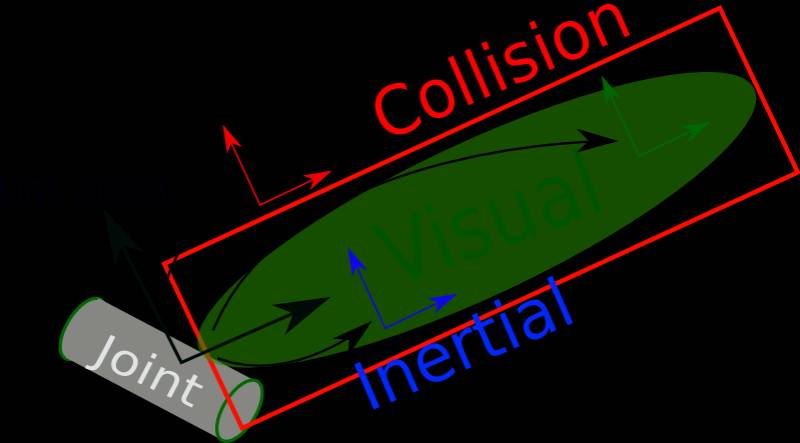
The Unified Robot Description Format (URDF) is an XML-based format used to describe the physical configuration of robots in Robot Operating System (ROS) and RobotOps pipelines. URDF defines a robot’s geometry, joints, sensors, actuators, and kinematics, allowing simulation tools and controllers to interpret robot models consistently.
It serves as the single source of truth for a robot’s structure, bridging the gap between design, simulation, and deployment in RobotOps workflows.
History or Background
- Introduced in ROS (Robot Operating System) around 2009, URDF was designed to standardize how robots are described across different robotics platforms.
- Before URDF, each simulator or control framework had its own proprietary formats, leading to incompatibility.
- Over time, URDF evolved as the de facto standard for robot modeling in the ROS ecosystem.
Why is it Relevant in RobotOps?
In RobotOps (the DevOps-inspired methodology for robotics), URDF plays a critical role by:
- Providing consistent robot definitions across CI/CD pipelines.
- Enabling simulation-first testing before deploying changes to real robots.
- Supporting automation and reproducibility in cloud-based robotic environments.
- Serving as an integration layer between CAD models, simulators, and robot controllers.
2. Core Concepts & Terminology
Key Terms and Definitions
- Link: A rigid body element of a robot (e.g., base, arm, wheel).
- Joint: A movable connection between two links (e.g., hinge, slider).
- Sensor Plugins: Definitions for LIDAR, cameras, IMUs, etc.
- Transmission: Specifies how actuators drive joints.
- Gazebo / RViz: Common simulators and visualization tools that consume URDF.
- xacro: An XML macro language used to simplify URDF creation.
How It Fits into the RobotOps Lifecycle
URDF maps directly to different stages of the RobotOps pipeline:
| RobotOps Stage | Role of URDF |
|---|---|
| Design | Define robot CAD → convert to URDF |
| Simulation | Load URDF into Gazebo / RViz for testing |
| CI/CD | Automated validation of URDF files, testing physics in CI |
| Deployment | Consistent description ensures real robot matches simulation |
| Monitoring | URDF defines sensor positions for telemetry |
3. Architecture & How It Works
Components & Workflow
URDF is structured into hierarchical components:
- Root Link → starting point of the robot.
- Child Links → connected via joints.
- Sensors/Actuators → defined as plugins or transmissions.
- Visualization → meshes, colors, and collision geometries.
- Simulation & Control → consumed by simulators and controllers.
Internal Workflow
- CAD model → Export mesh (STL/DAE).
- Define URDF → XML file describing links/joints.
- Run validation → URDF checkers (linting).
- Load in RViz/Gazebo → for simulation.
- Integrate in RobotOps pipeline → CI/CD ensures consistency.
Architecture Diagram (Textual Representation)
[ CAD Model ] --> [ URDF File (links, joints, sensors) ] --> [ RobotOps CI/CD Pipeline ]
        |                                                        |
        v                                                        v
   [ Meshes (.stl/.dae) ]                            [ Simulators: Gazebo, RViz ]
                                                     [ Controllers: ROS Control ]
Integration Points with CI/CD or Cloud Tools
- GitHub Actions / GitLab CI → Validate URDF before merge.
- Dockerized URDF tools → Ensure reproducibility.
- Cloud Robotics (AWS RoboMaker, Google Cloud Robotics) → Deploy URDF-defined robots in simulation fleets.
- Automated Testing → Use URDF to test kinematics, collisions, and control logic before deploying to real robots.
4. Installation & Getting Started
Basic Setup or Prerequisites
- OS: Ubuntu 20.04 or later
- Dependencies: ROS2 or ROS1 installed
- Packages:
urdf,xacro,rviz2,gazebo
Hands-on: Beginner-Friendly Setup Guide
- Install ROS2 (Humble)
sudo apt update
sudo apt install ros-humble-desktop
- Create a Workspace
mkdir -p ~/robot_ws/src
cd ~/robot_ws/
colcon build
- Create a Simple URDF File
my_robot.urdf
<robot name="simple_bot">
  <link name="base_link">
    <visual>
      <geometry>
        <box size="1 1 0.2"/>
      </geometry>
      <material name="blue"/>
    </visual>
  </link>
</robot>
- Launch in RViz
ros2 launch urdf_tutorial display.launch.py model:=my_robot.urdf
You should now see a simple blue box robot in RViz.
5. Real-World Use Cases
Example 1: Mobile Robot Fleet Simulation
- URDF used to define a warehouse robot’s wheels, sensors, and manipulators.
- CI/CD ensures updates are tested in Gazebo before rollout.
Example 2: Robotic Arm in Manufacturing
- URDF describes the arm’s joints and kinematics.
- Simulations validate safety and reachability before deploying to assembly lines.
Example 3: Drone Delivery System
- URDF defines quadcopter structure, propellers, and sensors.
- Cloud-based simulations test navigation under different weather conditions.
Example 4: Healthcare Robots
- URDF models hospital-assistive robots (e.g., telepresence bots).
- Ensures safe integration of sensors (LiDAR, cameras) for navigation.
6. Benefits & Limitations
Key Advantages
- Standardized robot description across tools.
- Easy integration with simulators and controllers.
- Encourages simulation-first testing in RobotOps pipelines.
- Extensible with plugins for sensors/actuators.
Common Challenges or Limitations
- URDF cannot represent closed kinematic loops (e.g., parallel robots).
- Limited in expressing dynamic properties (needs SDF extension for physics).
- Large URDF files become hard to maintain → solved with xacro macros.
7. Best Practices & Recommendations
- Use xacro for modular, maintainable URDF files.
- Automate validation with CI/CD (linting, simulation tests).
- Version control URDF alongside robot code.
- Security Tip: Validate mesh imports to avoid malicious code injection.
- Performance: Keep meshes lightweight for fast simulation.
- Compliance: Ensure URDF-defined safety zones match ISO robotics standards.
8. Comparison with Alternatives
| Feature | URDF | SDF (Simulation Description Format) | MJCF (MuJoCo XML) |
|---|---|---|---|
| Supported in ROS | ✅ Yes | ✅ Yes (via Gazebo) | ❌ Limited |
| Physics | ❌ Limited | ✅ Full physics support | ✅ Advanced |
| Kinematic Loops | ❌ No | ✅ Yes | ✅ Yes |
| Readability | ✅ High (simple XML) | ❌ More complex | ❌ Complex |
| Best For | RobotOps + ROS | High-fidelity simulation | AI/ML robotics research |
Choose URDF if:
- You are in the ROS ecosystem.
- Need simulation + deployment consistency.
- Want simpler XML over complex physics.
9. Conclusion
URDF is the foundation of RobotOps pipelines. It enables reproducible, automated, and safe robot lifecycle management by serving as the standardized robot description format.
Future Trends
- Integration with Digital Twins for real-time monitoring.
- Expansion into cloud-native robotics.
- Improved conversion tools between URDF and SDF.
Next Steps
- Explore xacro for complex robots.
- Integrate URDF validation into your CI/CD pipeline.
- Join ROS and RobotOps communities for collaboration.
