1. Introduction & Overview
What is CI/CD for Robotics?
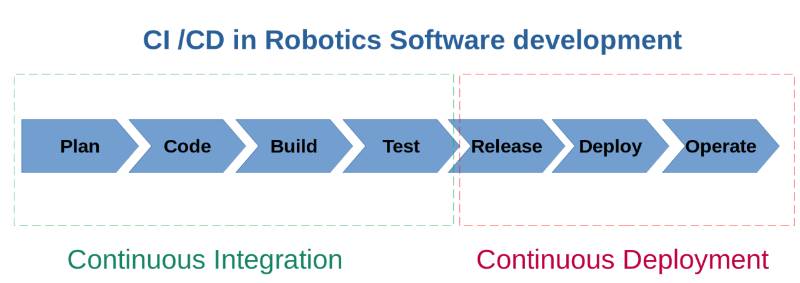
- CI/CD (Continuous Integration / Continuous Deployment) is a DevOps practice that automates building, testing, and deploying software.
- In robotics (RobotOps), CI/CD ensures that updates to robot software—such as navigation algorithms, sensor integrations, or firmware—are tested and deployed efficiently without breaking functionality.
- Instead of manually uploading code to robots and testing physically, CI/CD pipelines allow simulation, verification, and automated deployment across fleets.
History or Background
- Traditional Robotics Development: Manual coding, local testing on physical robots, and long deployment cycles.
- Evolution with DevOps: Inspired by web/app DevOps, robotics adopted CI/CD pipelines using cloud-based build/test automation.
- Modern RobotOps: Combines robotics middleware (e.g., ROS/ROS2) with CI/CD pipelines, simulation tools (Gazebo, Isaac Sim), and cloud orchestration (AWS RoboMaker, Azure Robotics).
Why is it Relevant in RobotOps?
- Robots operate in dynamic, safety-critical environments (e.g., hospitals, warehouses, autonomous vehicles).
- CI/CD ensures:
- Faster innovation cycles (deploy new navigation stack quickly).
- Safety (automated testing prevents faulty updates).
- Scalability (manage fleets of thousands of robots remotely).
- Compliance (maintain logs and verifications for audits).
2. Core Concepts & Terminology
Key Terms
| Term | Definition |
|---|---|
| CI (Continuous Integration) | Frequent merging of code changes into a shared repo with automated builds/tests. |
| CD (Continuous Deployment/Delivery) | Automatic deployment of validated changes to target environments (robots, simulators, fleets). |
| RobotOps | The practice of managing robotics software lifecycle using DevOps principles. |
| ROS/ROS2 | Popular middleware for robotic software development. |
| Gazebo / Isaac Sim | Simulation platforms to test robot behavior virtually before real-world deployment. |
| Hardware-in-the-loop (HIL) testing | Testing robotic software directly on real or emulated hardware. |
| Digital Twin | A virtual replica of robots/environments for safe testing of deployments. |
How it Fits into RobotOps Lifecycle
- Code Development → Developer pushes ROS/firmware changes.
- CI → Automated builds + linting + unit tests.
- Simulation Testing → Run in Gazebo/Isaac Sim for validation.
- CD → Deployment to real robots or fleets via OTA (Over-the-Air).
- Monitoring → Collect logs/metrics and trigger rollbacks if failures.
3. Architecture & How It Works
Components
- Source Control: GitHub/GitLab/Bitbucket (stores robot software).
- CI System: GitHub Actions, GitLab CI, Jenkins (automated builds/tests).
- Simulation Environment: Gazebo, Webots, Isaac Sim.
- Deployment Manager: Kubernetes, AWS RoboMaker, or custom OTA systems.
- Monitoring & Feedback: Prometheus, ELK Stack, or Robot telemetry dashboards.
Internal Workflow
- Developer commits code → Pull request triggers CI pipeline.
- CI Pipeline runs:
- Build ROS/firmware packages.
- Run unit/integration tests.
- Run simulation tests in Gazebo/Isaac.
- CD Pipeline runs:
- Deploy to test robot fleet.
- Validate via health checks.
- Gradually deploy to production fleet.
- Monitoring & Rollback if anomalies are detected.
Architecture Diagram (Text Description)
[Developer Commit] → [Git Repo] → [CI Build/Test] → [Simulation] → [CD Deploy Manager] → [Robots/Fleet]
       ↑                                                                                   ↓
     [Feedback Loop ← Telemetry/Logs ← Monitoring Tools]
Integration Points with CI/CD & Cloud Tools
- AWS RoboMaker → Managed simulation & deployment.
- Azure Robotics Platform → Fleet management + CI/CD integration.
- Docker & Kubernetes → Packaging robotic apps for consistency.
- ArgoCD / FluxCD → GitOps for robot software.
4. Installation & Getting Started
Basic Setup / Prerequisites
- Installed tools:
- Git + Docker
- ROS2 (Foxy/Humble)
- Gazebo/Isaac Sim
- CI/CD Platform (GitHub Actions / GitLab CI / Jenkins)
Hands-On: Step-by-Step Beginner Guide
Step 1 – Setup GitHub Repo
git init robotops-demo
cd robotops-demo
echo "print('Hello Robot')" > main.py
git add .
git commit -m "Initial commit"
git remote add origin <repo_url>
git push origin main
Step 2 – Add GitHub Actions Workflow (.github/workflows/ci.yml)
name: CI for Robotics

on: [push]

jobs:
  build:
    runs-on: ubuntu-latest
    steps:
      - uses: actions/checkout@v3
      - name: Setup ROS2
        run: sudo apt-get update && sudo apt-get install -y ros-humble-desktop
      - name: Run Unit Tests
        run: pytest tests/
      - name: Run Simulation
        run: gazebo --verbose my_robot.world
Step 3 – Deployment (CD Example with Docker)
deploy:
  runs-on: ubuntu-latest
  steps:
    - name: Deploy to Fleet
      run: |
        docker build -t robotops:latest .
        docker push myregistry/robotops:latest
        kubectl rollout restart deployment/robotops-fleet
5. Real-World Use Cases
- Warehouse Robots (Logistics)
- CI/CD pipelines validate navigation stack changes in Gazebo before OTA deployment to autonomous forklifts.
- Healthcare Robots
- Surgical-assist robots tested via digital twins before updating software in real hospitals.
- Autonomous Vehicles (Mobility)
- Fleet CI/CD ensures new perception models are safely deployed and rolled back if anomalies detected.
- Agricultural Robots (AgriTech)
- Automated deployment of crop-monitoring drone software across large fleets with zero downtime.
6. Benefits & Limitations
Benefits
- Faster development cycles.
- Safer deployment via simulation.
- Consistent software delivery across fleets.
- Automated rollback & monitoring.
Limitations
- High compute cost for simulations.
- Complex hardware/software dependencies.
- Safety compliance can slow down full automation.
- Requires specialized CI/CD tooling (not standard web-app CI/CD).
7. Best Practices & Recommendations
- Security: Sign robot firmware & Docker images.
- Performance: Use GPU-enabled CI runners for ML/vision tasks.
- Compliance: Maintain logs for ISO 26262 (automotive), IEC 61508 (safety).
- Automation Ideas:
- Automated regression testing in Gazebo.
- Canary deployments to a subset of robots.
- Rollback triggers via health telemetry.
8. Comparison with Alternatives
| Approach | Pros | Cons |
|---|---|---|
| Manual Deployment | Simple, no infra needed | Error-prone, slow, unsafe |
| Basic CI (no CD) | Ensures quality code | Still manual deployments |
| Full CI/CD for Robotics | Automated, scalable, safe | Complex setup, high infra cost |
➡ Choose CI/CD for Robotics when:
- You manage fleets of robots.
- Safety-critical testing is required.
- You want to reduce human intervention in updates.
9. Conclusion
- CI/CD for Robotics in RobotOps is the backbone of modern robotic software delivery.
- It brings the speed and safety of DevOps to robotics, enabling reliable fleet management at scale.
- Future Trends:
- AI-driven automated testing for robots.
- Wider use of digital twins.
- GitOps-driven RobotOps pipelines.
