Introduction & Overview
What is Canary Deployment?
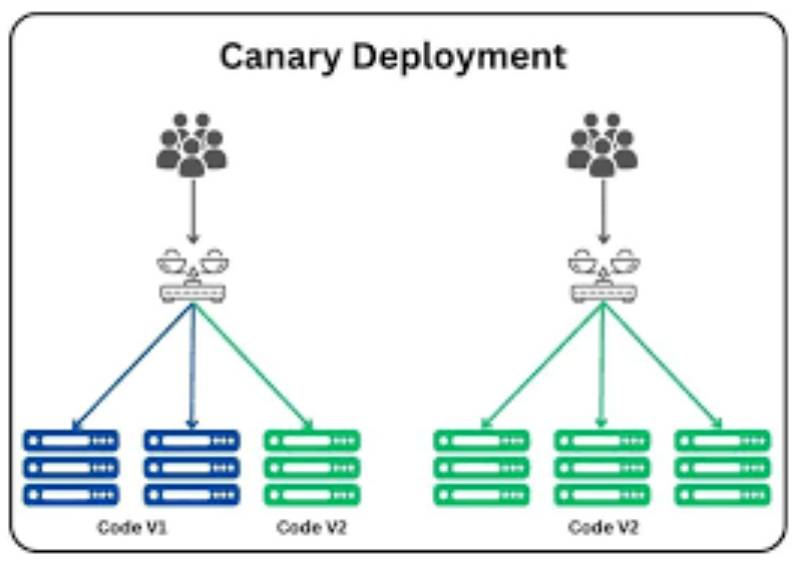
Canary Deployment is a progressive software release strategy in which a new version of a service or application is rolled out to a small subset of users or systems before being gradually deployed to the entire environment. The term originates from the practice of using “canaries in coal mines” to detect toxic gases early. Similarly, in software or robotics, Canary Deployment serves as an early warning system—allowing teams to test new versions with minimal risk.
In the RobotOps context—where autonomous systems, robotic process controllers, and edge AI models are continuously updated—Canary Deployments ensure safe and reliable rollouts without disrupting mission-critical robotic operations.
History or Background
- 2000s: Canary Deployments first gained traction at large-scale internet companies (Google, Netflix, Amazon) to reduce risks in cloud-based microservices.
- Modern Use: Today, it is a standard practice in CI/CD pipelines and DevOps. With the rise of RobotOps (the integration of DevOps principles into robotics), Canary Deployments are essential for safely updating robotic fleets, warehouse automation systems, and autonomous vehicles.
Why is it Relevant in RobotOps?
In robotics, downtime or faulty updates can have physical-world consequences—such as stalled assembly lines, failed deliveries, or safety hazards in autonomous vehicles. Canary Deployment provides:
- Controlled and safe rollouts of software/firmware.
- Real-time validation on a subset of robots before mass rollout.
- Quick rollback if errors occur.
Core Concepts & Terminology
Key Terms
- Canary Release: A small-scale rollout to validate new software.
- Traffic Splitting: Distributing requests between the old and new versions (e.g., 95% to stable, 5% to canary).
- Rollback: Reverting to the old version if canary deployment fails.
- RobotOps: The practice of applying DevOps principles (CI/CD, observability, automation) to robotic systems.
- Control Plane: Manages deployment and routing decisions.
- Data Plane: Executes actual robot tasks with deployed software.
Fit into RobotOps Lifecycle
- Develop → Code changes for robotic control software.
- Test → Simulation and unit testing.
- Deploy (Canary Stage) → Deploy to a small set of robots.
- Observe → Monitor logs, telemetry, safety checks.
- Scale → Gradually roll out to more robots.
- Operate → Stable production use across fleet.
Architecture & How It Works
Components
- Deployment Controller: Orchestrates which robots get the new version.
- Load Balancer/Router: Directs traffic to canary or stable versions.
- Monitoring & Telemetry: Tracks robot performance, error rates, and KPIs.
- Rollback Mechanism: Ensures safe fallback.
Internal Workflow
- Deploy Canary → Select subset of robots (e.g., 5 out of 100).
- Route Tasks → Assign limited workloads.
- Monitor → Collect performance data (latency, sensor accuracy, failure rates).
- Evaluate → Decide whether to expand rollout or rollback.
- Gradual Expansion → Increase canary group size until full adoption.
Architecture Diagram (textual description)
[CI/CD Pipeline] --> [Deployment Controller] --> [Canary Robots (5%)]
                                          \
                                           --> [Stable Robots (95%)]

[Monitoring/Telemetry] <-------------------- [All Robots]
Integration with CI/CD & Cloud Tools
- Kubernetes + Istio/Linkerd → Service mesh for traffic routing.
- AWS Greengrass / Azure IoT Edge → Cloud-to-robot deployment orchestration.
- GitHub Actions / GitLab CI → Automate canary rollouts.
- Prometheus + Grafana → Monitoring robot KPIs.
Installation & Getting Started
Prerequisites
- CI/CD pipeline (e.g., GitHub Actions, Jenkins).
- Kubernetes or edge deployment platform.
- Fleet of robots or simulators for testing.
Step-by-Step Guide (Example: Kubernetes-based RobotOps Canary Deployment)
- Create a Deployment YAML (stable + canary versions).
apiVersion: apps/v1
kind: Deployment
metadata:
  name: robot-controller-canary
spec:
  replicas: 2   # Canary robots
  template:
    spec:
      containers:
      - name: robot-app
        image: myrepo/robot-controller:v2
---
apiVersion: apps/v1
kind: Deployment
metadata:
  name: robot-controller-stable
spec:
  replicas: 8   # Stable robots
  template:
    spec:
      containers:
      - name: robot-app
        image: myrepo/robot-controller:v1
- Configure Traffic Splitting (using Istio VirtualService):
apiVersion: networking.istio.io/v1alpha3
kind: VirtualService
metadata:
  name: robot-routing
spec:
  http:
  - route:
    - destination:
        host: robot-controller-stable
      weight: 90
    - destination:
        host: robot-controller-canary
      weight: 10
- Deploy & Monitor:
kubectl apply -f canary-deployment.yaml
kubectl apply -f istio-routing.yaml
- Observe Metrics:
- Error rate < 1% → Proceed with rollout.
- Error rate > 5% → Trigger rollback.
Real-World Use Cases
- Warehouse Robotics
- Updating navigation algorithms in autonomous forklifts.
- Canary group = 2 forklifts → Validate before rolling out to 50.
- Healthcare Robots
- Deploying new medication-dispensing logic.
- Canary rollout ensures compliance and patient safety.
- Autonomous Delivery Drones
- Testing updated GPS algorithms.
- Canary drones validate stability before full rollout.
- Industrial Assembly Robots
- Deploying new welding precision updates.
- Canary reduces downtime risk in production lines.
Benefits & Limitations
Advantages
- Reduced Risk: Failures isolated to small subset.
- Continuous Feedback: Real-world robot telemetry.
- Business Continuity: Stable robots continue working.
Limitations
- Complex Setup: Requires traffic routing + monitoring.
- Delayed Rollouts: Slower than blue/green deployments.
- Robot Heterogeneity: Canary group may not represent all conditions.
Best Practices & Recommendations
- Security: Encrypt updates (TLS, signed firmware).
- Observability: Use distributed tracing (Jaeger, Prometheus).
- Automation: Automate rollback triggers with error thresholds.
- Compliance: Ensure updates meet ISO/IEC standards for robotics.
- Staged Rollouts: Define rollout stages (5% → 20% → 50% → 100%).
Comparison with Alternatives
| Strategy | Description | Pros | Cons |
|---|---|---|---|
| Canary | Gradual rollout | Low risk, real-world validation | Slower rollout |
| Blue/Green | Two environments, instant switch | Fast rollback | Requires full duplicate infra |
| A/B Testing | Rollout for feature comparison | Great for UX testing | Not ideal for safety-critical robots |
When to Choose Canary:
- High-risk robot updates (navigation, safety-critical software).
- Large fleets requiring gradual rollout.
Conclusion
Canary Deployment is a cornerstone of RobotOps, enabling safe, controlled, and observable software rollouts in robotic environments. By reducing risks and enabling rapid rollback, it ensures mission-critical robotic systems remain reliable and secure.
Future Trends
- AI-driven anomaly detection in canary rollouts.
- Autonomous rollback without human intervention.
- Deeper integration with edge AI and IoT orchestration.
