1. Introduction & Overview
What is Blue-Green Deployment?
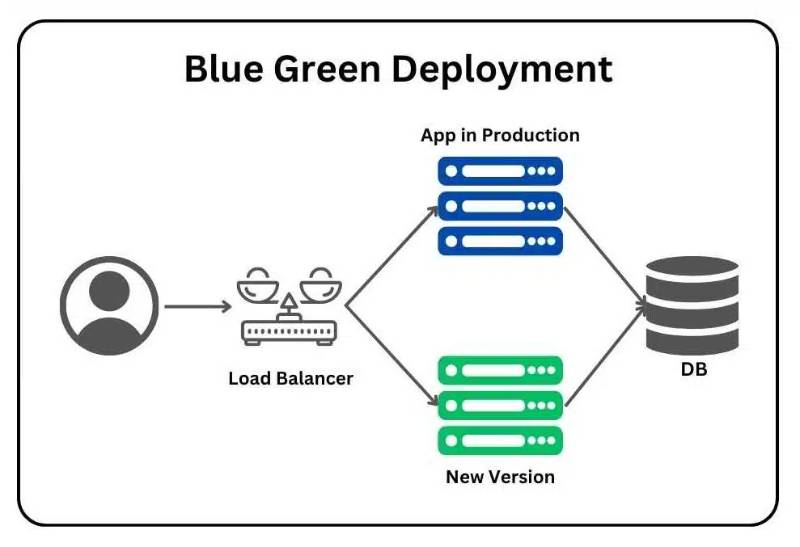
Blue-Green Deployment is a software release management strategy that reduces downtime and risk during application updates. It involves running two identical environments:
- Blue Environment: The currently active (production) environment.
- Green Environment: The idle but fully functional environment where the new version of the application is deployed and tested.
When the green environment is validated, traffic is switched from blue to green, making the new version live with minimal disruption.
History or Background
- Concept Origin: Popularized in early 2000s by deployment experts seeking zero-downtime release strategies.
- Adoption: Widely embraced in DevOps pipelines, particularly with cloud-native applications, microservices, and containerized environments.
- Modern Evolution: Now integrated with orchestration platforms (Kubernetes, OpenShift) and CI/CD tools (Jenkins, GitHub Actions, GitLab CI).
Why is it Relevant in RobotOps?
RobotOps refers to applying DevOps principles in robotics systems, autonomous machines, and industrial automation. In robotics, software updates are critical for safety, performance, and compliance. Blue-Green Deployment ensures:
- Minimal Downtime: Robots remain operational while updates are tested.
- Rollback Capability: Easy to revert to the stable (blue) version if failures occur.
- Safer Deployments: Reduces risk in mission-critical robotic systems such as self-driving cars, drones, or manufacturing robots.
2. Core Concepts & Terminology
Key Terms
- Blue Environment: Stable production system.
- Green Environment: Candidate environment for the new release.
- Traffic Switch: Routing mechanism that directs traffic from blue to green.
- Rollback: Returning traffic to the old environment in case of failure.
- CI/CD: Continuous Integration and Continuous Deployment pipelines.
How It Fits into the RobotOps Lifecycle
- Code Development → Engineers push robotic control code or firmware.
- CI/CD Integration → Automated pipelines build, test, and package new releases.
- Deployment Stage → New release is deployed to the green environment.
- Validation → Robotic simulators and real hardware test the green environment.
- Switch Traffic → Production robots shift from blue to green seamlessly.
- Monitoring & Feedback → Continuous logs and telemetry ensure stability.
3. Architecture & How It Works
Components
- Load Balancer / Router: Routes traffic to either blue or green environment.
- CI/CD Pipeline: Automates build, test, and deployment.
- Monitoring Tools: Tracks robot health, latency, and stability.
- Rollback Mechanism: Switches traffic back if errors occur.
Internal Workflow
- Deploy version N to Blue (production).
- Build and deploy version N+1 to Green.
- Run automated and hardware-in-the-loop tests.
- If stable, switch traffic from blue to green.
- Keep blue idle for rollback safety.
Architecture Diagram (described)
Imagine a flow where:
- User/Robot Fleet → Load Balancer → directs traffic → Blue (v1) or Green (v2).
- CI/CD pipeline triggers deployment to Green, validation occurs, then switch.
Integration with CI/CD or Cloud Tools
- Jenkins Pipelines: Automates robotic firmware build and deployment.
- GitHub Actions: Triggered by new commits to main branch.
- Kubernetes + Istio: Handles traffic shifting between environments.
- AWS CodeDeploy / Azure DevOps / GCP Cloud Deploy: Native blue-green deployment support.
4. Installation & Getting Started
Basic Setup / Prerequisites
- RobotOps CI/CD environment (GitLab, Jenkins, or GitHub Actions).
- Containerized robot software or VM-based environment.
- Load balancer (NGINX, Istio, AWS ELB, HAProxy).
Step-by-Step Beginner Setup
Example with Kubernetes for RobotOps Software
# Blue Deployment (v1)
apiVersion: apps/v1
kind: Deployment
metadata:
  name: robot-app-blue
spec:
  replicas: 3
  template:
    spec:
      containers:
      - name: robot-app
        image: robotops/app:v1

---
# Green Deployment (v2)
apiVersion: apps/v1
kind: Deployment
metadata:
  name: robot-app-green
spec:
  replicas: 3
  template:
    spec:
      containers:
      - name: robot-app
        image: robotops/app:v2
- Deploy both environments in Kubernetes.
- Configure an Istio VirtualService or NGINX Ingress to shift traffic.
- Test Green environment with simulators.
- Use a flag in CI/CD to promote green → production.
5. Real-World Use Cases
Example 1: Autonomous Vehicles
- Updating navigation algorithms with minimal downtime.
- Green deployment tested in simulation before going live in production fleets.
Example 2: Manufacturing Robots
- Rolling out firmware updates across robotic arms without halting the assembly line.
Example 3: Drone Fleets
- Switching drone control systems (AI navigation) in real-time while drones are mid-flight.
Example 4: Healthcare Robots
- Safe deployment of updates in robotic surgical assistants to ensure compliance with safety standards.
6. Benefits & Limitations
Benefits
- Near-zero downtime updates.
- Fast rollback in case of failures.
- Safe and controlled deployments for mission-critical robotics.
- Enhances automation in RobotOps pipelines.
Limitations
- Infrastructure Cost: Requires duplicate environments.
- Complexity: More setup and monitoring overhead.
- Not Always Feasible: For robots with limited hardware, duplicating environments may be hard.
7. Best Practices & Recommendations
- Security: Encrypt robot-to-server traffic, validate green environment with penetration tests.
- Performance: Run hardware-in-loop tests before switching.
- Maintenance: Automate cleanup of old environments.
- Compliance: Align with ISO 10218 (robot safety) and IEC 61508 (functional safety).
- Automation: Use GitOps for auto-triggered green deployments.
8. Comparison with Alternatives
| Approach | Downtime | Rollback | Cost | Suitability for RobotOps |
|---|---|---|---|---|
| Blue-Green | Zero | Easy | High | Best for mission-critical |
| Rolling Updates | Minimal | Medium | Medium | Good for incremental updates |
| Canary Releases | Low | Complex | Medium | Best for gradual testing |
| A/B Testing | N/A | N/A | Low | Best for UX/ML-driven robots |
When to Choose Blue-Green:
- Mission-critical robots where downtime is unacceptable.
- Safety-critical updates requiring instant rollback.
9. Conclusion
Blue-Green Deployment is a powerful strategy for RobotOps, enabling safe, low-risk, and continuous delivery of robotic software. It is particularly effective in industries where uptime and safety are paramount, such as autonomous vehicles, healthcare robotics, and industrial automation.
Future Trends
- Integration with digital twins for robotic simulation.
- AI-driven validation of green environments.
- Cost-optimized hybrid models (combining blue-green + canary).
Next Steps
- Start small with containerized robotic applications.
- Experiment with CI/CD tools like GitHub Actions or Jenkins.
- Join communities to stay updated.
Useful Resources
- Kubernetes Blue-Green Deployment Docs
- AWS Blue-Green Deployment Guide
- RobotOps Community
