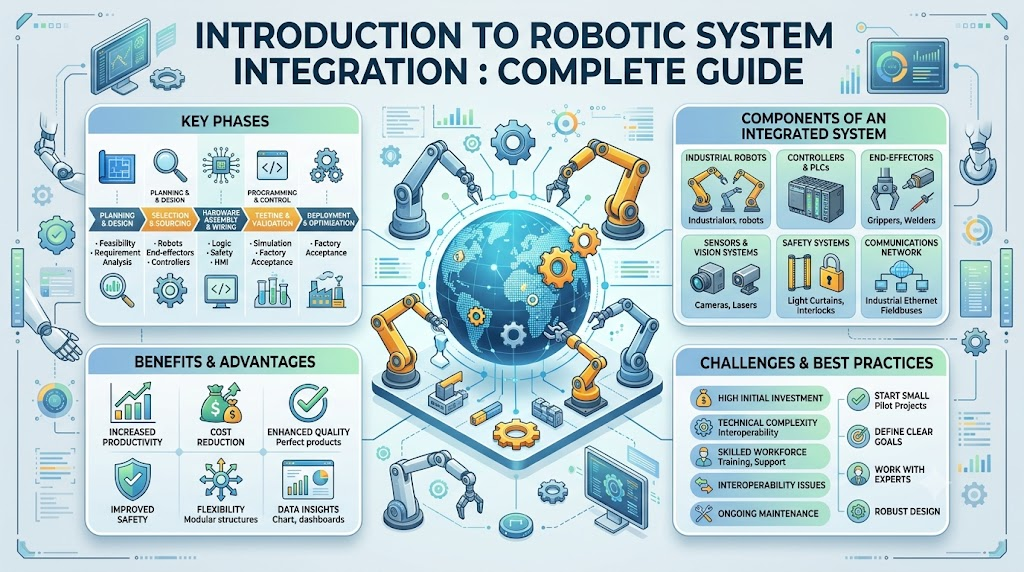
Introduction
Robots are everywhere now. They pack boxes, weld car parts, and even help in surgery. But a robot rarely works alone. It needs many parts working together as one system. This is where robotic system integration comes in. It is the process of making all these parts work as a team. Without good integration, even the best parts can fail together. This guide explains the basics of robotic system integration. It is written for beginners. We keep the language simple and clear.
What is robotic system integration?
Robotic system integration means connecting hardware, software, sensors, and controls into one working robot. Each part must talk to the others and work at the right time.
A robot is a system, not one thing
People often picture a robot as a single machine. In truth, a robot is a system of many parts. It has motors, sensors, wires, code, and more, all working together.
Building vs. integrating
Building a robot means making or buying its parts. Integrating a robot means making those parts work together as a whole. You can have great parts and still fail if they do not connect well.
Why integration is the hardest part
Each part of a robot might work fine on its own. Problems often show up only when parts try to work together. This is why integration is often the hardest, and most important, step.
The Main Parts of a Robotic System
A robotic system is made of several key parts. Each one plays a different role.
Mechanical components. These are the physical parts you can touch. Arms, wheels, grippers, and frames all fall into this group.
Sensors. Sensors let a robot sense its surroundings. Common types include cameras, lidar (a laser-based distance sensor), proximity sensors, force sensors, and temperature sensors.
Actuators. Actuators make a robot move. Motors, servos, and hydraulics are common actuator types. They turn electrical signals into real motion.
Controllers and processors. This is the “brain” of the robot. It runs the logic that decides what the robot should do next.
Software and control systems. This is the code that tells the robot how to behave. It reads sensor data and sends commands to actuators.
Power systems. Every robot needs power. This includes batteries, power supplies, and wiring that keeps everything running.
Communication and networking hardware. This lets different parts of the robot send data to each other. It also lets the robot connect to outside systems.
| Component Type | Examples |
|---|---|
| Mechanical | Arms, wheels, grippers, frames |
| Sensors | Cameras, lidar, proximity, force, temperature |
| Actuators | Motors, servos, hydraulics |
| Controllers | Microcontrollers, industrial PCs |
| Software | Control logic, algorithms |
| Power | Batteries, power supplies |
| Communication | Wired and wireless networking hardware |
Core Integration Concepts
Hardware-software integration
This means making physical parts respond to code. For example, when code sends a command, a motor must turn the exact amount asked for.
Sensor fusion
Sensor fusion means combining data from many sensors. This gives a clearer, more reliable picture. For example, a robot might combine camera and lidar data to judge distance more accurately.
Communication protocols
A protocol is a set of rules for how parts “talk” to each other. Common examples include CAN bus, Ethernet, and wireless links. Protocols make sure data arrives correctly and on time.
Middleware and frameworks
Middleware is software that helps different parts of a robot communicate smoothly. ROS, or Robot Operating System, is a popular framework. It gives engineers ready-made tools instead of building everything from scratch.
Control loops
A control loop is a repeating cycle. The robot senses its environment, decides what to do, then acts. This loop repeats many times per second to keep the robot responsive.
Safety systems
Safety systems protect people and equipment. Emergency stops, movement limits, and fail-safes all fall into this group. These systems should never be an afterthought.
Key Metrics and Checks During Integration
Engineers check several things while integrating a robotic system.
- Response time and latency. How fast does the robot react to new information?
- Accuracy and precision of movement. Does the robot move to the exact spot it should?
- System uptime and reliability. How often does the system run without failing?
- Power consumption. How much energy does the system use during operation?
- Communication delay between parts. How long does data take to travel between components?
- Error rate and failure recovery time. How often do errors happen, and how fast can the system recover?
Sample test report: A robotics test report might list each component’s pass or fail status. It could show response times, error counts, and notes on any issues found during testing.
How Integration Works, Step by Step
Here is the general process for integrating a robotic system:
Define requirements → select components → connect hardware → integrate software and control logic → test individual parts → test the full system → fix issues → deploy and monitor
First, engineers define what the robot needs to do. Then they choose the right parts for the job. Next, they connect the hardware and wire it up. After that, they add software and control logic. Each part gets tested alone first. Then the full system gets tested together. Any issues get fixed. Finally, the robot is deployed and watched closely.
Example: A warehouse robot’s camera worked fine alone. Its motor also worked fine alone. But together, there was a delay. Engineers found the cause: slow data transfer between the camera and the controller. They fixed it by upgrading the connection.
Real-World Use Cases
- Industrial and manufacturing robots. These robots weld, assemble, and paint parts on factory lines.
- Warehouse and logistics automation. Robots move, sort, and pack goods in warehouses.
- Service and delivery robots. These robots deliver food, clean floors, or assist customers.
- Medical and surgical robots. Surgeons use these robots for precise, careful procedures.
- Agricultural robots. These robots plant seeds, monitor crops, or harvest produce.
- Autonomous vehicles. Self-driving cars and drones rely heavily on strong system integration.
Benefits and Challenges
Benefits
- Robots that work reliably as a whole system
- Fewer failures during operation
- Safer operation for people nearby
- Easier upgrades down the line
Challenges
- Mismatched components that do not work well together
- Communication delays between parts
- Software bugs that are hard to trace
- Hardware wear and tear over time
- Safety risks if systems are not built carefully
- Cost and time overruns during projects
Best Practices for Getting Started
- Start with clear requirements before choosing any hardware.
- Test each component alone before connecting it to others.
- Build in safety systems from day one, not as an afterthought.
- Use standard communication protocols whenever possible.
- Document how each part connects and communicates with the others.
- Test the full system in realistic conditions before you deploy it.
Common Mistakes to Avoid
- Choosing hardware before defining clear requirements
- Skipping tests on individual parts before combining them
- Adding safety systems late in the project
- Using custom protocols when standard ones would work fine
- Failing to document how the system is wired and connected
- Testing only in ideal conditions, not real-world ones
Popular Tools and Platforms
This list is for awareness only. It is not a ranking or recommendation.
| Tool | Known For |
|---|---|
| ROS (Robot Operating System) | Framework for building and connecting robot software |
| Gazebo | Simulating robots in a virtual environment |
| MATLAB/Simulink | Modeling and testing control systems |
| SolidWorks | Designing mechanical parts and assemblies |
| PLC software | Programming industrial control systems |
| CAN bus tools | Testing and debugging vehicle and robot communication networks |
Future Trends
- AI-powered robots. Future robots will adapt and learn from their surroundings more than today’s robots.
- Easier integration through standard platforms. Standard tools and platforms will make integration faster and simpler.
- More collaborative robots. These robots, often called cobots, work safely alongside humans in shared spaces.
Frequently Asked Questions
What is robotic system integration?
Robotic system integration means connecting hardware, software, sensors, and control systems into one working robot. All parts must work together smoothly and on time.
What is the difference between a robot and a robotic system?
A robot is often just the physical machine, like an arm or a wheeled base. A robotic system includes the robot plus its sensors, software, power, and communication tools, all working as one unit.
What is ROS and why is it used?
ROS stands for Robot Operating System. It is a popular framework that gives engineers ready-made tools for robot software, so they do not have to build everything from scratch.
What is sensor fusion?
Sensor fusion means combining data from multiple sensors to get a clearer picture. For example, mixing camera and lidar data can help a robot judge distance more accurately than either sensor alone.
Why do communication protocols matter in robotics?
Protocols are rules that let different parts of a robot talk to each other correctly. Without clear protocols, parts can send confusing or incomplete data, leading to errors.
What causes most robotic system failures?
Common causes include mismatched components, communication delays, and software bugs. Many failures only appear when parts are combined, not when tested alone.
Do I need to know both hardware and software for this field?
Having knowledge of both helps a lot in this field. Many integration problems happen at the point where hardware and software meet, so understanding both sides makes troubleshooting easier.
How is safety handled in robotic systems?
Safety is handled through emergency stops, movement limits, and fail-safe designs. These systems should be built in from the start of a project, not added later.
Which skills should I learn to start a career in this field?
Useful skills include basic programming, understanding of sensors and actuators, and knowledge of communication protocols. Hands-on experience with tools like ROS also helps a lot.
Are there free tools to practice robotic system integration?
Yes. ROS and Gazebo are both free and widely used for learning and practice. They let you build and test robotic systems without needing expensive physical hardware.
Conclusion
Robotic system integration ties together mechanical parts, sensors, actuators, and software. This is often the hardest part of any robotics project. It is also the most important.
Start with clear requirements. Test each part alone before combining them. Build safety in from the start. With careful integration, a robot becomes more than just parts. It becomes a reliable system you can trust.
