1. Introduction & Overview
What is Teleoperation?
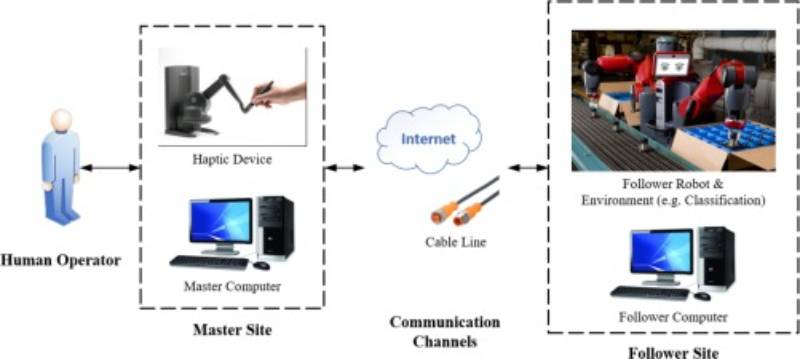
Teleoperation refers to the remote control of a robot or robotic system by a human operator. Instead of relying fully on autonomy, the human issues commands via interfaces like joysticks, VR devices, or cloud-based dashboards, while the robot executes tasks in real-time or with slight delay.
It bridges the gap between autonomy and manual operation, allowing robots to operate effectively in dynamic, unpredictable, or hazardous environments.
History or Background
- 1940s–50s: First use in nuclear industries for handling radioactive materials.
- 1960s–70s: NASA and defense used teleoperation in space exploration and bomb disposal.
- 1980s–2000s: Emergence of telerobotics in surgery (e.g., Da Vinci surgical robot).
- 2000s–Present: Teleoperation has expanded into industrial automation, remote surgery, logistics, agriculture, and defense.
Why is it Relevant in RobotOps?
RobotOps (Robotics Operations) emphasizes managing, deploying, and operating robotics at scale, often integrated with DevOps-like practices. Teleoperation fits in by:
- Allowing safe intervention in case of autonomous system failures.
- Enabling human-in-the-loop decision-making for sensitive tasks.
- Acting as a backup control system in CI/CD-driven robotic deployments.
- Supporting global remote work (e.g., operating a robot in Japan from India).
2. Core Concepts & Terminology
Key Terms
| Term | Definition |
|---|---|
| Teleoperation | Human-controlled operation of a robot at a distance. |
| Telerobotics | Broader concept combining teleoperation with autonomy. |
| Haptic Feedback | Sensory feedback (touch/force) to operators for precision. |
| Latency | Delay between human input and robot response. |
| Cloud Teleoperation | Controlling robots over the cloud using APIs, 5G, or WebRTC. |
| Shared Autonomy | Combination of autonomous control with human overrides. |
How it Fits into the RobotOps Lifecycle
- Development: Define control interfaces, safety rules.
- Testing: Simulate teleoperation in virtual environments.
- Deployment: Provision teleoperation endpoints in production.
- Operations: Monitor latency, logs, and operator performance.
- CI/CD Integration: Roll out updates to teleoperation software safely.
3. Architecture & How It Works
Components of Teleoperation System
- Operator Interface: Joystick, VR controller, or cloud dashboard.
- Communication Middleware: ROS2, WebRTC, MQTT, or proprietary protocols.
- Robot Control System: Onboard software that translates commands.
- Feedback Mechanisms: Video streaming, sensor telemetry, haptic feedback.
- Cloud Integration: Remote server for authentication, scaling, and analytics.
Internal Workflow
- Operator sends command →
- Signal transmitted via middleware (ROS2, 5G, WebSocket, MQTT) →
- Robot interprets command & executes →
- Sensors/cameras capture response →
- Feedback loop back to operator (video, haptics).
Architecture Diagram (described)
Imagine a 5-layer diagram:
- Layer 1: Operator Device (joystick, VR headset, dashboard).
- Layer 2: Communication Protocols (ROS2 DDS, WebRTC, MQTT).
- Layer 3: Cloud/Edge Servers (authentication, CI/CD updates).
- Layer 4: Robot Controller (ROS nodes, safety checks).
- Layer 5: Robot Actuators & Sensors (motors, cameras, LiDAR).
Integration Points with CI/CD or Cloud Tools
- CI/CD Pipelines: Deploy teleoperation software updates (ROS nodes, dashboards).
- Monitoring Tools: Prometheus + Grafana to track latency and operator inputs.
- Cloud Providers: AWS RoboMaker, Azure Robotics, Google Cloud Robotics.
- Security: Role-based access, VPN tunnels, TLS encryption.
4. Installation & Getting Started
Basic Setup or Prerequisites
- Linux system with ROS2 (Humble or Foxy) installed.
- A robot simulator (Gazebo / Webots) or physical robot (TurtleBot, UR5).
- Joystick/VR controller.
- Network setup with low latency (5G or Wi-Fi 6 preferred).
Hands-On: Beginner-Friendly Setup Guide
Step 1: Install ROS2
sudo apt update
sudo apt install ros-humble-desktop
Step 2: Install Teleoperation Package
sudo apt install ros-humble-teleop-twist-keyboard
Step 3: Launch Teleoperation Node
ros2 run teleop_twist_keyboard teleop_twist_keyboard
Step 4: Control the Robot in Simulation
ros2 launch turtlebot3_gazebo turtlebot3_world.launch.py
Then use the keyboard to drive the robot in Gazebo.
Step 5: Extend to Cloud-Based Teleoperation
- Deploy a ROS2 bridge using WebRTC/MQTT.
- Connect via browser-based dashboard.
5. Real-World Use Cases
- Healthcare (Remote Surgery)
- Doctors use robotic surgical arms with haptic feedback for minimally invasive surgeries.
- Space Exploration (NASA Rovers)
- Rovers like Perseverance receive teleoperation commands from Earth.
- Defense & Disaster Recovery
- Bomb disposal robots, hazardous chemical handling.
- Logistics & Warehousing
- Remote operators intervene when autonomous robots face anomalies.
6. Benefits & Limitations
Benefits
- Safe operation in hazardous areas.
- Extends human reach to inaccessible environments.
- Hybrid model (autonomy + human-in-the-loop).
- Enables global workforce (operate from anywhere).
Limitations
- Latency issues (esp. in deep space, long-distance ops).
- Requires constant connectivity.
- Expensive hardware (haptics, VR).
- Operator fatigue over long sessions.
7. Best Practices & Recommendations
- Security Tips:
- Use end-to-end encryption (TLS, VPN).
- Role-based access for operators.
- Performance Optimization:
- Prefer edge computing to reduce latency.
- Use 5G/low-latency protocols (WebRTC).
- Maintenance:
- Regular firmware/software updates via CI/CD.
- Continuous monitoring (Grafana dashboards).
- Compliance:
- Healthcare: HIPAA (surgical teleoperation).
- Defense: ITAR compliance.
- EU Robotics: GDPR (camera feeds).
8. Comparison with Alternatives
| Approach | Description | When to Use |
|---|---|---|
| Autonomous Robots | Fully AI-driven with minimal human input. | Stable, repetitive tasks in structured environments. |
| Manual Operation | Direct physical control (no remote interface). | Localized tasks, small-scale robots. |
| Teleoperation | Remote human-in-the-loop with real-time feedback. | Dynamic, hazardous, or sensitive tasks requiring precision. |
Choose Teleoperation when:
- Safety is critical.
- Full autonomy is not reliable.
- Remote access is required.
9. Conclusion
Teleoperation is a cornerstone of RobotOps, ensuring safety, flexibility, and human-in-the-loop control. As robotics evolves, teleoperation will:
- Merge with AI-based shared autonomy.
- Improve with 5G, edge computing, and low-latency cloud platforms.
- Play key roles in healthcare, defense, logistics, and space missions.
Next Steps:
- Explore ROS2 Teleop Packages: ROS2 Teleop Docs
- Join RobotOps Communities: ROS Discourse | Robotics Stack Exchange
