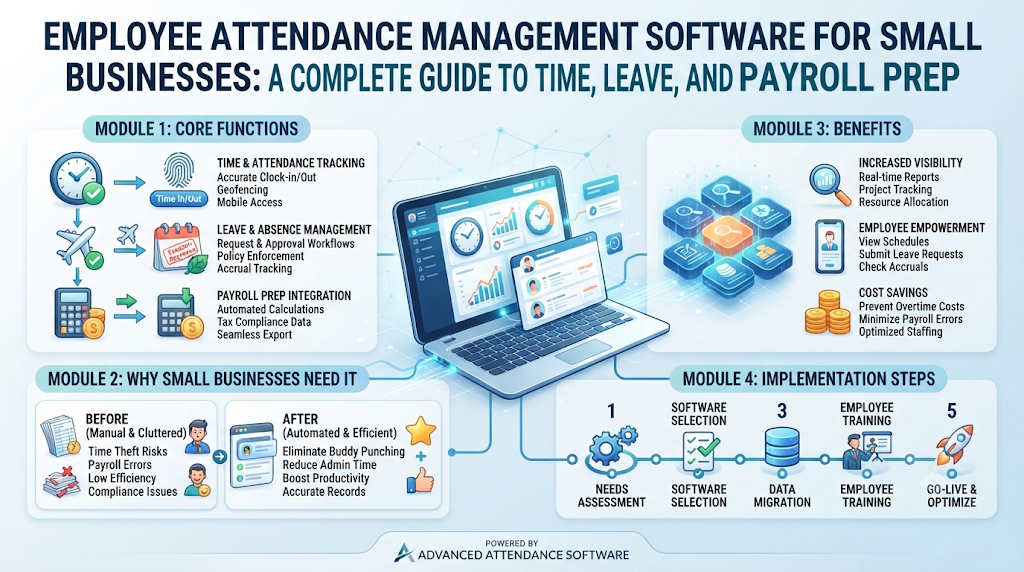
Running a small or growing business takes hard work, yet hours often slip away on routine HR tasks. Managers chase down missed punch-ins, HR teams dig through chat messages for leave requests, and payroll prep turns into a stressful month-end rush. Spreadsheets help at first, but mistakes grow as your team expands. A modern Attendance and Leave Management System like InOrOff brings daily time records, leave requests, and summaries into one clear place.
This guide shows how Employee Attendance Management Software works for small teams, managers, and employees. You will learn how time tracking, leave approvals, PTO balances, and payroll-ready reports fit together without heavy jargon or complicated setups.
Why Small Businesses Outgrow Paper Logs and Spreadsheets
When a company has five or ten people, a wall chart or shared spreadsheet feels easy. Once the team grows, manual tracking creates everyday friction:
- Missing or Late Entries: Employees forget to log start or end times, leaving gaps in daily records.
- Scattered Leave Requests: One person asks on chat, another sends an email, and a third mentions time off in passing.
- Formula Mistakes: A single wrong cell in a spreadsheet can throw off monthly hours or remaining leave days.
- Slow Month-End Checks: Teams spend days matching attendance notes against holidays and approved time off before payroll starts.
Switching to Time and Attendance Software for Small Business teams replaces scattered notes with clear, organized records that everyone can understand.
How Employee Check In Check Out Software Works
At its core, Employee Check In Check Out Software records when an employee starts work, takes breaks, and finishes the day. Instead of writing times by hand, staff log their activity digitally.
Browser-Based Check-Ins and Timestamps
Many modern platforms support browser-based check-in and check-out through a web link. When an employee clicks check-in or check-out, the system records a server-verified timestamp. Timestamps help create a consistent log of working hours, breaks, late arrivals, and early departures.
Still, a timestamp only shows when a system action happened. It does not by itself prove physical presence at a desk or site. Fair attendance rules pair time logs with clear work expectations and open communication.
Handling Missed Punches and Attendance Corrections
Even with digital tools, people sometimes forget to click check-out before closing their laptop or leaving for a client visit. A good workflow lets employees submit an attendance correction request with a short note. Managers or HR can then review and approve or reject the change, keeping a clean audit trail of any updates.
Optional Office IP Attendance System Controls
Some businesses want to limit check-ins to their office network. An Office IP Attendance System uses approved IP addresses to restrict where browser check-ins can happen.
- Why Teams Use IP Rules: It can help keep office check-ins tied to the workplace network rather than random locations.
- Practical Limits: Office Wi-Fi changes, router updates, or home-office days can block valid check-ins if rules are too strict.
- Privacy Note: An IP address relates to a network connection, not exact GPS coordinates or continuous employee surveillance. Hybrid and remote teams need flexible policies that respect employee privacy.
Connecting Attendance with Employee Leave Management Software
Tracking daily hours only tells half the story. Planned vacations, sick days, and half-day absences directly shape who is available to work. That is why Employee Leave Management Software belongs right alongside daily attendance tracking.
How Leave Approval Workflow Software Simplifies Requests
Without a clear system, leave requests get lost in busy inboxes. Leave Approval Workflow Software gives employees a simple way to apply for time off and gives managers one place to review it.
A typical approval flow looks like this:
- Employee Submits Request: The employee picks the leave type, start date, end date, and half-day option if needed.
- Manager Reviews Team Coverage: The manager checks upcoming deadlines and team workload before deciding.
- Approve or Reject Clearly: The manager approves or rejects the request with clear status visibility.
- Records Stay in Sync: Approved time off updates the team schedule and adjusts leave balances automatically.
PTO Tracking Software and Leave Policies
Many small companies group vacation, personal days, and casual time off into a single pool called Paid Time Off (PTO). PTO Tracking Software helps teams follow their written company policy consistently.
Important policy details include:
- Accrual Rules: Some businesses grant a set number of days at the start of the year, while others accrue days monthly or per pay period.
- Half-Day Leave: Allowing half-day requests helps employees handle appointments without taking a full day off.
- Holiday Exclusions: Public or company holidays should not eat into an employee’s PTO balance if they fall on a non-working holiday.
- Carry-Forward and Expiry: Clear rules state how many unused days carry into the next cycle and when carried-over days expire.
Because labour laws and company rules differ by country and region, businesses should always align leave policies with local regulations and clear written handbooks.
Why an Employee Leave Balance Tracker Matters
Nobody likes guessing how many days off they have left. An Employee Leave Balance Tracker shows used, approved, pending, and remaining leave in one clear view.
When employees can see their own balances, they plan vacations earlier and ask HR fewer repetitive questions. Managers also spot overlapping time-off requests sooner.
Manual Registers vs. Digital Attendance and Leave Systems
Comparing traditional habits with digital tools highlights where teams save the most effort.
| Everyday Area | Manual Registers & Spreadsheets | Digital Attendance & Leave System |
|---|---|---|
| Daily Check-In Logs | Handwritten sheets or separate chat notes | Centralized check-in and check-out history |
| Leave Approvals | Buried in emails or verbal promises | Structured approval and rejection status |
| Leave Balances | Manual math across multiple sheets | Clear tracking of used, pending, and remaining days |
| Corrections | Hard to trace who changed what and why | Reviewed correction history with clear notes |
| Month-End Prep | Slow copying and pasting before payroll | Ready summaries and exportable reports |
Practical Examples for Small Businesses
The examples below are hypothetical scenarios created for illustration. They do not represent actual customer data or guaranteed outcomes.
Scenario 1: Mid-Month Leave Request and Half-Day Plan
Priya works on a six-person marketing team. She wants to take a half-day on Thursday morning for a personal appointment and two full days off the next week. She submits both requests through her leave workflow. Her manager sees that the rest of the team can cover Thursday morning and approves both requests. Priya’s leave balance updates right away, and her teammate knows she will be online by afternoon on Thursday.
Scenario 2: Preparing Payroll-Ready Attendance Summaries
At the end of the month, an HR administrator reviews attendance records for a 15-person agency. Two employees had approved attendance corrections for forgotten check-outs, and one team member took approved PTO. Using Payroll Ready Attendance Software, the administrator reviews the monthly attendance summary, checks that corrections are settled, and exports a clean CSV or PDF report to share with the payroll processor.
Note: Exporting attendance summaries supports payroll preparation, but it does not replace dedicated payroll calculation, tax filing, or statutory compliance checks.
Common Mistakes Small Teams Should Avoid
Even well-meaning teams run into preventable snags when managing time and leave:
- Relying on Verbal Approvals: Saying “sure, take Friday off” without logging it often causes confusion later.
- Ignoring Half-Day Rules: Treating a two-hour afternoon absence like a full day off—or forgetting to deduct half days—skews balances.
- Leaving Requests Pending Too Long: Late approvals leave employees unsure about travel plans and hurt team scheduling.
- Treating Exports as Final Payroll: Attendance summaries help calculate hours worked, but salaries, taxes, and local statutory deductions require proper payroll review.
Best Practices for Fair and Smooth Time Tracking
Small businesses get better results when policies stay simple, clear, and respectful:
- Write Down Clear Rules: Share simple guidelines on check-in times, breaks, PTO accrual, carry-forward limits, and holiday exclusions.
- Protect Employee Data: Limit access to attendance and leave records so only authorized managers, HR staff, and the employee themselves view sensitive details.
- Review Corrections Promptly: Check missed punch or attendance correction requests regularly so month-end stays calm.
- Keep Exports Organized: Store monthly attendance summaries and versioned CSV or PDF files in a secure folder for payroll review.
How InOrOff Fits Small and Growing Businesses
InOrOff is a cloud-based employee attendance and leave management platform built for small and growing businesses. It brings browser-based employee check-in and check-out, server-verified timestamps, working-hour tracking, leave requests, manager approvals, and leave balance visibility together in one workspace.
For teams that want extra structure, InOrOff also offers optional office IP attendance restrictions, PTO and half-day tracking, holiday exclusions, leave accrual and carry-forward rules, attendance correction workflows, and monthly summaries with versioned CSV and PDF exports for external payroll processing. As with any HR tool, businesses should confirm how specific features match their local policies and payroll workflow before rolling them out.
Conclusion
Clear attendance and leave habits help small teams work with less stress and fewer surprises. When daily check-ins, leave approvals, leave balances, and monthly summaries live in one organized place, managers spend less time chasing updates and employees know where they stand.
A practical next step is to review how your team currently tracks check-ins and leave requests, write down simple policy rules, and see how a centralized system can simplify your weekly routine.
Frequently Asked Questions (FAQs)
1. What is Employee Attendance Management Software?
It is a digital tool that helps businesses record daily attendance, working hours, breaks, late arrivals, and check-in or check-out times in one organized system.
2. How does Employee Leave Management Software help HR teams?
It centralizes leave requests, manager approvals, holiday calendars, and leave balances so HR teams do not have to track time off across scattered emails or spreadsheets.
3. Why use a combined Attendance and Leave Management System?
Combining attendance and leave data keeps daily schedules accurate when employees take approved time off, reducing conflicts and manual updates for managers and HR.
4. Is Time and Attendance Software for Small Business teams worth using with a small headcount?
Yes, even small teams benefit when they want fewer spreadsheet errors, clear leave balances, and faster month-end summaries as the business grows.
5. How does Employee Check In Check Out Software work in a browser?
Employees sign in to a web browser and record their check-in and check-out actions, which the system logs with server-verified timestamps and working-hour records.
6. What does Leave Approval Workflow Software do for managers?
It gives employees a structured way to submit leave requests and gives managers a clear queue to approve, reject, or review time-off requests while keeping records updated.
7. How does PTO Tracking Software handle half-day leave and carry-forward rules?
PTO tracking software records time off against your configured company policy, helping track half-day entries, holiday exclusions, leave accruals, and carry-forward or expiry rules.
8. What is an Office IP Attendance System, and does it use GPS?
An office IP attendance system restricts check-ins to approved IP network addresses rather than using GPS location tracking or continuous employee surveillance.
9. What makes Payroll Ready Attendance Software useful at month-end?
It organizes monthly attendance summaries, approved corrections, and leave records into clean exports—such as CSV or PDF files—that support external payroll processing.
10. How does an Employee Leave Balance Tracker help staff?
It gives employees clear visibility into their used, approved, pending, and remaining leave so they can plan time off ahead without guessing.
11. Does attendance software automatically handle payroll taxes and legal compliance?
No. Attendance software helps track time and generate summaries, while payroll calculations, tax rules, and legal compliance depend on your payroll setup and local employment laws.
12. Why is data privacy important in attendance and leave tracking?
Attendance and leave logs contain personal employee records, so restricting access to authorized roles and handling exports carefully protects employee privacy and trust.
