🧭 Introduction & Overview
🔍 What is Robot Orchestration?
Robot Orchestration refers to the centralized control, coordination, and optimization of multiple bots or automation scripts that perform security, compliance, and operational tasks within a DevSecOps pipeline. These “robots” can be:
- Security scanning bots
- Compliance monitoring bots
- Auto-remediation scripts
- Deployment/testing automation bots
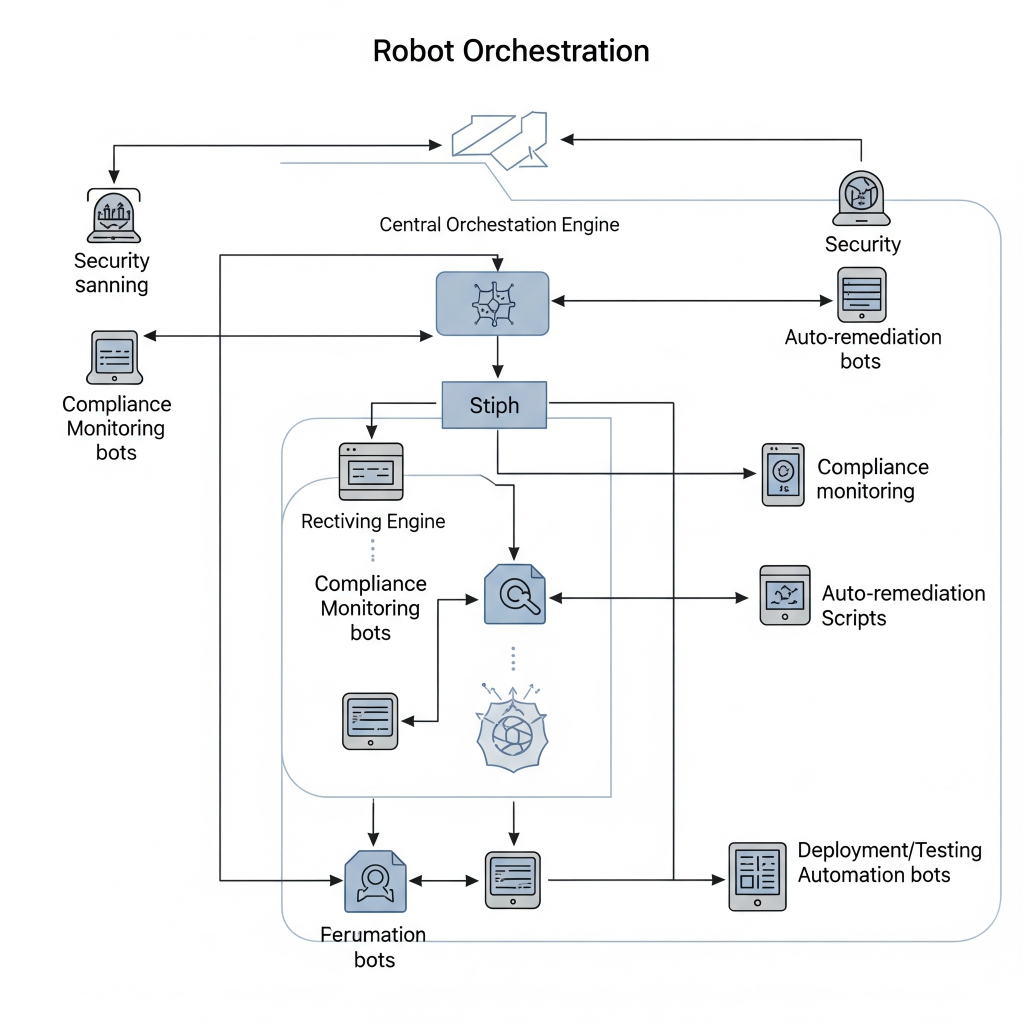
Robot Orchestration ensures they execute in the right order, with shared context, and error handling across various environments and pipelines.
🕰️ History or Background
- Originated in RPA (Robotic Process Automation) systems.
- Evolved with DevOps + Security integrations, especially with AI Ops, Security Automation, and CI/CD pipelines.
- Now increasingly used to orchestrate security bots and cloud-native workflows.
🔐 Why is it Relevant in DevSecOps?
In DevSecOps, automation is key to enforce security without slowing down delivery. Robot orchestration enables:
- Automated vulnerability scanning
- Policy-as-code enforcement
- Auto-remediation of misconfigurations
- Coordinated response to alerts or incidents
🔁 It ensures repeatability, reliability, and compliance in automated security workflows.
📘 Core Concepts & Terminology
✅ Key Terms
| Term | Definition |
|---|---|
| Robot | An automated script/bot performing a task (scan, deploy, notify, etc.) |
| Orchestration Engine | The platform coordinating robot execution, logic, and sequencing |
| Trigger | Event that starts a robot workflow (e.g., code push, alert) |
| Workflow | Sequence of tasks/bots executed under defined rules |
| Execution Context | Runtime data passed between bots (e.g., environment info, results) |
| Secure Orchestration | Ensures secrets, tokens, and data are handled securely |
🧬 How It Fits in DevSecOps Lifecycle
Robot orchestration enhances every phase of DevSecOps:
| DevSecOps Phase | Robot Orchestration Role |
|---|---|
| Plan | Enforce policy-as-code checks pre-development |
| Develop | Linting, static code analysis via automated bots |
| Build | Security unit test bots, secret detection |
| Test | DAST, SAST, SCA bots orchestrated before deploy |
| Release | Security gatekeeper bots, compliance checkers |
| Deploy | IaC validation, post-deploy scan bots |
| Operate | Runtime security monitoring, anomaly detection bots |
| Monitor | Incident response orchestration, auto-alert triaging |
🏗️ Architecture & How It Works
🧩 Components
- Orchestrator Engine (like Camunda, Robocorp, Apache Airflow)
- Robots (Custom scripts, security tools, API connectors)
- Triggers (GitHub Actions, Jenkins events, webhooks)
- Execution Bus (Queue/worker model)
- Secrets & Policy Management (Vault, OPA)
- Logging & Observability Module
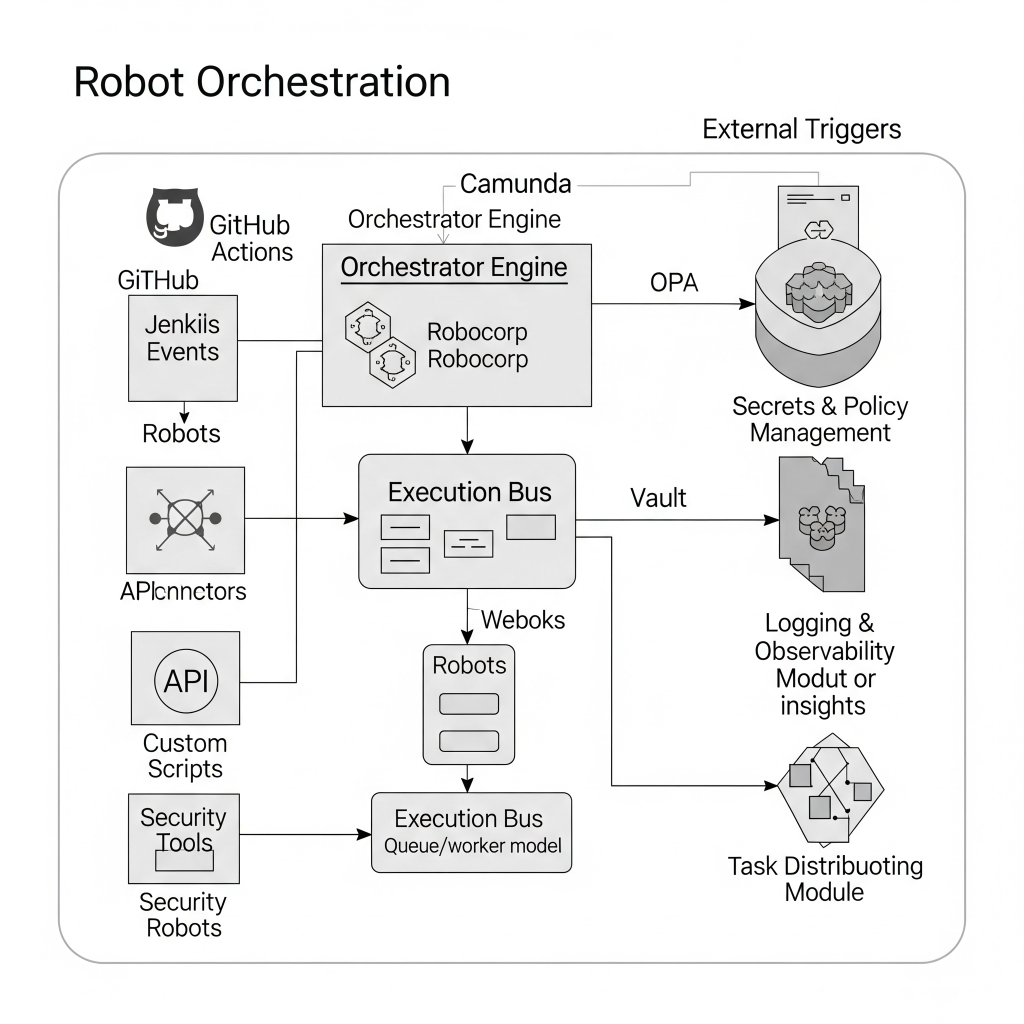
🔁 Internal Workflow
flowchart TD
    A[Trigger: Code Push] --> B[Start Orchestration Engine]
    B --> C[Run Static Code Analysis Robot]
    C --> D[Run Secrets Detection Robot]
    D --> E[Conditional Branch: If Secrets Found]
    E -->|Yes| F[Notify Dev + Block Pipeline]
    E -->|No| G[Continue to Build & Deploy]
🧷 Integration Points with CI/CD and Cloud Tools
| Tool | Role in Robot Orchestration |
|---|---|
| GitHub Actions | Triggers bots via workflow YAML |
| Jenkins | Executes robot jobs via plugins or shell scripts |
| Kubernetes | Hosts containerized bots and workflow engines |
| Vault/SecretsMgr | Securely pass secrets to bots |
| AWS Lambda / GCP Cloud Functions | Bots themselves can run as serverless tasks |
🚀 Installation & Getting Started
🧰 Basic Prerequisites
- Python 3.9+ or Docker
- Orchestration Engine: Robocorp, Apache Airflow
- Git + CI pipeline access
- Access to security tools (e.g., Trivy, Checkov, OWASP ZAP)
✋ Hands-on Setup Guide (Using Robocorp)
Step 1: Install Robocorp CLI
pip install rcc
Step 2: Initialize a Robot
rcc create --template devsecops-security-checks
cd devsecops-security-checks
Step 3: Define the Robot Script
*** Tasks ***
Run Security Checks
    Run Process    trivy fs .
    Run Process    checkov -d .
Step 4: Create .yaml pipeline trigger (GitHub Actions)
name: Security Check

on: [push]

jobs:
  run-robot:
    runs-on: ubuntu-latest
    steps:
      - uses: actions/checkout@v2
      - run: |
          pip install rcc
          rcc run
🌐 Real-World Use Cases
1. 🔐 Auto-remediation in AWS
- Detect misconfigured S3 bucket via robot
- Trigger another robot to apply policy fix
2. 🕵️ CI/CD Secret Scanning
- Orchestrate bots:
gitleaks→notify Slack→revert commitif needed
3. 🛡️ Kubernetes Compliance as Code
- Bot checks for PodSecurityPolicy
- Enforces runtime security using Falco bot
4. 🏥 Healthcare Security Bot Chain
- PHI detection bots + HIPAA log audit bots orchestrated post-deploy
⚖️ Benefits & Limitations
✅ Benefits
- Modular, reusable security automation
- Increased DevSecOps speed without compromising compliance
- Easier to visualize and debug security flows
- Reduces MTTR via automated incident response
❌ Limitations
- Learning curve for orchestration tools
- Need secure secrets and access handling
- Debugging parallel workflows can be complex
- Performance overhead in complex pipelines
🛠️ Best Practices & Recommendations
🔐 Security Tips
- Use secret managers (Vault, SOPS)
- Validate input/output of each robot
- Monitor access logs and audit trail
⚙️ Performance Tips
- Parallelize non-dependent bots
- Use caching where possible (e.g., scan result cache)
📏 Compliance & Automation
- Integrate with Open Policy Agent (OPA)
- Automate evidence collection for audits
- Use bots to update ticketing systems automatically
🔄 Comparison with Alternatives
| Approach | Robot Orchestration | Traditional CI Tasks | RPA Platforms (e.g. UiPath) |
|---|---|---|---|
| Designed for DevSecOps | ✅ | ⚠️ (manual config) | ❌ |
| Security Built-in | ✅ | ⚠️ | ❌ |
| Cloud-native Integration | ✅ | ⚠️ | ⚠️ |
| Cost | ⚠️ (compute dependent) | ✅ (part of CI pipeline) | ❌ (license heavy) |
| Visual Workflow Management | ✅ | ❌ | ✅ |
✅ Use Robot Orchestration when you need modular, scalable, automated DevSecOps workflows.
✅ Conclusion
Robot Orchestration is an emerging pillar in the DevSecOps ecosystem, enabling secure, scalable, and compliant automation of tasks across the software lifecycle. As security shifts left and infrastructure becomes programmable, orchestrating bots intelligently helps achieve speed, safety, and compliance together.
